Der Vercel-Vorfall und die Phishing-Kampagnen, die sich bereits in aller Öffentlichkeit verbergen
Im April 2026 gerieten Sicherheitsteams weltweit in den Krisenmodus, als Vercel – eine der am häufigsten genutzten Cloud-Bereitstellungsplattformen – eine erhebliche Sicherheitslücke bekannt gab. Der Vorfall, der auf eine Kompromittierung der Lieferkette bei einem Drittanbieter zurückzuführen war, veranlasste die Sicherheitsteams dazu, alles, was mit der Vercel-Infrastruktur in Berührung kam, eiligst zu untersuchen.
Viele dieser Untersuchungen könnten jedoch ein Cybersicherheitsrisiko aufgedeckt haben, das in keinem Zusammenhang mit dem Datenleck selbst stand. Lange bevor der Vorfall im April 2026 Schlagzeilen machte, nutzten Angreifer die kostenlose Hosting-Plattform von Vercel unabhängig davon als zentralen Bestandteil ihrer Angriffsinfrastruktur und setzten *.vercel.app-Subdomains ein, um Phishing-Kampagnen zum Diebstahl von Zugangsdaten durchzuführen.
Tatsächlich hatte „ INKY “ diese Phishing-Kampagnen bereits seit Dezember 2025 erkannt und blockiert – Monate bevor der Vercel-Hack bekannt wurde. Bei den mehr als 6.000 blockierten E-Mails, die auf über 2.000 Organisationen abzielten, ließen sich drei unterschiedliche Kampagnencluster ausmachen. Obwohl die Angreifer unabhängig voneinander agierten und unterschiedliche Köder einsetzten, hatten sie eine bemerkenswerte Taktik gemeinsam: Sie hosteten Seiten zum Abgreifen von Anmeldedaten auf kostenlosen *.vercel.app-Subdomains.
Dieser umfassende Bericht untersucht alle drei Kampagnencluster, analysiert die dahinterstehenden Techniken und verdeutlicht, was der Vercel-Hack und diese Phishing-Angriffe gemeinsam haben – und was nicht.
Auf einen Blick: Überblick über den Angriffsablauf
Erkannte Cluster:Drei verschiedene Phishing-Kampagnen, die alle das kostenlose Hosting von vercel.app als Infrastruktur zum Ausspähen von Zugangsdaten missbrauchen
Angriffsmethoden:Missbrauch der Google AppSheet-Plattform | Kompromittierte Microsoft 365-Konten | Vom Angreifer kontrollierte Absenderdomain
Nutzlast:Schädliche Links, die auf kostenlosen *.vercel.app-Subdomains gehostet werden und zu Seiten führen, auf denen Anmeldedaten abgegriffen werden
Ziele:„Spray-and-Pray“-Angriffe + gezielte Spear-Phishing-Angriffe auf die Bau- und Handwerksbranche
INKY -Volumen:Über 6.283 E-Mails wurden von Dezember 2025 bis Mai 2026 in über 2.030 Organisationen blockiert
Der Sicherheitsvorfall bei Vercel: Hintergrund
Im April 2026 gab Vercel eine Sicherheitsverletzung bekannt, die auf einen Angriff über die Lieferkette zurückzuführen war, an dem Context.ai, ein Drittanbieter, beteiligt war. Nach Angaben von Vercel wurde ein Mitarbeiter von Context.ai mit der Malware „Lumma Stealer“ infiziert – einem weit verbreiteten Infostealer, der häufig über bösartige Software-Downloads verbreitet wird. Die Malware ermöglichte es dem Angreifer, Google Workspace-OAuth-Token vom Gerät des Mitarbeiters zu stehlen.
Mit diesen Tokens verschaffte sich der Angreifer Zugang zu den internen Systemen von Vercel und gelangte schließlich an die Umgebungsvariablen der Kunden – Konfigurationsgeheimnisse, die zusammen mit den bereitgestellten Anwendungen gespeichert sind. Diese Variablen können sensible Informationen wie API-Schlüssel, Datenbank-Anmeldedaten und Tokens von Drittanbietern enthalten. Vercel bestätigte später, dass der Angreifer auf BreachForums behauptete, Zugriffsschlüssel für die Datenbank und Teile des Quellcodes erlangt zu haben.
Im Rahmen seiner Reaktion veröffentlichte Vercel einen wichtigen Indikator für eine Kompromittierung (IOC) in Form einer OAuth-Anwendungs-ID und arbeitete mit Google Mandiant, GitHub, Microsoft, npm und Socket zusammen, um den Vorfall zu untersuchen und einzudämmen. Das Unternehmen erklärte außerdem, dass bei dem Angriff keine npm-Pakete kompromittiert worden seien.
Wurden die in diesem Bericht beschriebenen Phishing-Kampagnen durch den Datenleck verursacht?
Nein. Zwar geht es bei beiden um Vercel, doch handelt es sich um völlig unterschiedliche Bedrohungen.
Die in diesem Bericht analysierten Phishing-Kampagnen nutzten kostenlose *.vercel.app-Subdomains als temporäre Hosting-Infrastruktur für Seiten zum Ausspähen von Anmeldedaten – eine Funktion, die jedem zur Verfügung steht, der ein Vercel-Konto erstellt. Im Gegensatz dazu handelte es sich bei dem Sicherheitsvorfall um einen unbefugten Zugriff auf die internen Systeme von Vercel mittels gestohlener Anmeldedaten, die im Zuge einer Kompromittierung der Lieferkette eines Drittanbieters erlangt wurden.
Die Überschneidung betrifft vor allem den zeitlichen Rahmen und die Plattformzugehörigkeit. Beide traten im April 2026 in den Vordergrund, und bei beiden spielte Vercel in gewisser Weise eine Rolle. Daher können Sicherheitsteams, die verdächtige Aktivitäten im Zusammenhang mit Vercel untersuchen, auf Indikatoren für beide Bedrohungen stoßen. Die folgende Tabelle verdeutlicht, wie man zwischen den beiden unterscheiden kann.
| Bedrohung | IOC-Schlüssel | Wo man suchen sollte |
|---|---|---|
| Sicherheitsverletzung in der Lieferkette von Vercel | OAuth-App-ID: 110671459871-30f1…apps.googleusercontent.com | Google Workspace-Prüfprotokolle |
| Phishing-Kampagnen (dieser Bericht) | Absender variiert + URL: *.vercel.app Nutzdaten | E-Mail-Sicherheitsplattform |
Tabelle 1: Unterscheidung zwischen dem Vercel-Hack und den in diesem Bericht behandelten Phishing-Kampagnen
Drei Cluster, eine gemeinsame Infrastruktur
INKY Es wurden drei unterschiedliche Phishing-Cluster identifiziert, die unabhängig voneinander das kostenlose *.vercel.app-Hosting als Infrastruktur für Angriffe zum Diebstahl von Zugangsdaten nutzten. Die einzelnen Cluster unterschieden sich hinsichtlich der Vorgehensweise, des Themas der Köder und der Zielgruppe – doch alle führten die Opfer in dieselbe Endphase: auf der Vercel-Plattform gehostete Phishing-Seiten.
| Cluster A | Cluster B | Cluster C | |
|---|---|---|---|
| Lieferung | Missbrauch der Google AppSheet-Plattform | Kompromittierte Microsoft 365-Konten | Vom Angreifer kontrollierte Absenderdomain |
| Thema „Köder“ | Sperrung eines Facebook-Geschäftskontos | Ausschreibung für Bauarbeiten + gefälschte OneDrive-PDF-Datei | T4-Bescheinigung der Steuerbehörde (CRA) |
| Authentifizierungsergebnis | SPF/DKIM/DMARC bestanden | SPF/DKIM/DMARC bestanden | SPF/DKIM/DMARC bestanden |
| Nutzlast | *.vercel.app-Link im E-Mail-Text | *.vercel.app-Link in einer passwortgeschützten PDF-Datei | *.vercel.app-Link in einem PDF-Anhang |
| Verschleierung | Zeichen mit der Breite Null im Anzeigenamen | Passwortgeschützte PDF-Dateien verhindern das Scannen | Passwort im PDF-Dokument angezeigt; das äußere PDF-Dokument ist unverschlüsselt |
| Aktiv seit | Dezember 2025 | Mai 2026 | März 2026 |
Tabelle 2: Direktvergleich der drei Phishing-Cluster
Cluster 1: Missbrauch von Google AppSheet
Die erste Gruppe nutzte Google AppSheet, Googles No-Code-Anwendungsplattform, missbräuchlich, um Phishing-E-Mails über die legitime Google-Infrastruktur zu versenden. Durch die Kombination von vertrauenswürdiger E-Mail-Zustellung mit Seiten zum Abgreifen von Anmeldedaten, die auf Vercel gehostet wurden, schufen die Angreifer eine Kampagne, die herkömmliche E-Mail-Sicherheitskontrollen umgeht und für die Empfänger gleichzeitig äußerst glaubwürdig wirkt.
So funktioniert es
Google AppSheet ist eine No-Code-Anwendungsplattform, mit der Nutzer datengesteuerte Apps erstellen und automatisierte E-Mail-Benachrichtigungen auslösen können. Wenn eine AppSheet-App eine Benachrichtigung auslöst, stammt die E-Mail von noreply@appsheet.com – einer legitimen Adresse der Google-Infrastruktur, die von allen AppSheet-Kunden gemeinsam genutzt wird.
Die Angreifer verschafften sich Zugriff auf ein oder mehrere AppSheet-Konten – wahrscheinlich durch „Credential-Stuffing“-Angriffe oder Käufe auf Schwarzmarkt-Plattformen – und konfigurierten AppSheet so, dass in großem Umfang Phishing-Benachrichtigungen versendet wurden. Jede E-Mail wurde über die Infrastruktur von Google selbst versendet und mit dem DKIM-Schlüssel von Google signiert.
Warum die Authentifizierung als Indikator versagt: Da die E-Mails tatsächlich aus der Google-Infrastruktur stammen, werden die SPF-, DKIM- und DMARC-Prüfungen für appsheet.com alle erfolgreich bestanden. Es liegt kein Spoofing vor. Daher gibt es für herkömmliche, auf Authentifizierung basierende E-Mail-Sicherheitsmaßnahmen kaum einen Grund, die Nachrichten als verdächtig zu kennzeichnen.
Der Köder: Sperrung des Facebook-Business-Kontos
Jede E-Mail gibt vor, eine Benachrichtigung von Facebook Business zu sein, und warnt die Empfänger, dass ihr Geschäftskonto wegen Verstößen gegen die Nutzungsbedingungen überprüft wird und deaktiviert wird, sofern nicht umgehend Maßnahmen ergriffen werden. Der Aufruf zum Handeln leitet die Nutzer zu einer neu erstellten *.vercel.app-Subdomain weiter, auf der eine Seite zum Abgreifen von Anmeldedaten gehostet wird.
Um einer Erkennung noch besser zu entgehen, fügten die Angreifer zwischen den Buchstaben des Anzeigenamens Zeichen mit der Breite Null (U+200A) ein. Was optisch als „Facebook Business“ erscheint, wird auf Byte-Ebene tatsächlich als „Fa cebook Bu si ness“ dargestellt. Diese einfache Verschleierungstechnik umgeht die Regeln zur Erkennung von Anzeigenamen mit exakter Übereinstimmung, bleibt dabei für den Empfänger jedoch unsichtbar.
Muster für die Betreffzeile
Die Betreffzeilen folgen demselben Format aus Firmenname + zufälliger alphanumerischer ID, das auch in der übergreifenden AppSheet-Kampagne verwendet wird:
- Valley Cooling & Refrigeration Co. ZV195545707372SGVP
- Westside Eye Center RRPU020121773OTD
- Riverside Charter Academy BE937622771FEE
Die zufällige ID stellt sicher, dass keine zwei E-Mails denselben Betreff haben, wodurch signaturbasierte Betreff-Filter während der gesamten Kampagne umgangen werden.
Beispiele für E-Mail-Kopfzeilen
| Kopfzeilenfeld | Wert |
|---|---|
| Von | Fa cebook Bu si ness <noreply@appsheet.com> |
| Betreff | [Empfängerorganisation] [Zufällige alphanumerische ID] |
| DKIM-Signatur | d=appsheet.com (von Google signiert) |
| SPF | Weiter |
| DMARC | Weiter |
| URL der Nutzdaten | *.vercel.app (eindeutig pro E-Mail-Adresse) |
Tabelle 3: Beispiele für E-Mail-Header der AppSheet/Vercel.app-Kampagne
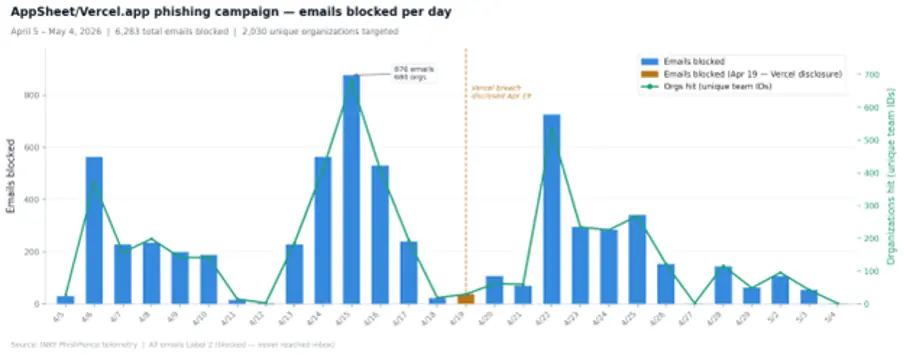
Abb. 1: Tägliches E-Mail-Aufkommen im Rahmen der AppSheet/Vercel.app-Kampagne (5. April – 4. Mai 2026). Die Bekanntgabe des Datenlecks bei Vercel am 19. April ist markiert. Die Kampagnenaktivitäten fanden bereits vor der Bekanntgabe statt, was bestätigt, dass kein kausaler Zusammenhang besteht.
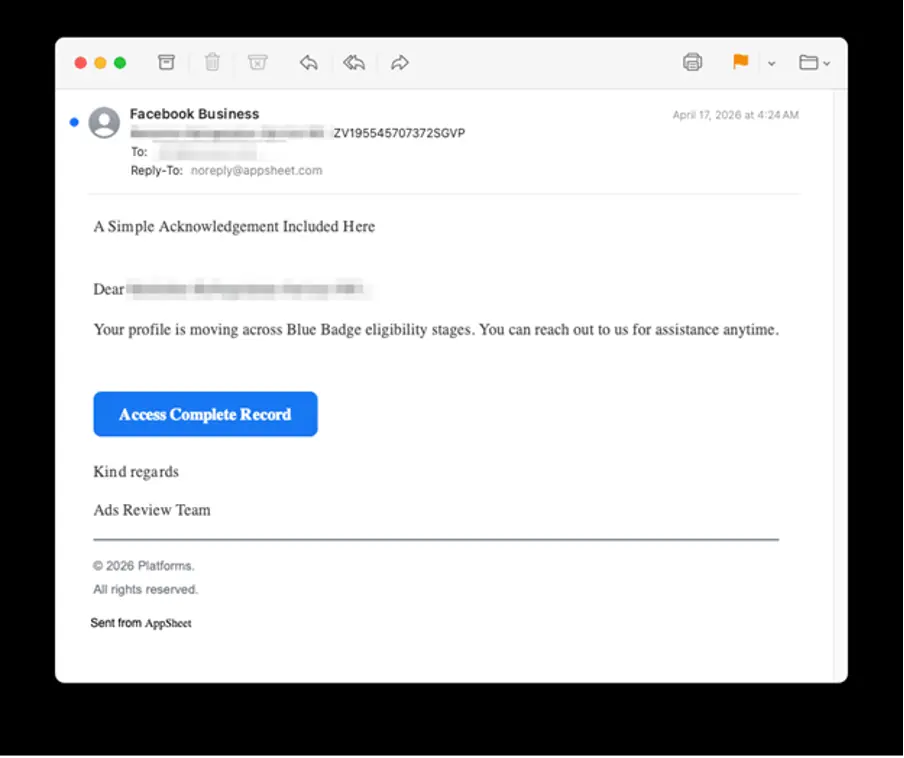
Abb. 2: Phishing-E-Mail von „AppSheet/Vercel.app“, dargestellt in einem E-Mail-Client: Der Anzeigename lautet „Facebook Business“ und wurde unter Verwendung von für den Empfänger unsichtbaren Zeichen mit der Breite Null zusammengestellt; die „Reply-To“-Adresse führt zurück zu noreply@appsheet.com
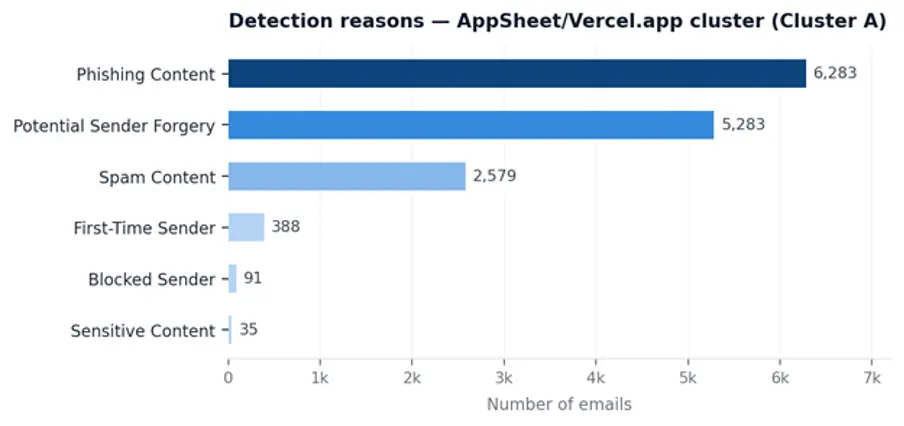
Abb. 3: Gründe für die Erkennung durch „ INKY “: Alle 6.283 E-Mails wurden als „Phishing-Inhalt“ gekennzeichnet; 5.283 wurden zusätzlich als „Mögliche Absenderfälschung“ gekennzeichnet, was darauf hindeutet, dass „ INKY “ eine Diskrepanz zwischen der angezeigten Absenderidentität und der AppSheet-Infrastruktur festgestellt hat.
Cluster B: Kompromittierte Microsoft 365-Konten – mit Schwerpunkt auf der Baubranche
Die zweite Gruppe verfolgte einen anderen Ansatz. Anstatt eine legitime Plattform zum Versenden von E-Mails zu missbrauchen, nutzten die Angreifer kompromittierte Microsoft 365-Konten, die echten Unternehmen aus der Baubranche gehörten. Durch die Kombination von vertrauenswürdigen Absenderidentitäten, branchenspezifischen Ködern und auf Vercel gehosteten Phishing-Seiten war die Kampagne darauf ausgelegt, sich nahtlos in die routinemäßige Geschäftskommunikation einzufügen.
So funktioniert es
Dieser Cluster nutzt legitime, kompromittierte Microsoft 365-Konten bei realen Unternehmen, um Phishing-E-Mails zu versenden. Beide identifizierten Konten gehörten zu Unternehmen aus dem Bau- und Handwerkssektor, was darauf hindeutet, dass gezielt eine Branche ins Visier genommen wurde, in der Ausschreibungen von unbekannten Kontakten üblich sind und oft sogar erwartet werden.
Da die E-Mails von echten, aktiven Microsoft 365-Konten mit ordnungsgemäß konfigurierter Authentifizierung stammen, erfüllen sie von Natur aus die Anforderungen von SPF, DKIM und DMARC. Hierbei handelt es sich nicht um eine Umgehungstechnik – die Nachrichten bestehen die Authentifizierung, da die Absenderkonten rechtmäßig dazu autorisiert sind, E-Mails im Namen ihrer Organisationen zu versenden.
Der Köder: Ausschreibung für Bauaufträge mit einer passwortgeschützten PDF-Datei
Jede E-Mail gibt sich als formelle Ausschreibung für ein Bauprojekt aus und scheint von einem echten Mitarbeiter eines seriösen Unternehmens zu stammen. In der Nachricht wird ein Ausschreibungspaket beschrieben und ein Passwort zum Öffnen der angehängten PDF-Datei angegeben, wobei das Passwort als Sicherheitsmaßnahme zum Schutz sensibler Projektinformationen dargestellt wird.
Nach dem Öffnen mit dem angegebenen Passwort zeigt die PDF-Datei eine einzelne Seite an, die so gestaltet ist, dass sie einer Benachrichtigung zur Freigabe von Dokumenten in Microsoft OneDrive ähnelt. Auf dieser Seite wird behauptet, dass Projektdateien für den Empfänger freigegeben wurden, und dieser wird aufgefordert, auf die Schaltfläche „Dokumente in OneDrive anzeigen“ zu klicken. Diese Schaltfläche leitet das Opfer zu melody-swgd-com.vercel.app weiter, wo eine Seite zum Abgreifen von Anmeldedaten auf ihn wartet.
Warum passwortgeschützte PDF-Dateien das Scannen vereiteln: Viele E-Mail-Sicherheitstools können passwortverschlüsselte PDF-Anhänge ohne Zugriff auf den Entschlüsselungsschlüssel nicht überprüfen. Indem der Angreifer den Phishing-Köder in die verschlüsselte PDF-Datei einbettet und das Passwort ausschließlich im E-Mail-Text angibt, trennt er den Inhalt effektiv vom Anhang. Automatisierte Scanner stoßen auf eine unlesbare Datei, während der Empfänger sie problemlos öffnen und den schädlichen Inhalt einsehen kann.
Die gemeinsam genutzte Infrastruktur deutet auf einen einzigen Angreifer hin
Beide kompromittierten Konten – die zu verschiedenen Unternehmen in unterschiedlichen US-Bundesstaaten gehörten – versendeten E-Mails, die die Empfänger auf dieselbe, von Vercel gehostete Phishing-Seite weiterleiteten: melody-swgd-com.vercel.app. Die Wiederverwendung identischer Infrastruktur lässt stark vermuten, dass ein einziger Angreifer beide Konten kompromittiert und parallel betrieben hat, wobei er eine zentralisierte Website zum Sammeln von Anmeldedaten zur Unterstützung der Kampagne nutzte.
Die Forscher identifizierten zudem eine sekundäre URL, die in den Link-Anmerkungen einer PDF-Datei eingebettet war: biddingsth.github.io/bidders/. Dies deutet darauf hin, dass der Angreifer GitHub Pages als zusätzliche Hosting-Option nutzte, wahrscheinlich als Backup oder als alternativen Mechanismus zur Bereitstellung von Payloads neben Vercel.
Beispiel für ein E-Mail-Profil
| Kopfzeilenfeld | Wert |
|---|---|
| Von | Real employee name <real-employee@[compromised-domain].com> |
| An | [Zielunternehmen] Empfänger |
| Betreff | Ausschreibung – [Firmenname] [Projektnummer] |
| Authentifizierung | SPF bestanden, DKIM bestanden, DMARC bestanden (echtes Microsoft 365-Konto) |
| Anhang | Passwortgeschützte PDF-Datei — [Unternehmen] Projekt 2026.pdf |
| PDF-Passwort | Im E-Mail-Text enthalten |
| PDF-Inhalt | Gefälschte OneDrive-Benachrichtigung mit einem Link zu *.vercel.app |
| URL der Nutzdaten | melody-swgd-com.vercel.app |
| Sekundäre URL | biddingsth.github.io/bidders/ |
Tabelle 4: Beispiel für ein E-Mail-Profil einer Phishing-Kampagne zu Microsoft 365/Vercel
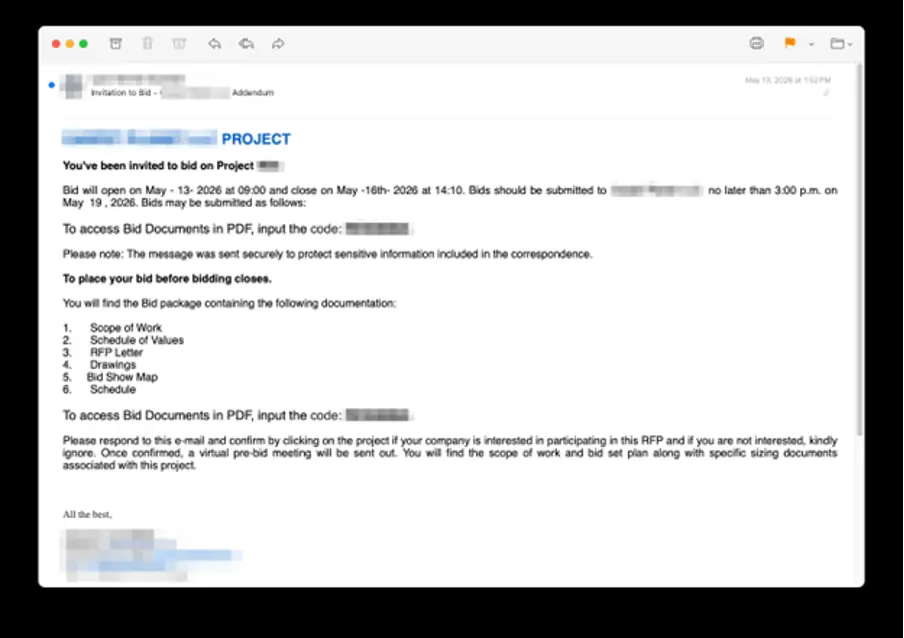
Abb. 4: Phishing-E-Mail aus Cluster B: Ausschreibung für ein Bauprojekt von einem gehackten Microsoft 365-Konto
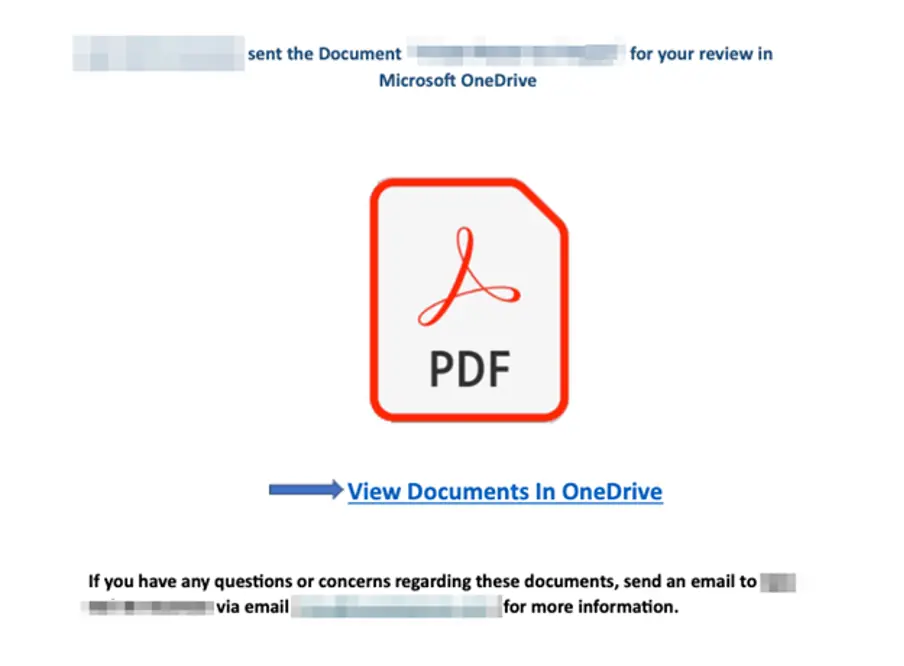
Abb. 5: PDF-Inhalt nach der Entschlüsselung mit dem im E-Mail-Text angegebenen Passwort: gefälschte Microsoft OneDrive-Dokumentfreigabe mit dem Aufruf zum Handeln „Dokumente in OneDrive anzeigen“, der auf melody-swgd-com.vercel.app verweist
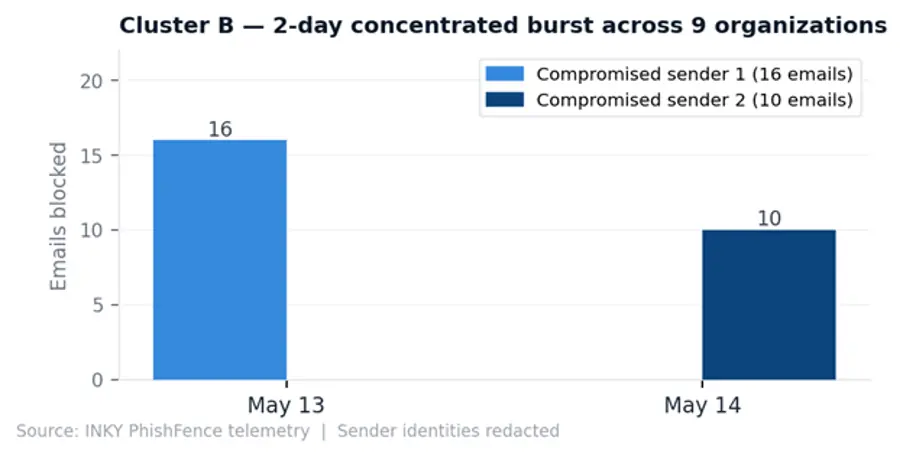
Abb. 6: E-Mail-Aufkommen in Cluster B: Zwei kompromittierte Microsoft 365-Konten versendeten innerhalb von nur zwei Tagen (13.–14. Mai 2026) 26 E-Mails an neun Organisationen.
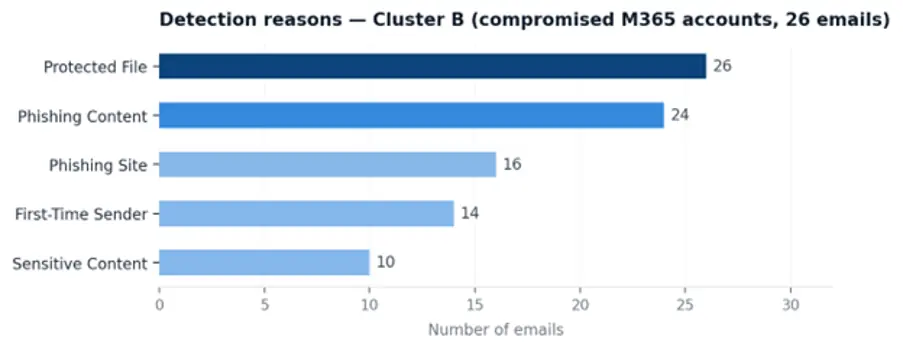
Abb. 7: Gründe für die Erkennung durch „ INKY “: In allen 26 E-Mails wurde eine geschützte Datei markiert; beim Absender „carpetplanet.net“ wurde eine Phishing-Website erkannt, was darauf hindeutet, dass „ INKY “ die Payload-URL „vercel.app“ als bekannten Phishing-Host identifiziert hat.
Cluster C: Vom Angreifer kontrollierte Domain – Vortäuschung der Identität einer staatlichen Steuerbehörde
Der dritte Cluster zeigt, dass Angreifer nicht immer Konten kompromittieren oder legitime Plattformen missbrauchen müssen, um wirksame Phishing-Kampagnen zu starten. Stattdessen hat dieser Akteur seine eigene Infrastruktur von Grund auf aufgebaut und dabei eine vom Angreifer kontrollierte Domain für den E-Mail-Versand sowie von Vercel gehostete Phishing-Seiten zum Sammeln von Anmeldedaten genutzt.
So funktioniert es
Im Gegensatz zu den Clustern A und B nutzt dieser Akteur weder eine legitime Plattform noch ein gekapertes Konto. Stattdessen hat er eine eigene Absenderdomain registriert und konfiguriert – einschließlich SPF-, DKIM- und DMARC-Einträgen –, um Phishing-E-Mails zu versenden, die vorgeben, von der Canada Revenue Agency (CRA) zu stammen.
Als Absendername wird „Canada Revenue Agency (CRA)“ angezeigt, während es sich bei der tatsächlichen Absenderdomain um eine vom Angreifer kontrollierte Domain handelt, die in keiner Verbindung zur kanadischen Regierung steht. Da die Domain ordnungsgemäß für die E-Mail-Authentifizierung konfiguriert ist, bestehen die Nachrichten die SPF-, DKIM- und DMARC-Prüfungen, obwohl sie bösartig sind.
Der Köder: Benachrichtigung über den Steuerbescheid T4
In der E-Mail wird behauptet, dass ein T4-Formular – eine kanadische Einkommensbescheinigung – zum Herunterladen bereitsteht. Da dies zeitlich auf die Steuerperiode abgestimmt ist, wirkt dieser Köder für kanadische Unternehmen und Arbeitnehmer, die regelmäßig steuerbezogene Mitteilungen erwarten, äußerst relevant und glaubwürdig.
Der E-Mail ist eine PDF-Datei im Format „2025 T4SLIP [Referenznummer].pdf“ angehängt. Die Datei ist zwar nicht verschlüsselt, dient jedoch lediglich als Sprungbrett zur Phishing-Seite und enthält nicht die eigentliche Schadsoftware.
Beim Öffnen zeigt das PDF eine einzelne Seite an, die einem sicheren Dokumentenportal ähnelt. Es enthält ein Passwort („2026“) und weist den Empfänger an, einem Link zu folgen, um auf sein Steuerdokument zuzugreifen. Dieser Link leitet die Nutzer zu einer neu erstellten, von Vercel gehosteten Phishing-Seite unter t4slip[reference].vercel.app weiter, wo der Prozess zum Abgreifen von Anmeldedaten beginnt.
Beispiel für ein E-Mail-Profil
| Kopfzeilenfeld | Wert |
|---|---|
| Aus dem Anzeigenamen | Kanadische Steuerbehörde (CRA) |
| Absenderadresse | network@[Angreifer-Domain].com |
| Betreff | Neue E-Mail von der kanadischen Steuerbehörde [Ref.: XXXXX] |
| Authentifizierung | SPF bestanden, DKIM bestanden, DMARC bestanden (eigene Domain des Angreifers) |
| Anhang | 2025 T4SLIP [Referenznummer].pdf |
| PDF-Inhalt | Sicheres Dokumentenportal mit Passwort und Link |
| URL der Nutzdaten | t4slip[reference].vercel.app |
Tabelle 5: Profil einer Phishing-E-Mail aus der Stichprobe von Cluster C (Domain im Besitz des Angreifers)
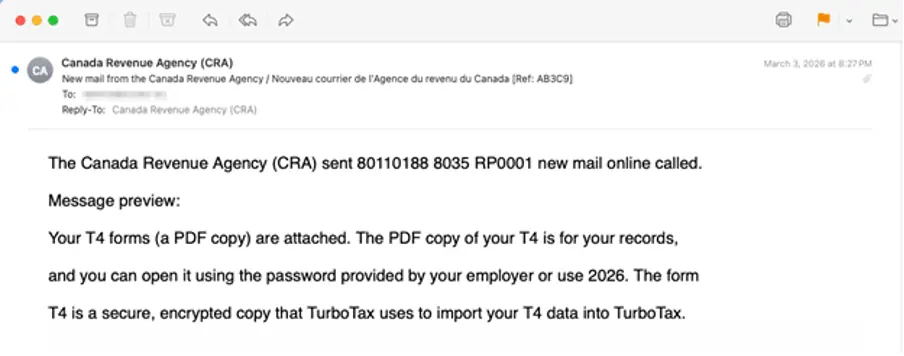
Abb. 8: Phishing-E-Mail aus Cluster C, die sich als Nachricht der Canada Revenue Agency ausgibt und von einer vom Angreifer registrierten Domain versendet wurde, die die SPF-/DKIM-/DMARC-Prüfung vollständig bestanden hat
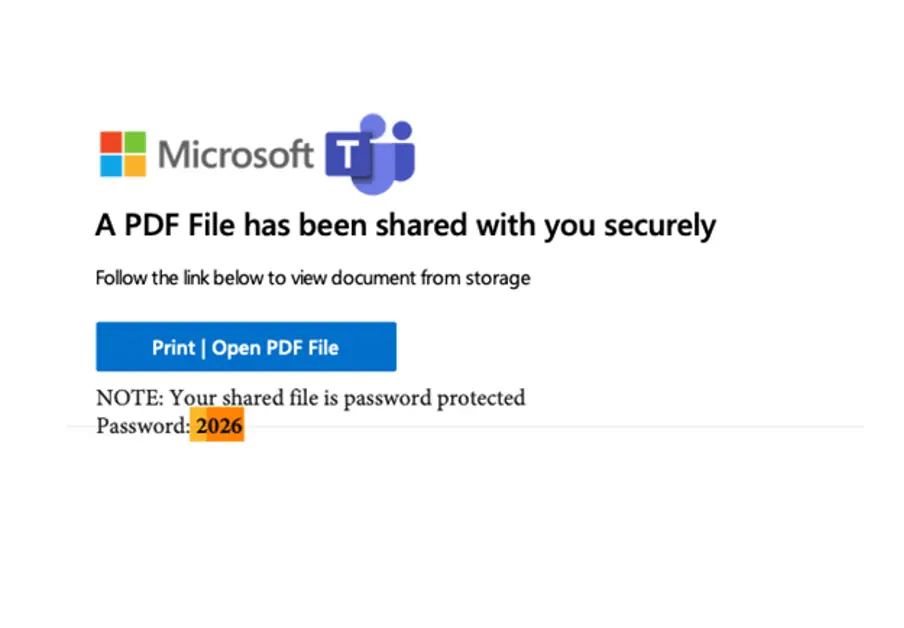
Abb. 9: PDF-Nutzdaten von Cluster C – gefälschte Seite zur sicheren Dateifreigabe von Microsoft Teams mit einem Link von vercel.app zum Ausspähen von Anmeldedaten
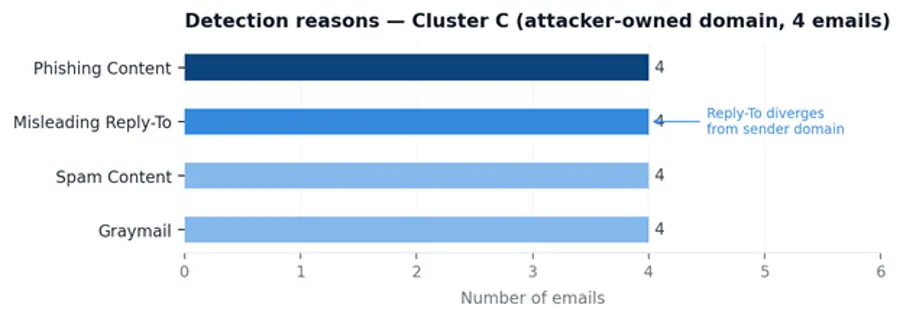
Abb. 10: Gründe für die Erkennung durch „ INKY “ für Cluster C. Bei allen vier E-Mails traten alle Gründe gleichzeitig auf. „Misleading Reply-To“ weist darauf hin, dass „ INKY “ festgestellt hat, dass die Antwortadresse von der Absenderdomain abwich – ein häufiges Anzeichen für Phishing-Angriffe, bei denen sich die Angreifer als Regierungsstellen ausgeben.
Zuordnung zu MITRE ATT&CK
Die drei Cluster basieren auf einem gemeinsamen Kern von Techniken und unterscheiden sich hinsichtlich ihrer anfänglichen Zugangs- und Bereitstellungsmethoden.
| Technik | ID | Cluster A | Cluster B | Cluster C |
|---|---|---|---|---|
| Phishing | T1566 | Ja | Ja | Ja |
| Spear-Phishing-Link | T1566.002 | Ja | ||
| Anhang zum Spearphishing | T1566.001 | Ja | Ja | |
| Verkleiden | T1036.005 | Ja | Ja | Ja |
| Funktionen der Bühne: Hochladen | T1608.001 | Ja | Ja | Ja |
| Infrastruktur erwerben | T1583 | Ja | Ja | Ja |
| Vertrauensverhältnis / Missbrauch der Plattform | T1199 | Ja | ||
| Verschleierte Dateien oder Informationen | T1027 | Ja | Ja | |
| Verschlüsselte/kodierte Datei | T1027.013 | Ja | ||
| Kompromittierte Konten: E-Mail | T1586.002 | Ja | ||
| Gültige Konten | T1078 | Ja | ||
| Konten einrichten | T1585 | Ja | ||
| Benutzerausführung: Schädliche Datei | T1204.002 | Ja | Ja |
Tabelle 6: Zuordnung der MITRE ATT&CK-Techniken über alle drei Cluster hinweg
Alle drei Cluster laufen bei T1608.001 (Fähigkeiten: Hochladen von Malware) zusammen – wobei sie die kostenlose Hosting-Stufe von Vercel als wegwerfbare Infrastruktur zum Sammeln von Anmeldedaten nutzen. Diese Übereinstimmung bei unabhängig voneinander agierenden Angreifern deutet darauf hin, dass vercel.app zu einer weithin anerkannten Standardlösung im Phishing-Ökosystem geworden ist: frei verfügbar, sofort einsetzbar, TLS-validiert und auf einer Domain mit gutem Ruf gehostet.
Warum herkömmliche Schutzmaßnahmen versagen
Auf den ersten Blick scheinen sich diese drei Kampagnen stark voneinander zu unterscheiden. Bei einer wird die Google-Infrastruktur missbraucht, bei einer anderen werden kompromittierte Microsoft 365-Konten ausgenutzt und bei der dritten kommen vom Angreifer kontrollierte Domains zum Einsatz. Dennoch umgehen alle drei erfolgreich viele der Kontrollmechanismen, auf die sich Unternehmen üblicherweise verlassen, um Phishing-E-Mails zu erkennen. Der gemeinsame Nenner besteht darin, dass sie das Vertrauen in authentifizierte Absender, seriöse Plattformen und vertraute Geschäftsabläufe ausnutzen.
- Gültige SPF-, DKIM- und DMARC-Einstellungen in allen drei Clustern: Bei jeder Zustellungsmethode werden einwandfreie Authentifizierungsergebnisse erzielt. Cluster A besteht den Test, da die E-Mail tatsächlich aus der Google-Infrastruktur stammt. Cluster B besteht den Test, da es sich bei dem Absender um ein legitimes, aktives Microsoft 365-Konto handelt. Cluster C besteht den Test, da der Angreifer die E-Mail-Authentifizierung auf seiner eigenen Domain korrekt konfiguriert hat. In allen drei Fällen überprüft die Authentifizierung die Infrastruktur des Absenders, nicht dessen Absichten.
- Reputation als vertrauenswürdiger Absender: Die AppSheet-Kampagne profitiert von der guten Reputation von noreply@appsheet.com, das regelmäßig legitime Benachrichtigungen im Auftrag von Google versendet. Die kompromittierten Microsoft 365-Konten übernehmen die Reputation der Organisationen, zu denen sie gehören. Daher bietet eine auf der Reputation basierende Filterung nur geringen Schutz vor diesen Angriffen.
- Auf einer vertrauenswürdigen Plattform gehostete Payloads: Alle drei Cluster leiten die Opfer auf Phishing-Seiten weiter, die auf Subdomains von *.vercel.app gehostet werden. Da Vercel eine legitime und weit verbreitete Entwicklerplattform ist, werden deren Subdomains von einigen Sicherheitskontrollen möglicherweise weniger streng geprüft. Die Phishing-Seiten werden zudem über HTTPS mit gültigen Zertifikaten bereitgestellt, was den Anschein der Legitimität noch verstärkt.
- Verschlüsselte Anhänge schränken die Sichtbarkeit ein: In Cluster B ist der Phishing-Link in einem passwortgeschützten PDF-Anhang eingebettet. Ohne den Entschlüsselungsschlüssel können automatisierte Scan-Tools den Inhalt der Datei nicht überprüfen. Wenn die Sicherheitslösung nicht auch den Kontext der E-Mail analysiert, bleibt die Phishing-Nutzlast vor der Überprüfung verborgen.
- Die Verschleierung des Anzeigenamens umgeht Regeln zur Namensübereinstimmung: In Cluster A fügten Angreifer Zeichen mit der Breite Null in den Anzeigenamen „Facebook Business“ ein. Obwohl diese Zeichen für die Empfänger unsichtbar sind, verändern sie den zugrunde liegenden Text so stark, dass Regeln zur Erkennung exakter Übereinstimmungen und auf Teilzeichenfolgen basierende Erkennungsregeln umgangen werden, wodurch die Phishing-E-Mail einfache Filtertechniken umgehen kann.
Wie „ INKY “ sie aufspürte
INKYDie verhaltensbasierte und generative KI-Analyse bewertete den gesamten Kontext jeder E-Mail, anstatt sich auf ein einzelnes Signal zu stützen:
Cluster A: Die Kombination aus einem bekannten, legitimen Plattform-Absender (AppSheet) und neu erstellten, bisher unbekannten *.vercel.app-Payload-Domains wurde als anomal markiert. „ INKY “ identifizierte die Diskrepanz zwischen der angeblichen Absenderidentität (eine geschäftliche Benachrichtigung) und der tatsächlichen Versandinfrastruktur und erkannte trotz der einwandfreien Authentifizierungsergebnisse Phishing-Inhalte im E-Mail-Text.
Cluster B: Die generative KI von „ INKY“ las den passwortgeschützten PDF-Anhang – unter Verwendung des im E-Mail-Text angegebenen Passworts – und identifizierte darin den Köder zum Abgreifen von Anmeldedaten. Die Kombination aus einem Betreff, der auf eine Ausschreibung für Bauaufträge hindeutete, und einer gefälschten OneDrive-Nutzlast hinter einer verschlüsselten PDF-Datei wurde als Phishing-Inhalt eingestuft.
Cluster C: Die Diskrepanz zwischen dem Anzeigenamen der Canada Revenue Agency und einer nichtstaatlichen Absenderdomain in Verbindung mit dem Link *.vercel.app im PDF-Anhang wurde als Phishing-Inhalt mit einer irreführenden Absenderidentität gekennzeichnet.
| Cluster | Gründe für die Feststellung |
|---|---|
| A – Missbrauch der AppSheet-Plattform | Phishing-Inhalte, mögliche Absenderfälschung, Spam-Inhalte, erstmaliger Absender |
| B — Kompromittierte M365-Konten | Phishing-Inhalte |
| C — Vom Angreifer betriebene Domain | Phishing-Inhalte, irreführende „Reply-To“-Adresse |
Tabelle 7: Gründe für die Erkennung von „ INKY “ nach Cluster
| IOC-Typ | Wert | Cluster |
|---|---|---|
| E-Mail-Adresse des Absenders | noreply@appsheet.com | A |
| URL-Muster | *.vercel.app (alle Cluster) | A, B, C |
| URL | melody-swgd-com.vercel.app | B |
| URL | biddingsth.github.io/bidders/ | B |
| URL-Muster | t4slip[ref].vercel.app | C |
| Themenmuster | [Name der Organisation] [RANDOM_ALPHANUM_ID] | A |
| Themenmuster | Ausschreibung — [Unternehmen] [Ref] | B |
| Themenmuster | Neue E-Mail von der kanadischen Steuerbehörde [Ref:] | C |
| Verschleierung | U+200A Haarabstand mit der Breite Null im Anzeigenamen | A |
| Anhang | Passwortgeschütztes PDF – Inhalt im Dokument | B |
| Anhang | PDF mit einem Link zu vercel.app in den Anmerkungen | B, C |
Tabelle 8: Indikatoren für eine Kompromittierung (IOCs) im Zusammenhang mit allen drei Phishing-Clustern
Bewährte Verfahren: Leitlinien und Empfehlungen
Die drei in diesem Bericht untersuchten Phishing-Cluster wenden zwar unterschiedliche Taktiken an, verfolgen jedoch ein gemeinsames Ziel: die Ausnutzung vertrauenswürdiger Infrastrukturen und vertrauter Geschäftsabläufe, um Zugangsdaten zu stehlen. Die folgenden Empfehlungen können Sicherheitsteams und Endnutzern dabei helfen, das Risiko solcher Angriffe zu verringern und verdächtige Aktivitäten zu erkennen, bevor Zugangsdaten kompromittiert werden.
Für Sicherheitsteams
- Stellen Sie sicher, dass für alle Microsoft 365- und Google Workspace-Konten die Multi-Faktor-Authentifizierung (MFA) aktiviert ist.
Cluster B zeigt, dass kompromittierte Konten mit gültiger Authentifizierung zu den am schwersten zu erkennenden Angriffen auf E-Mail-Ebene gehören. MFA verhindert die Übernahme von Konten selbst dann, wenn Anmeldedaten gestohlen oder auf Schwarzmärkten erworben wurden. Phishing-resistente MFA (FIDO2/Passkeys) bietet den stärksten Schutz vor Angriffen, bei denen Anmeldedaten abgegriffen werden.
E-Mails, bei denen das „An“-Feld leer ist oder die eigene Adresse des Absenders enthält, können in Verbindung mit ungewöhnlichen Versandmustern (Massenversand, neue Empfängerdomänen) auf eine Kontoübernahme hindeuten. Setzen Sie die mehrstufige Authentifizierung (MFA) für alle Microsoft 365- und Google Workspace-Konten durch.
- Microsoft 365-Konten auf Anzeichen für eine Kompromittierung überprüfen.
Nach der Kontoübernahme richten Angreifer häufig Weiterleitungsregeln für den Posteingang ein, versenden Massen-E-Mails an unbekannte Empfängerdomänen und melden sich von unbekannten Standorten aus an. Überprüfen Sie die Microsoft 365-Prüfprotokolle auf diese Muster, insbesondere bei Konten in Branchen, die regelmäßig Dokumente mit externen Kontakten austauschen – Bauwesen, Logistik, Finanzdienstleistungen –, da diese die Hauptziele für die Ausschreibungs-Köder in Cluster B sind.
- Wenden Sie den Verhaltenskonttext auf E-Mails von vertrauenswürdigen SaaS-Plattformen an.
Authentifizierungsergebnisse allein reichen nicht aus, um einen Plattformmissbrauch zu erkennen. Eine E-Mail von einem legitimen Absender wie Google, Zoom, DocuSign oder AppSheet, die auf eine neu registrierte oder zur kostenlosen Nutzungsstufe gehörende Hosting-Subdomain verweist, stellt eine mit hoher Wahrscheinlichkeit vorliegende Anomalie dar – unabhängig davon, ob SPF, DKIM und DMARC die Überprüfung bestehen. E-Mail-Sicherheitstools, die den gesamten Nachrichtenkontext auswerten – Absenderplattform, Alter des Linkziels, Betreffmuster und Unstimmigkeiten bei der Absenderidentität –, bieten eine Erkennung, die regelbasierte Systeme nicht leisten können.
- Behandeln Sie Links mit den Endungen *.vercel.app und *.netlify.app von unbekannten Absendern mit besonderer Vorsicht.
Seriöse Produktkommunikation verweist selten auf kostenlose Subdomains für Entwickler-Hosting. Markieren Sie diese zur weiteren Überprüfung, unabhängig von der Reputation der Absenderdomain. Melden Sie außerdem missbräuchlich genutzte Vercel-Deployments. Vercel nimmt Missbrauchsmeldungen unter abuse@vercel.com entgegen. Die Angabe der vollständigen *.vercel.app-URL gewährleistet die schnelle Entfernung der Seite, die Zugangsdaten sammelt.
Falls Ihre Organisation Vercel nutzt, überprüfen Sie bitte die Audit-Protokolle von Google Workspace auf den IOC des Sicherheitsvorfalls. Suchen Sie nach der OAuth-Anwendungs-ID (110671459871-30f1spbu0hptbs60cb4vsmv79i7bbvqj.apps.googleusercontent.com), um festzustellen, ob Nutzer die kompromittierte Anwendung autorisiert haben.
Für E-Mail-Empfänger
- Überprüfen Sie stets die tatsächliche Absenderadresse und nicht nur den Anzeigenamen.
Ein Anzeigename kann beliebig festgelegt werden – „Canada Revenue Agency (CRA)“, „Facebook Business“ oder „Microsoft OneDrive“ –, unabhängig davon, wer die E-Mail tatsächlich versendet. Die tatsächliche Absenderadresse wird in jedem gängigen E-Mail-Client neben oder unter dem Anzeigenamen angezeigt. Seriöse Behörden in Kanada versenden E-Mails über gc.ca-Domains (die CRA nutzt cra-arc.gc.ca). Facebook versendet Benachrichtigungs-E-Mails über facebookmail.com. Jede Nachricht, die vorgibt, von diesen Organisationen zu stammen, aber von einer nicht damit in Verbindung stehenden kommerziellen Domain gesendet wird, sollte vor allem als verdächtig eingestuft werden.
- Überprüfen Sie das Ziel des Links, bevor Sie darauf klicken.
Bewegen Sie den Mauszeiger auf dem Desktop über einen Link oder drücken Sie auf dem Handy lange darauf, um die tatsächliche URL anzuzeigen, bevor Sie dem Link folgen. Eine Schaltfläche mit der Bezeichnung „Dokumente in OneDrive anzeigen“ oder „PDF-Datei öffnen“, die zu einer *.vercel.app-, *.netlify.app- oder GitHub Pages-Subdomain führt, ist kein Dienst von Microsoft oder einer Behörde. Seriöse Plattformen hosten ihre eigenen Anmelde- und Dokumentenseiten auf ihren eigenen Domains.
- Betrachten Sie einen passwortgeschützten Anhang, dessen Passwort in derselben E-Mail enthalten ist, als Warnsignal.
Wenn ein Anhang zu Ihrem Schutz verschlüsselt ist, würde der Absender das Passwort nicht in derselben Nachricht angeben. Wenn ein Passwort im E-Mail-Text angegeben ist, dient die Verschlüsselung ausschließlich dazu, automatisierte Sicherheitstools daran zu hindern, den Anhang zu scannen – nicht dazu, Sie zu schützen. Öffnen Sie solche Anhänge nur, wenn Sie sich durch eine unabhängige Überprüfung der Identität des Absenders sicher sind.
- Überprüfen Sie unerwartete Anfragen über offizielle Kanäle und nicht über Links oder Telefonnummern in der E-Mail.
Sollten Sie eine unaufgeforderte Ausschreibung, einen Steuerbescheid oder eine Warnung vor einer Kontosperrung erhalten, mit der Sie nicht gerechnet haben, rufen Sie direkt die offizielle Website der Organisation auf, indem Sie die Adresse selbst eingeben, oder rufen Sie dort unter einer auf dieser Website angegebenen Telefonnummer an. Verwenden Sie keinesfalls die in der E-Mail angegebenen Kontaktdaten, Links oder Telefonnummern – diese können direkt zum Angreifer führen.
- Kostenlose Subdomains bei Entwickler-Hosting-Anbietern stellen keine seriöse Geschäftsinfrastruktur dar.
Etablierte Organisationen – Behörden, Banken, Großunternehmen – hosten keine offiziellen Dokumente, Anmeldeseiten oder Steuerformulare auf kostenlosen Entwicklerplattformen wie vercel.app oder netlify.app. Wenn ein Link oder eine PDF-Datei Sie im Zusammenhang mit einem Steuerbescheid, einer Rechnung oder einer Kontobenachrichtigung zu einer Subdomain auf einer dieser Plattformen weiterleitet, handelt es sich bei der E-Mail mit ziemlicher Sicherheit um einen Phishing-Versuch.
- Seien Sie besonders vorsichtig bei Ausschreibungen im Bau- und Handwerksgewerbe.
Die Angreifer aus Cluster B hatten es gezielt auf Subunternehmer und Lieferanten abgesehen, die regelmäßig Ausschreibungsaufrufe von unbekannten Kontakten erhalten. Wenn Sie in der Baubranche, im Facility-Management oder in einem verwandten Bereich tätig sind, sollten Sie jeden neuen Ausschreibungsaufruf überprüfen, indem Sie den Generalunternehmer direkt anrufen, bevor Sie Anhänge öffnen oder Zugangsdaten eingeben.
Abschließende Gedanken
Der Sicherheitsvorfall bei Vercel sorgte im April 2026 für großes Aufsehen rund um die Plattform von Vercel. Was Ermittler, die nach Bedrohungen im Zusammenhang mit Vercel suchten, möglicherweise in ihren E-Mail-Sicherheitswarteschlangen gefunden haben, sind diese drei Phishing-Cluster – Kampagnen, die seit Monaten liefen und bei denen jeweils unabhängig voneinander die kostenlose Hosting-Stufe von Vercel als wegwerfbare Infrastruktur zum Sammeln von Anmeldedaten genutzt wurde.
Diese Konvergenz ist kein Zufall. *.vercel.app bietet alles, was ein Phishing-Betreiber von einem Payload-Host erwartet: sofortige Bereitstellung, keine Identitätsprüfung, gültige TLS-Zertifikate, eine hohe Domain-Reputation und eine einfache Rotation, wenn eine Subdomain gesperrt wird. Solange kostenlose Hosting-Plattformen keine strengeren Maßnahmen zur Missbrauchsbekämpfung einführen, werden sie in der gesamten Bedrohungslandschaft eine attraktive Infrastruktur für Phishing-Kampagnen bleiben.
Die tiefere Erkenntnis betrifft die Authentifizierung. Alle drei Cluster bestehen die SPF-, DKIM- und DMARC-Prüfung. Alle drei nutzen echte oder legitim erscheinende Versandinfrastrukturen. Die entscheidenden Signale – Verhaltensanomalien, der Kontext der Nutzdaten sowie die gesamte Kette vom Absender über den Link bis zur Seite – erfordern eine Analyse, die über die Überprüfung der Header hinausgeht. Genau hier bietet die verhaltensbasierte und KI-gestützte E-Mail-Sicherheit Erkennungsmöglichkeiten, die regelbasierte Systeme übersehen.