Notifications: Direct links to source Monitoring Profile and Policy
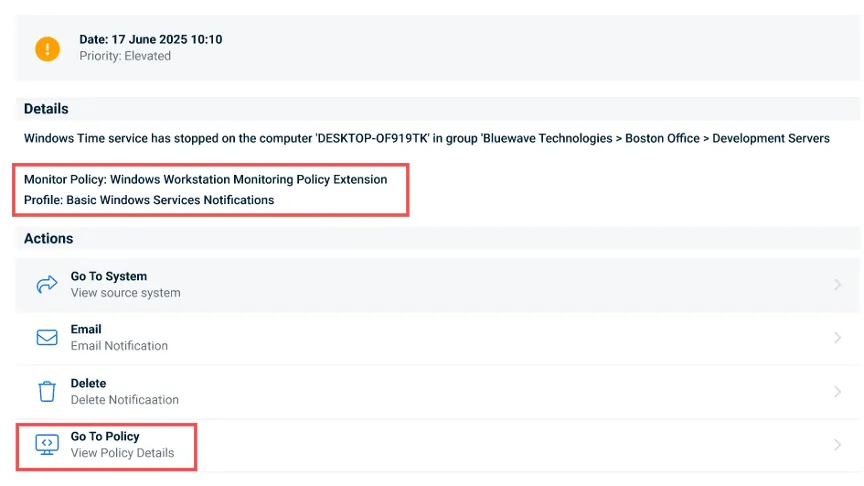
Monitoring notifications in Kaseya VSA 10 now include direct visibility into their source, making it easier to understand and act on alerts. Notifications generated by Monitoring policies display the policy and profile names that triggered the alert, along with a “Go to Policy” action that opens the device’s effective policy settings.
This enhancement accelerates troubleshooting and fine-tuning by allowing administrators to quickly review and adjust monitoring configurations, helping reduce alert noise. Agent-generated notifications are clearly labeled for transparency, and even deleted policies or profiles are gracefully handled with informative placeholders in the Effective Settings view.
One Complete Platform for IT & Security Management
Kaseya 365 is the all-in-one solution for managing, securing, and automating IT. With seamless integrations across critical IT functions, it simplifies operations, strengthens security, and boosts efficiency.

Microsoft security challenges: How to protect your business, data and identity
Discover the biggest Microsoft security challenges and learn practical strategies to protect your users, data, identities and business from evolving threats.
Read more
How MSPs could become a ‘critical supplier’ under new UK legislation
Learn how MSPs could be affected by the CSRB legislation – as a designated critical supplier (DCS). And how MSPs that address security gaps with the right tools will be in a strong position to offer Compliance as a Service (CaaS) to their clients.
Read more
Email security under NIS2
Explore how NIS2 is raising the importance of email security and how AI-powered threats and tools are reshaping cyber resilience.
Read more