QBR report builder: Cover page customization
myITprocess now lets you fully customize the QBR Report Builder cover page so every client presentation matches your brand and messaging.
You can upload your own background image, control blur levels, change the displayed organization name, update the report description and choose a custom font color for all cover text. These options give you precise control over how each report looks without exporting to external design tools.
With consistent, on-brand cover pages across clients, your team can deliver polished, professional QBRs, reinforce your identity and make a stronger impression.
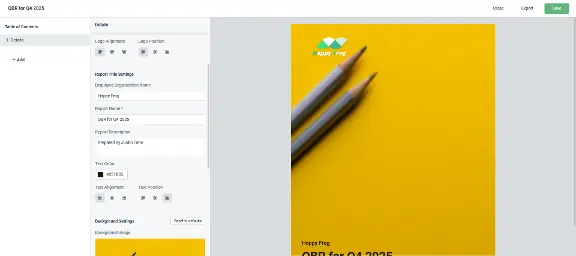
Learn more about QBR report builder cover page customization for myITprocess here.
One Complete Platform for IT & Security Management
Kaseya 365 is the all-in-one solution for managing, securing, and automating IT. With seamless integrations across critical IT functions, it simplifies operations, strengthens security, and boosts efficiency.

Best IT documentation software in 2026: Features, benefits & top tools
Discover the best IT documentation software for MSPs and IT teams, compare leading tools and learn how to simplify IT operations and asset management.
Read now
5 best N-able alternatives for IT management in 2026
Compare the 5 best N-able alternatives in 2026. Discover key features, pricing and how each solution stacks up across RMM, PSA and IT documentation.
Read now
5 best ConnectWise alternatives in 2026
Discover the 5 best ConnectWise alternatives for 2026. Explore key features, pricing and capabilities across RMM, PSA and IT documentation.
Read now