Device Card: Natively interface with Command and PowerShell
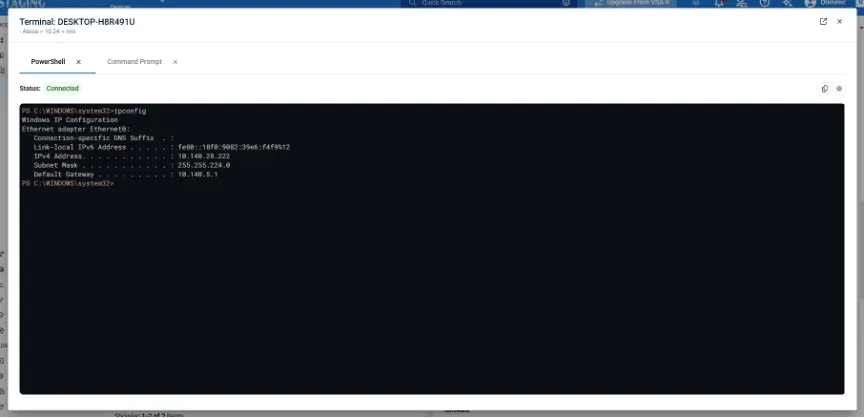
Kaseya VSA 10 now delivers a redesigned, OS-native Command and PowerShell experience directly within the Device Card, enabling technicians to manage Windows, macOS and Linux agents without launching a remote desktop session. The new terminal closely mirrors each operating system’s native look and feel, with support for light and dark modes, streamlined statuses and improved session handling for a more intuitive workflow.
Productivity is further enhanced with copy/paste support, command history navigation, the ability to pop out terminals into separate browser tabs and faster recovery from disconnects or errors with one-click reconnect and retry actions. The update is automatically enabled via an agent update within 36 hours of upgrading to VSA 10.24, with seamless fallback to the previous UI until agents are updated.
One Complete Platform for IT & Security Management
Kaseya 365 is the all-in-one solution for managing, securing, and automating IT. With seamless integrations across critical IT functions, it simplifies operations, strengthens security, and boosts efficiency.

Best endpoint management software in 2026: Top 5 solutions ranked
Explore the five best endpoint management tools in 2026, compared across OS and device coverage, patching capabilities, discovery, inventory and security.
Read now
Best RMM software in 2026: Top 5 tools ranked
Compare the 5 best RMM software tools in 2026. See AI, automation, integrations and onboarding side by side, plus who each platform fits best.
Read now
Datto SaaS Protection Update: Graph API Migration & Performance
Get a direct update on Datto SaaS Protection: Microsoft Graph API migration progress, up to 2x faster backups, reliability gains, and what’s still to come.
Read now