QBR report builder: Cover page customization

December 17
New
myITprocess, Kaseya 365 Ops

myITprocess now lets you fully customize the QBR Report Builder cover page so every client presentation matches your brand and messaging.

You can upload your own background image, control blur levels, change the displayed organization name, update the report description and choose a custom font color for all cover text. These options give you precise control over how each report looks without exporting to external design tools.

With consistent, on-brand cover pages across clients, your team can deliver polished, professional QBRs, reinforce your identity and make a stronger impression.
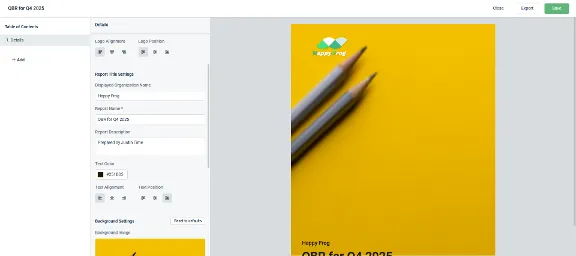
myitprocess-qbr-report-builder-cover-page-customization

Learn more about QBR report builder cover page customization for myITprocess here.

One complete platform for IT & security management

Kaseya 365 is the all-in-one solution for managing, securing, and automating IT. With seamless integrations across critical IT functions, it simplifies operations, strengthens security, and boosts efficiency.

Smart Audit: How to identify which passwords are actually at risk

Passwords are still the easiest way in. According to the 2025 Data Breach Investigations Report (DBIR), compromised credentials were usedRead More

Read blog post

Rethinking cyber resilience for modern IT

Discover why cyber resilience is essential for modern businesses to withstand disruption and ensure rapid, reliable recovery.

Read blog post

Unifying security across the IT stack

Discover how unifying security across infrastructure, applications and data reduces risk and strengthens resilience.

Read blog post