Device Card: Natively interface with Command and PowerShell
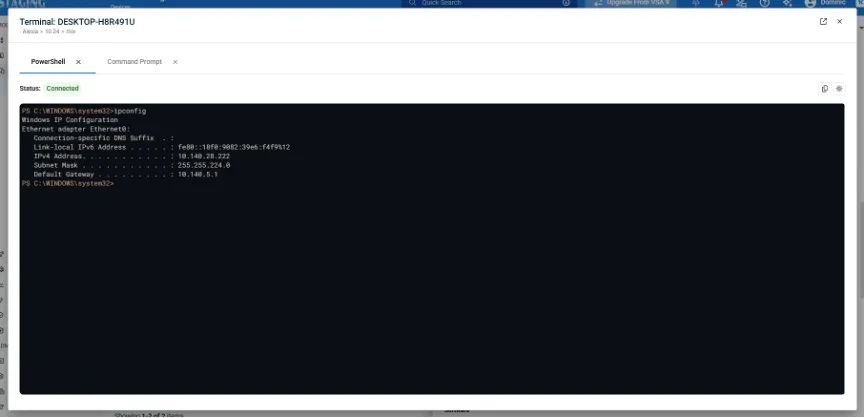
Kaseya VSA 10 now delivers a redesigned, OS-native Command and PowerShell experience directly within the Device Card, enabling technicians to manage Windows, macOS and Linux agents without launching a remote desktop session. The new terminal closely mirrors each operating system’s native look and feel, with support for light and dark modes, streamlined statuses and improved session handling for a more intuitive workflow.
Productivity is further enhanced with copy/paste support, command history navigation, the ability to pop out terminals into separate browser tabs and faster recovery from disconnects or errors with one-click reconnect and retry actions. The update is automatically enabled via an agent update within 36 hours of upgrading to VSA 10.24, with seamless fallback to the previous UI until agents are updated.
One Complete Platform for IT & Security Management
Kaseya 365 is the all-in-one solution for managing, securing, and automating IT. With seamless integrations across critical IT functions, it simplifies operations, strengthens security, and boosts efficiency.

What sets the world's top MSPs apart?
Download now
Microsoft security challenges: How to protect your business, data and identity
Discover the biggest Microsoft security challenges and learn practical strategies to protect your users, data, identities and business from evolving threats.
Download now
How MSPs could become a ‘critical supplier’ under new UK legislation
Learn how MSPs could be affected by the CSRB legislation – as a designated critical supplier (DCS). And how MSPs that address security gaps with the right tools will be in a strong position to offer Compliance as a Service (CaaS) to their clients.
Download now