VSA 10: Show or hide the remote mouse
Enable technicians to view the remote user’s mouse cursor alongside their own during shared Remote Desktop sessions on Windows and macOS devices. Administrators can control access through the Allow technician to view remote mouse setting in Remote Desktop configuration profiles.
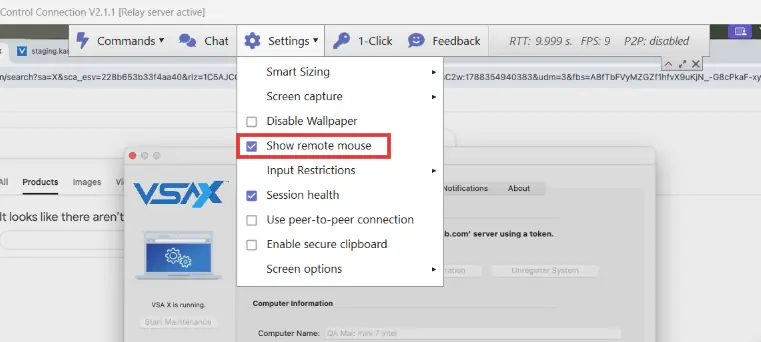
When enabled by policy, technicians can show or hide the remote cursor directly from the Remote Desktop client toolbar during a session. Cursor positioning is supported across multi-monitor setups, helping technicians follow user actions and collaborate more effectively during troubleshooting. The feature is disabled by default at both the policy and session level.
One Complete Platform for IT & Security Management
Kaseya 365 is the all-in-one solution for managing, securing, and automating IT. With seamless integrations across critical IT functions, it simplifies operations, strengthens security, and boosts efficiency.

5 best ConnectWise alternatives in 2026
Discover the 5 best ConnectWise alternatives for 2026. Explore key features, pricing and capabilities across RMM, PSA and IT documentation.
Read now
Best MSP software in 2026: Top 10 tools and platforms
Compare the best MSP software for RMM, PSA, backup and security. See what 10 top MSP platforms deliver and how to choose the right one for your MSP.
Read now
Best endpoint management software in 2026: Top 5 solutions ranked
Explore the five best endpoint management tools in 2026, compared across OS and device coverage, patching capabilities, discovery, inventory and security.
Read now