Cybercriminals no longer rely on obvious phishing tricks or poorly forged emails. Instead, they increasingly abuse trusted platforms, legitimate workflows and small gaps in widely used security controls. By manipulating everyday business processes that users already trust, threat actors turn reputable infrastructure into an unwitting delivery mechanism for scams, making malicious messages far harder to spot and far more likely to succeed.
INKY has detected attacks in which bad actors abuse legitimate invoices and dispute notifications from well-known vendors, such as PayPal, Apple, DocuSign and HelloSign. These platforms often allow users to enter a “seller name” or add a custom note when creating an invoice or notification. Attackers abuse this functionality by inserting scam instructions and a phone number into those user-controlled fields. They then send the resulting invoice or dispute notice to an email address they control, ensuring the malicious content is embedded in a legitimate, vendor-generated message.
Since the message originates directly from the vendor, such as PayPal, and is cryptographically signed, it easily passes DomainKeys Identified Mail (DKIM) and Domain-based Message Authentication, Reporting & Conformance (DMARC) checks. After receiving the legitimate email, the attacker simply forwards it on to their intended targets. The result is a message that looks authentic, passes email authentication and arrives in inboxes with little to no warning.
This technique, known as a DKIM replay attack, is increasingly being used by attackers to deceive end users and bypass traditional email security controls.
How DKIM replay attacks work — and why they are so effective
A DKIM replay attack occurs when a bad actor captures a legitimate, DKIM-signed email and then “replays” that same message to additional recipients. Since the original headers and message body remain unchanged, the DKIM signature continues to validate. As a result, the email passes DMARC authentication even though it is being redistributed by an attacker rather than delivered by the original sender. To avoid breaking DKIM, attackers intentionally do not modify the message after it has been signed.
To understand why this works, it helps to look at how email authentication functions:
- DKIM attaches a cryptographic signature to an email’s headers and body. The receiving mail server uses the sending domain’s public key to confirm that the signed content has not been altered in transit. DKIM verifies message integrity, but it does not confirm who actually delivered the email.
- DMARC builds on DKIM or Sender Policy Framework (SPF) by checking alignment between the authenticated domain and the visible From: address. If DKIM passes and aligns with the From: domain, DMARC passes as well.
Attackers exploit this behavior to deliver phishing or scam content from high-reputation domains that recipients already trust. Even if SPF checks fail during forwarding, a valid and aligned DKIM signature often allows DMARC to pass. This makes DKIM replay attacks particularly difficult for traditional email security tools to detect and increasingly attractive for threat actors targeting end users.
DKIM replay attacks in action: Apple and PayPal invoice abuse
INKY observed threat actors actively abusing legitimate Apple and PayPal emails to carry out scams that pass authentication checks and appear trustworthy to recipients.
Apple App Store invoice abused in DKIM replay attacks
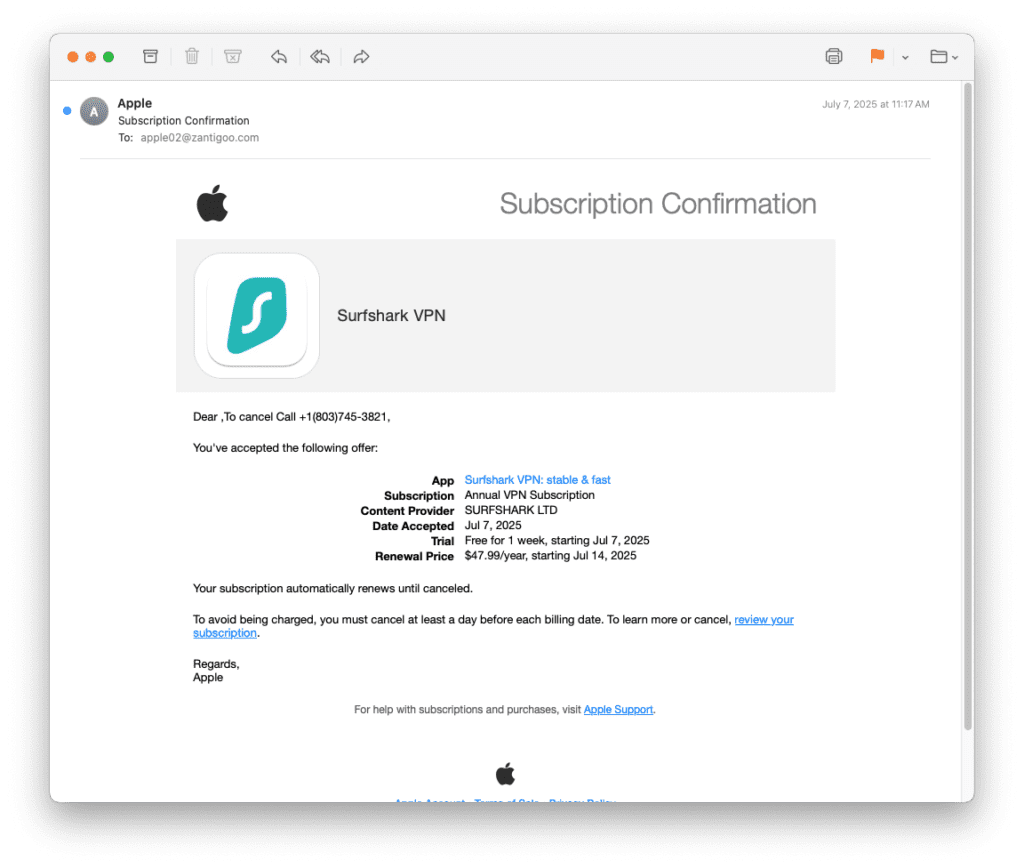
| Header field | Value |
| From | [email protected] |
| To | [email protected] (attacker’s mailbox) |
| Subject | Subscription Confirmation |
| DKIM‑Signature | d=email.apple.com |
Here’s a step-by-step breakdown of the attack:
- Obtain a legitimate DKIM-signed email: The attacker creates an Apple ID and subscribes to the Surfshark VPN app (in this case) in the Apple App Store. During the sign-up process, they insert malicious content — To cancel Call +1 (803) 745-3821 — into the account name field. Apple’s automated system then generates a subscription confirmation email containing this value and signs it using the domain’s DKIM key.
- Valid DKIM signature: The email’s DKIM header shows that Apple signed key headers and the entire message body. Receiving mail servers verify this signature using Apple’s public DKIM key and therefore mark the message as dkim=pass and dmarc=pass.
- Replay: After receiving the legitimate email, the attacker forwards it to a list of victims, for example, by using Outlook or another Simple Mail Transfer Protocol (SMTP) client. Forwarding does not modify the signed headers or body, so the DKIM signature remains valid. While the envelope recipient addresses change, DMARC evaluates the header From: domain and the DKIM signature, not the envelope RCPT TO value.
- Delivery to victims: Because the message originates from a reputable domain (email.apple.com) and all authentication checks (DKIM and DMARC) pass, many email filters treat it as legitimate. The unusual greeting — Dear, To cancel Call +1 (803) 745-3821 — may be the only obvious red flag. Unsuspecting recipients may call the listed phone number, allowing bad actors to harvest payment details or personal identifiable information (PII). They can also instruct victims to visit malicious sites to install malware or remote-access software or submit information through fraudulent forms.
PayPal disputed invoice abused in DKIM replay attacks
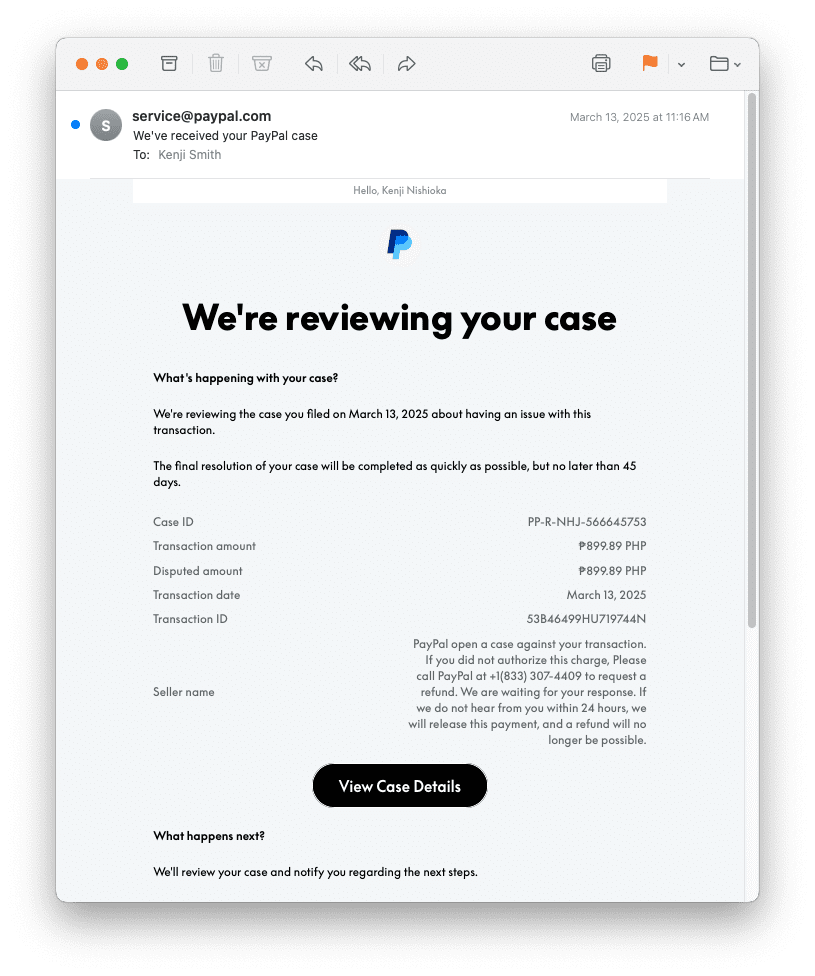
| Header field | Value |
| From | [email protected] |
| To | Kenji Smith [email protected] (the attacker’s mailbox) |
| Subject | We’ve received your PayPal case |
| DKIM‑Signature | d=paypal.com |
Here’s a step-by-step breakdown of the attack:
- Create a PayPal case or invoice with malicious content: The attacker uses their PayPal account to open a dispute or issue an invoice and sets the “seller name” to a scam message that includes a phone number. PayPal’s system stores this user-supplied value without validation.
- Send the email to an attacker-controlled mailbox: The attacker sends the invoice or case notification to an email address they control. PayPal generates a confirmation email from [email protected] and signs it using the domain’s DKIM key. The message includes the malicious “seller name.”
- Valid DKIM signature: The email’s DKIM header shows that PayPal signed key headers and the entire message body. Receiving mail servers verify this signature using PayPal’s public DKIM key and therefore mark the message as dkim=pass and dmarc=pass.
- Replay to victims: The attacker forwards the intact email to the intended victims using their own SMTP service. While the envelope recipient changes, the header To: field remains the attacker’s address, so the DKIM signature remains valid. Since the email originates from a legitimate PayPal domain and passes authentication checks, most spam and anti-phishing filters deliver it to the victim’s inbox.
- The victim calls the scam number: After seeing a convincing PayPal case notification and an urgent message about a disputed transaction, the victim is likely to call the listed phone number. Once on the call, scammers typically attempt to harvest financial information or PII or persuade the victim to install remote-access software.
Why traditional email security often fails to stop DKIM replay attacks
Traditional email security controls are designed to detect spoofed senders and altered messages. In DKIM replay attacks, however, attackers rely on fully legitimate, authenticated emails, allowing these messages to slip past defenses that depend heavily on authentication signals.
Common failure points include:
- Valid DKIM and DMARC: The message originates from Apple or PayPal and is signed using the organization’s legitimate DKIM keys. As a result, the signature verifies successfully, and DMARC passes, even though the email has been forwarded by an attacker.
- SPF misalignment: The attacker’s forwarding server is not authorized by Apple’s or PayPal’s SPF records, causing SPF to fail. However, DMARC still passes because aligned DKIM authentication alone is sufficient for DMARC compliance.
- User-supplied content: Apple and PayPal allow users to enter free-form text in seller name or note fields. This content is included in the DKIM-signed message body, allowing attackers to insert scam instructions or phone numbers during sign-up without invalidating the signature.
INKY catches threats like DKIM replay attacks with GenAI
Best practices: Guidance and recommendations
DKIM replay attacks exploit trust in well-known brands and authenticated email, making awareness and scrutiny critical for both users and security teams.
- Inspect the To: header: Verify whether the To: address in the message header matches the intended recipient. A mismatch between the visible headers and the envelope recipient can indicate that the email has been forwarded or replayed by an attacker.
- Be skeptical of phone numbers: Legitimate notifications from Apple and PayPal direct users to log in to their official websites, not to call unsolicited phone numbers. Users should avoid calling any numbers included in unexpected emails, especially those claiming urgent account or payment issues.
By combining header inspection with user education around common scam tactics, organizations can reduce the risk of DKIM replay attacks reaching and deceiving end users.