Fake voicemails, real malware: Inside a 26,000-email SVG smuggling campaign
A two-month phishing campaign disguised malicious JavaScript as harmless voicemail attachments, mislabeling the files as plain text to slip past attachment scanners. INKY detected and flagged all 26,589 messages.
Between June 1 and August 4, 2026, INKY tracked and detected a sustained phishing campaign that used a deceptively simple lure — a missed voicemail notification — to deliver malicious code hidden inside an image file. The campaign reached 5,527 organizations and generated 26,589 detected emails.
Every email was caught and flagged as dangerous. The attackers’ weapon of choice was a file format that most people, and many email filters, treat as harmless: the SVG image.
This blog explains what SVG files are, why attackers have embraced them as a malware-delivery mechanism in 2026 and exactly how this campaign worked. We also analyze the obfuscated JavaScript hidden inside the attachment, the trick the attackers used to disguise the file as plain text and how INKY detected it across every affected organization.
What is an SVG file, and why do attackers love it?
SVG (Scalable Vector Graphics) is an image format, but unlike a JPEG or PNG it is not made of pixels. An SVG is a text file written in XML that describes shapes, lines and text mathematically, so the image can scale to any size without losing quality. Logos, icons and charts on the web are frequently SVGs.
But there is a crucial difference between an SVG and a normal image: an SVG can contain code. The SVG specification allows scripts, including JavaScript, to be embedded directly inside the file so that graphics can be interactive. When an SVG is opened in a web browser, that embedded JavaScript executes. A PNG can never do this. An SVG can.
That single capability is what attackers exploit. To a person, and to many security tools, an SVG looks like a picture. To a browser, it can be a delivery vehicle for a program. This gap between how the file is perceived and what it can actually do is the entire basis of the technique known as SVG smuggling.
|
Why SVGs slip through defenses
Email security gateways have spent years learning to block dangerous attachment types such as executables, scripts, macro-enabled documents and archives. SVGs were historically treated as benign images and allowed through. Attackers noticed. By wrapping their JavaScript in an SVG shell, they deliver active code inside a file type that many filters were never configured to scrutinize. |
A surging 2026 threat
SVG-based attacks are not brand new. Researchers have documented malicious SVG attachments since around 2017, but their use exploded in 2026. Two things changed: the scale of the campaigns and the sophistication of the obfuscation.
- Fifty-fold growth. According to Hoxhunt’s 2026 Phishing Trends Report, malicious SVG attachments increased fiftyfold in 2025 over 2024, and now rank as the third most common malicious email attachment type, behind only PDF and HTML.
- Massive individual campaigns. In one February 2026 campaign tracked by Microsoft, roughly 1.2 million SVG-based phishing messages were delivered to more than 53,000 organizations across 23 countries. The SANS Internet Storm Center documented the same technique flooding inboxes in June 2026.
- Content-free payloads. Analyzing recent samples, researchers found SVGs containing no graphical content at all. The file exists purely to carry obfuscated JavaScript to the victim’s browser while being classified as an image by the email gateway.
- Voicemail lures. Multiple vendors, including Sublime Security and ReversingLabs, have documented SVG attachments disguised as voicemail or missed-call notifications, precisely the lure used in the campaign described here.
The campaign INKY tracked fits this pattern exactly and adds an extra evasion layer by mislabeling the SVG’s file type as plain text.
The campaign at a glance
Every message in this campaign followed the same template: a spoofed internal email claiming to be a voicemail notification, carrying one or more SVG attachments that were actually obfuscated JavaScript. The statistics below are drawn directly from INKY telemetry across the observed window.
| Metric | Value |
|---|---|
| Total emails detected | 26,589 |
| Organizations targeted | 5,527 |
| Campaign window observed | June 1 – August 4, 2026 (ongoing) |
| Threat disposition | 100% detected |
| Lure theme | Missed voicemail / call notification |
| Payload | SVG attachment containing obfuscated JavaScript |
| Evasion tell | SVG attachment declared as text/plain |
| Top detection signals | Phishing Content (100%), Spoofed Internal Sender (95%) |
| Personalization | 99.5% of subjects contained the recipient's own email name |
Table 1: Campaign summary from INKY PhishFence telemetry, June 1 – August 4, 2026.
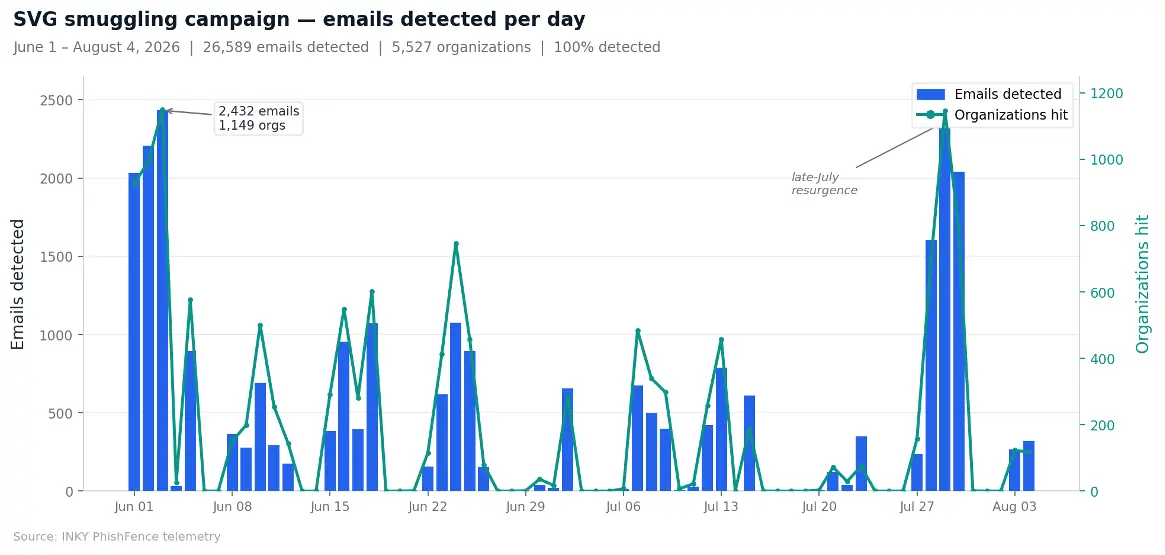
Figure 1: Daily detected-email volume across the campaign. Activity ran in waves, peaking on June 3 (2,432 emails across 1,149 organizations) with a pronounced resurgence in late July. Gaps fall on weekends, when the campaign paused.
Broad spray, not a targeted strike
The distribution of emails across organizations shows a wide, opportunistic campaign rather than a precision operation. Across 5,527 organizations, the median organization received just two emails, and 32% received only one. The ten most-affected organizations together account for just 6% of total volume. There is no concentration on a small set of high-value targets, which is the hallmark of a spray campaign built for broad credential harvesting rather than a tailored spear-phishing strike.
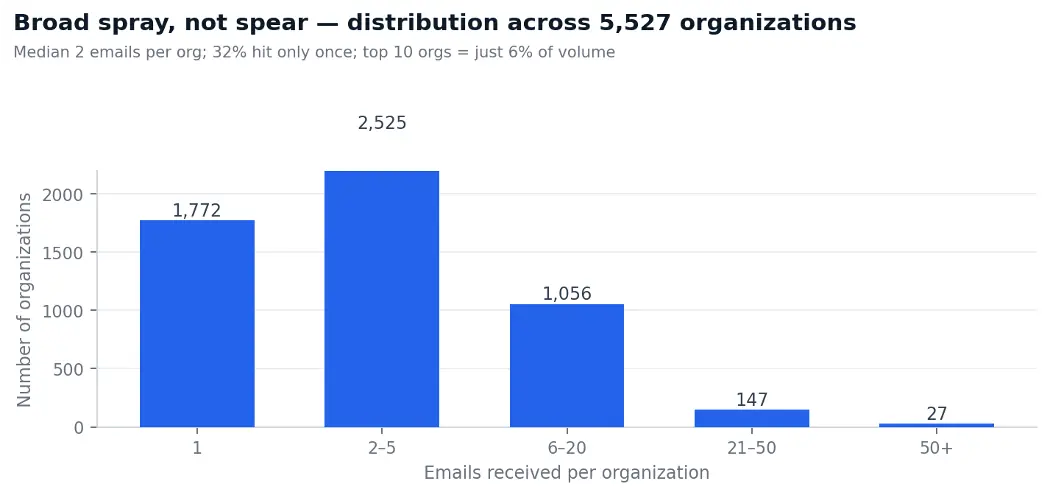
Figure 2: Distribution of emails per organization. The overwhelming majority of organizations received only a handful of messages, with a very small tail of more heavily hit organizations, confirming broad spray rather than targeted delivery.
Timed to the workweek
The campaign’s sending rhythm reinforces the picture of an operation engineered for plausibility. Volume concentrated on Monday through Thursday and peaked on Wednesday, with almost nothing sent on weekends. This is consistent with a lure designed to arrive while recipients are actively working and a missed-call notification feels routine.
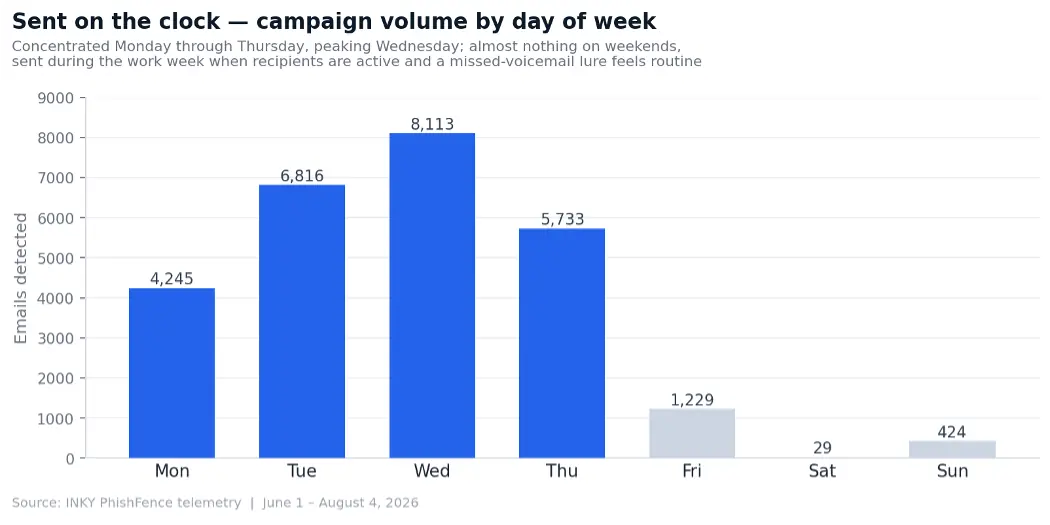
Figure 3: Campaign volume by day of week. Sending is concentrated Monday through Thursday and effectively stops on weekends.
Personalized from the target’s own address
In 99.5% of messages, the subject line’s display name was an exact copy of the string before the @ in the recipient’s own email address. A recipient at jsmith@… would see a subject reading “mCaller left Jsmith, 34s Preview…”. The attackers did not need a stolen contact list. They generated per-recipient personalization mechanically from the address itself. The tell that it is machine-generated rather than human is that role-based mailboxes were addressed by their literal names (for example “mCaller left Accountspayable”), something no real caller would ever write.
Anatomy of the phishing email
The email itself is deliberately sparse. It presents as an automated voicemail notification with little body text, a subject line referencing a missed call and one or more attachments styled to look like the voicemail file. Below is a redacted sample from the campaign.
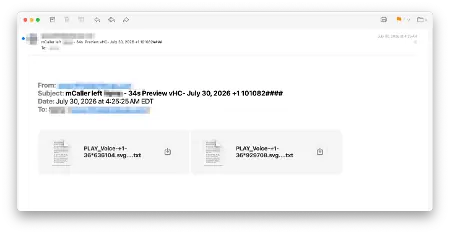
Figure 4: A redacted sample email from the campaign. The message spoofs an internal voicemail notification and carries two attachments named to look like the voicemail file. Note the .svg….txt naming. Recipient and sender identifiers have been redacted.
Two layers of deception
Before a single line of code runs, the message already relies on two forms of deception at the envelope level:
- Spoofed internal sender. The email claims to come from the recipient’s own domain, but it arrived from an external source and the sender was never authenticated to the organization’s mail server. It is designed to look like an internal system notification.
- The attachment is mislabeled. Although the files carry an .svg name and contain SVG/XML markup, they are declared in the message with a content type of text/plain rather than image/svg+xml. An attachment scanner keying on the declared type sees an innocuous text file, not active content.
Inside the attachment: What the code actually does
Opening the attachment in a text editor, rather than a browser, reveals that the “voicemail” is not an image at all. It is an XML document wrapping obfuscated JavaScript. The screenshot below shows the raw contents of one sample.
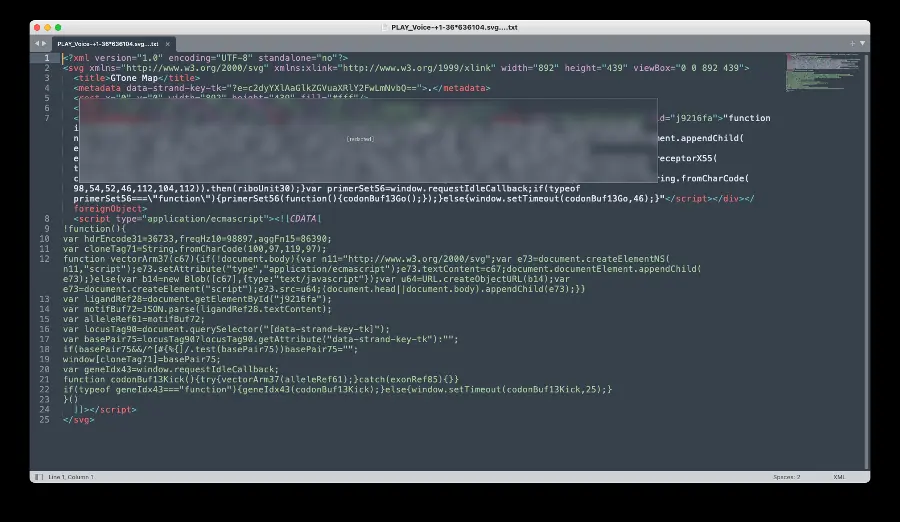
Figure 5: The raw contents of the SVG attachment. Beneath a thin SVG shell (a title and two rectangles) sits obfuscated JavaScript inside a foreignObject and a script CDATA block. The block containing the live callback URL has been redacted.
The structure
Stripped to its skeleton, the file has three parts:
- A minimal SVG shell. An
<svg>root with a<title>and a couple of<rect>elements. This is the only part that would render as an “image,” and it is essentially decorative cover. - A hidden data attribute. The root element carries a custom attribute (for example data-strand-key-tk=”…”) holding an encoded value the script reads at runtime. Splitting configuration into obscure attributes keeps the malicious values out of the obvious code path.
- Two script payloads. A
<foreignObject>containing an HTML<script type="application/json">block, and a second
How the obfuscation works
The code is written to defeat both human analysts and automated scanners that look for recognizable malicious patterns. Several techniques are layered together:
- Meaningless function and variable names. Every identifier is disguised with pseudo-scientific, biology-themed junk names such as intronGap91, riboUnit30, vectorArm37, codonBuf13Go, primerSet56. These carry no meaning and exist only to make the code unreadable and to vary between samples so no two files look identical.
- Character-code string building. Sensitive strings are never written in plain text. Instead, they are assembled at runtime from numeric character codes via String.fromCharCode(…). A static scanner reading the file sees a list of numbers, not the words they spell.
- Runtime script injection. Rather than calling dangerous functions directly, the code creates a new script element with document.createElementNS(…), assigns its source from a value built at runtime, and appends it to the document. This is a common way to defeat static analysis, since the malicious destination does not exist as a literal string in the file.
- Deferred execution. Execution is scheduled through requestIdleCallback / setTimeout, so the payload fires slightly after load rather than immediately, helping it evade tools that only observe the moment a file is opened.
What it’s actually doing
Decoded, the obfuscation becomes clear. The character-code sequences in the sample resolve to short strings that the script uses to build the name of the remote endpoint it contacts. A static scanner reading the file sees only the list of numbers below, never the words they spell:
|
String.fromCharCode(104,116,116,112,115) -> "https" String.fromCharCode(46,112,104,112) -> ".php" (numeric codes assemble the endpoint at runtime) |
The code reads its hidden data attribute, assembles the endpoint name from these codes, then uses window.fetch(…) to reach out to an attacker-controlled host and retrieve the next stage of the attack. The SVG itself does not contain the phishing page; it is a launcher that pulls its payload from a remote server at runtime.
What that next stage typically is, based on how this class of campaign behaves, follows a well-documented pattern.
The fetched content is generally a credential-harvesting page impersonating a widely used login such as Microsoft 365, Google Workspace or Adobe. In many campaigns the victim’s own email address is passed along and used to prefill the fake login form, making it look personalized and legitimate.
Increasingly these pages are not simple clones but adversary-in-the-middle (AiTM) portals: they relay what the victim types to the real login service in real time, capture the resulting session token, and thereby defeat multifactor authentication. This technique has been tied to phishing-as-a-service kits such as Tycoon2FA, Mamba2FA and Sneaky2FA. Hosting the payload remotely also lets the attacker update or swap the phishing page at any time without ever changing the SVG that was delivered.
|
The key insight
The SVG is not the payload. It is the **smuggling container**. Its entire job is to carry executable JavaScript past the email gateway inside a file type treated as an image (and here, mislabeled as text), then hand that code to the browser, which may execute it. The attachment that looks like a voicemail is really a small program whose first act is to phone home. |
Why this campaign bypasses conventional defenses
- Trusted file type. SVGs are widely treated as benign images. Many gateways historically did not scan them as active content.
- MIME mislabeling. Declaring the attachment as text/plain defeats scanners that decide whether to inspect based on the stated content type.
- No static signature. Junk identifiers, character-code string building and per-sample variation mean there is no fixed string or hash to match across the campaign. Each file looks different.
- Runtime-only payload. The malicious destination is assembled and fetched only when the file is executed in a browser. It is not present as readable text for a static scanner to find.
- Spoofed internal identity. The message masquerades as an internal notification, exploiting the trust users place in mail that appears to come from their own organization.
MITRE ATT&CK mapping
The techniques observed in this campaign map to the following MITRE ATT&CK tactics and techniques.
| Tactic | Technique (ID) | How it appears in this campaign |
|---|---|---|
| Initial Access | Phishing: Spearphishing Attachment (T1566.001) | Malicious SVG delivered as an email attachment disguised as a voicemail file |
| Execution | User Execution: Malicious File (T1204.002) | Attack relies on the recipient opening the SVG, which runs its embedded JavaScript in the browser |
| Defense Evasion | Masquerading (T1036) | SVG attachment mislabeled as text/plain and dressed up as a voicemail notification |
| Defense Evasion | Obfuscated Files or Information (T1027) | Junk identifiers, character-code string building, and per-sample variation hide intent |
| Defense Evasion | Deobfuscate/Decode Files or Information (T1140) | Script reconstructs strings and its destination at runtime via String.fromCharCode |
| Defense Evasion | Spoof Security Alerting / Impersonation (T1656) | Message impersonates an internal system sender from the recipient's own domain |
| Command and Control | Application Layer Protocol: Web Protocols (T1071.001) | Embedded script uses a web fetch to an attacker-controlled endpoint to retrieve the next stage |
| Credential Access | Input Capture (T1056) | Downstream stage typically presents a credential-harvesting page impersonating a familiar login |
Table 3: MITRE ATT&CK mapping for the SVG smuggling voicemail campaign. The credential-access stage is inferred from the fetched follow-on payload characteristic of this campaign class.
How INKY detected it
INKY does not rely on file-type assumptions or static signatures. It evaluates the full context and behavior of each message. Across all 26,589 emails, INKY detected the campaign and flagged every message with a “Danger” verdict. The detection rested on one universal signal, reinforced by a second:
- Phishing Content flagged 100% of the campaign. Every single message was classified as phishing based on multiple suspicious indicators, including that it carried an attachment with suspicious content and resembled a fake voicemail notification. This is the signal that caught the entire campaign, in every organization, without exception.
- Spoofed Internal Sender reinforced it on 95% of the campaign. As an additional signal, INKY recognized that the message claimed to originate from the recipient’s own domain but arrived from an external source, with a sender that had not authenticated to the organization’s mail server. This category fired on 95% of the campaign; the remaining messages, in organizations where this particular category was not in effect, were still caught in full by Phishing Content.
The banner INKY presented to recipients spelled out exactly why the message was dangerous:

Figure 6: The INKY warning banner shown on a campaign message, explaining both threat categories in plain language. The recipient's own domain has been redacted.
Each message was evaluated against the full range of INKY threat categories. Phishing Content alone was sufficient to flag every message in the campaign as dangerous, with Spoofed Internal Sender adding a second, corroborating signal on most of them.
| Threat Category | Coverage | Role in detection |
|---|---|---|
| Phishing Content | 100% | Universal signal — caught every message |
| Spoofed Internal Sender | 95% | Corroborating signal on most messages |
Table 2: INKY threat categories that fired across the campaign. Phishing Content flagged every message; Spoofed Internal Sender corroborated on most.
What Microsoft’s native filtering saw
The gap between INKY’s verdict and native email filtering is stark on this campaign.
Microsoft assigns every message a Spam Confidence Level (SCL), where a score of 0 or 1 means the message was judged not spam and is delivered normally to the inbox, while a score of 5 marks it as spam. Across this campaign, 19,994 of the 26,589 messages (75%) carried a Microsoft SCL of 0 or 1, and only 4,777 (18%) were scored SCL 5.
In other words, Microsoft’s native spam filtering rated three out of four of these phishing messages as not spam, inbox-bound mail, while INKY independently flagged every one of them as dangerous.
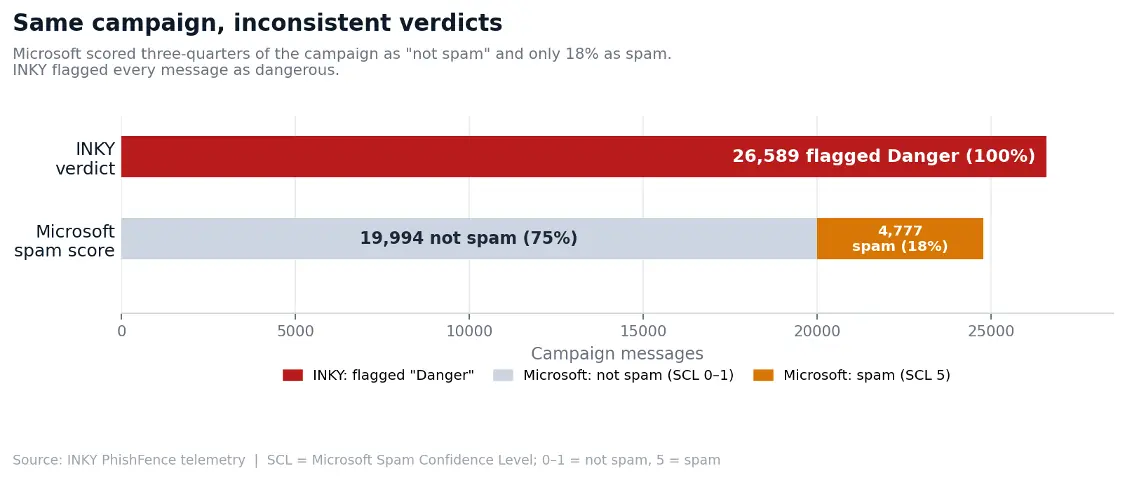
Figure 7: Microsoft spam scoring versus INKY verdict across the campaign. Microsoft scored 75% of messages as not spam (SCL 0 or 1) and only 18% as spam (SCL 5), while INKY returned a dangerous verdict on all 26,589.
What makes this striking is that the campaign was built from a single template. The same message structure, the same lure and the same attachment drew wildly different native verdicts depending on the receiving mailbox: clean for most, spam for some.
INKY, by contrast, returned the identical dangerous verdict across all 26,589 messages. This is the core argument for behavior-based detection: a message that scores as clean spam-wise can still be a credential-phishing attack, and only an approach that evaluates the full context reliably catches it.
Indicators of compromise
The following indicators are associated with this campaign. Because the payload varies per sample, behavioral and pattern indicators are more durable than any single file hash.
| Indicator | Value / Pattern | Notes |
|---|---|---|
| Lure theme | Missed voicemail / call notification | Social-engineering pretext |
| Subject pattern | mCaller left <name> - 34s Preview vHC- <date> <number> | <name> = recipient's email local-part |
| Attachment name | PLAY_Voice-….svg | Voicemail-styled SVG filename |
| Declared MIME type | text/plain | SVG mislabeled to evade scanners |
| Payload behavior | SVG → obfuscated JS → fetch to remote endpoint | Runtime script injection / callback |
| Obfuscation | String.fromCharCode, junk identifiers | Defeats static signatures |
Table 4: Indicators of compromise for the SVG smuggling voicemail campaign.
Recommendations
For Security Teams
- Treat SVGs as active content. Configure email and web gateways to inspect SVG attachments as potential script carriers, not as benign images, and do not rely on the declared MIME type to decide whether to scan.
- Consider blocking or quarantining inbound SVG attachments. Legitimate business email rarely needs to send SVGs directly to end users. Blocking or sandboxing inbound SVGs removes a growing attack surface with minimal disruption.
- Do not depend on file-hash signatures. Per-sample obfuscation means hashes change constantly. Prioritize behavioral and content-based detection that evaluates what a file does, not what it matches.
- Strengthen internal-spoof controls. Ensure your email security can detect messages that claim to come from your own domain but arrive externally and unauthenticated, which is the envelope trick this campaign relied on.
- Educate users on unexpected voicemail and image attachments. Reinforce that a missed-call or voicemail email with an attachment to “play” the message is a common phishing pretext, and that image files can carry code.
For email recipients
- Be suspicious of voicemail or missed-call notifications that arrive as email with an attachment to open, especially if you did not expect one.
- Never open an .svg attachment you were not expecting. Unlike ordinary images, SVGs can run code when opened in a browser.
- Treat any login page reached by opening an attachment as untrusted. Navigate to services directly instead of through links or files in email.
- Remember that an email appearing to come from your own organization can still be spoofed. An internal-looking “system” notification is not proof of legitimacy.
Conclusion
This campaign is a textbook example of a technique defining email threats in 2026: hiding executable code inside a file type the world treats as a harmless picture. By wrapping obfuscated JavaScript in an SVG, disguising that SVG as plain text, spoofing an internal sender and dressing the whole thing up as a routine voicemail, the attackers built a lure engineered to slip past both automated filters and human judgment, at a scale of tens of thousands of messages across thousands of organizations.
It did not work. INKY detected and flagged all 26,589 messages, using behavioral signals that evaluate what a message is and does rather than trusting what it claims to be. That distinction matters: native spam filtering scored three-quarters of this campaign as clean, inbox-bound mail. As attackers continue to weaponize trusted file formats, a behavior-first approach, not signatures and not file-type assumptions, is what separates detection from delivery.
Tags: SVG smuggling, SVG phishing, malicious SVG attachment, JavaScript smuggling, voicemail phishing, MIME type evasion, spoofed internal sender, email security 2026, INKY PhishFence, threat intelligence