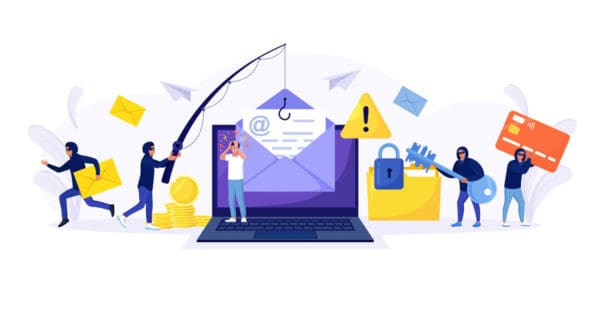
Today’s phishing attacks increasingly abuse trusted SaaS platforms, well-known collaboration tools and legitimate IT software to hide in plain sight. By blending into everyday business workflows and leveraging services users already trust, attackers make detection harder, bypass basic security controls and dramatically increase the likelihood of success. The following incident is one example of how this “living-off-the-land” approach is being used to deliver highly convincing phishing campaigns at scale.
In June 2025, INKY observed a chain‑link phishing campaign that leveraged Zoom’s legitimate notification infrastructure to distribute emails containing links to a Zoom document (docs.zoom.us) hosting a malicious download. The campaign targeted the U.S. Social Security Administration (SSA) beneficiaries by impersonating SSA alerts and leveraging the trust associated with Zoom communications.
After recipients clicked the link in the Zoom document, they were asked to download a so‑called “SSA Desktop App,” which was actually a renamed ConnectWise ScreenConnect (formerly ConnectWise Control) remote‑access client. This attack illustrates how threat actors weaponize legitimate SaaS platforms (Zoom) and remote‑support tools (ScreenConnect) as living‑off‑the‑land malware.
The email was sent from “SSA Notify <noreply‑[email protected]>” with the subject line “SSA Alert.” It passed SPF, DKIM and DMARC checks because it was delivered via Zoom’s Events infrastructure, allowing it to bypass unsophisticated email filters. The body of the email included the heading “Earnings Record Review Required” and warned the recipient of a potential discrepancy in their 2025 earnings record. It instructed the recipient to use a desktop or laptop, download a “secure SSA Desktop App” and sign in with SSA credentials. The call‑to‑action was a “VIEW FILE” button linking to a Zoom document hosted at docs.zoom.us. The message was designed to create urgency and used official SSA branding, making the phishing message appear legitimate.
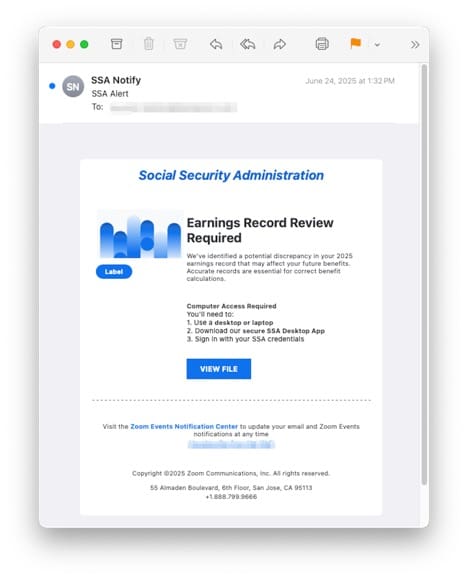
Figure 1: A phishing email resembling Zoom notification
Abuse of Zoom Docs to host malicious links
Zoom’s document-sharing functionality became an unintentional delivery mechanism, allowing a phishing payload to originate from a trusted domain and evade basic email security controls.
How Zoom was abused
Zoom offers features such as Zoom Events and Zoom Docs. When a user shares a Zoom Doc, Zoom sends a notification email from its own domain. Attackers exploited this mechanism by creating a Zoom document containing the phishing message and sharing it with targets. Because the email originated from noreply‑[email protected], it was cryptographically signed (SPF/DKIM/DMARC), allowing it to evade many email security checks and appear legitimate.
The phishing email contained an initial link to docs.zoom.us/doc/
This Zoom‑hosted document served as the first stage of the attack. It used SSA branding and claimed that mobile access was restricted, stating the user must use a desktop computer and download a “secure SSA Desktop App” (see the provided screenshots). The Zoom document mimicked an official statement, listing bullet points about verifying recent work history and tax contributions. It then instructed the user to:
- Use a desktop or laptop.
- Download the secure SSA Desktop App from the provided link.
- Sign in with SSA credentials.
A blue hyperlink labelled “Download Desktop App Now” pointed to an external domain (lawsmith.com/redir2), which is not affiliated with the SSA. The Zoom document was therefore used as a pivot, moving the victim from a trusted Zoom domain to a malicious site hosting the malware.
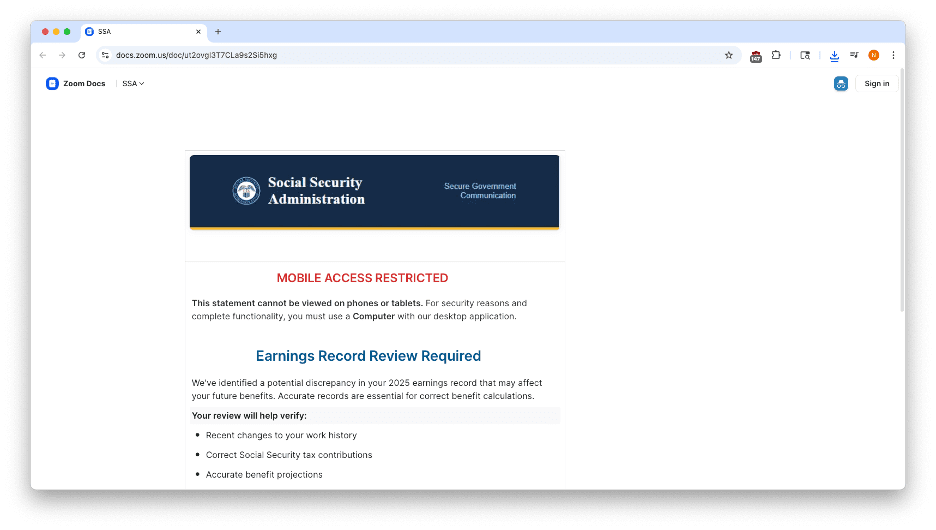
Figure 2: First half of the Zoom phishing doc
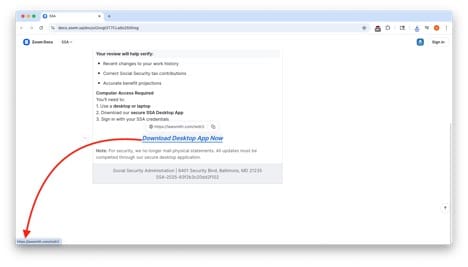
Figure 3: Second half of the Zoom phishing doc with the link to the external domain
This attack was effective because it exploited Zoom’s legitimate infrastructure and delivered phishing emails from noreply‑[email protected] with authenticated headers. Victims were tricked into clicking a link to a Zoom document, which many users and basic URL filters trust. The Zoom Doc then redirected users to a second malicious link, illustrating a ChainLink phishing technique.
The doc directed users to an executable named “Document‑needs_Signing‑PDF.ClientSetup.exe,” which VirusTotal identified as a ConnectWise remote‑access tool disguised as an SSA application.
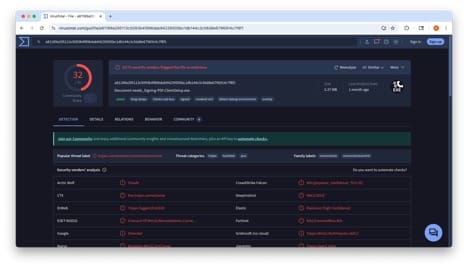
Figure 4: VirusTotal results
How the ConnectWise ScreenConnect trojan method works
To complete the attack chain, the phishing campaign transitioned from social engineering to remote access by abusing a widely deployed IT support tool trusted across enterprise environments.
Legitimate tool abused as malware
ConnectWise ScreenConnect (formerly ConnectWise Control) is a remote monitoring and management (RMM) tool used by IT support teams to remotely control endpoints. ScreenConnect gives technicians full control over a user’s computer. That’s why unauthorized installation can be dangerous since attackers can run scripts, transfer files or install additional malware without the victim realizing. In phishing campaigns, threat actors often trick victims into downloading a renamed ScreenConnect client disguised as invoices or, in this case, SSA documents. Once installed, the attacker can connect to the victim’s device and exfiltrate sensitive information such as banking details and personal identification numbers.
Broadcom’s protection bulletin noted a sharp increase in the malicious use of ConnectWise RMM tools by ransomware operators and other cybercrime actors; attackers distribute email attachments or malicious URLs using ConnectWise clients disguised as fake business or government documents to grant remote access to cybercriminals.
Because ScreenConnect is legitimate and signed, many antivirus engines treat it as trusted software. Threat actors leverage this to evade detection, a tactic often referred to as “living off the land.” Instead of deploying custom malware, they use trusted tools to perform remote control. Weaponizing a legitimate IT administration tool combined with social engineering gives attackers the dual advantage of trust exploitation and security evasion.
Attack chain summary and repercussions
- Initial phishing email: A convincing SSA alert arrives from noreply‑[email protected] with an urgent subject. The email passes SPF/DKIM/DMARC and includes Zoom branding, bypassing filters.
- Zoom Doc link: The email urges the user to click “View File”, leading to a document hosted at docs.zoom.us/doc/. Because the URL resides on the zoom.us domain, it is trusted by many security systems and users.
- Fake SSA document: The Zoom Doc contains SSA logos and warns the recipient that mobile access is restricted. It instructs the user to use a desktop computer and download the “secure SSA Desktop App.” This call-to-action links to an external site (lawsmith.com/redir2 in this case), which hosts the malicious file. This chain of redirects (Zoom → external domain) is known as ChainLink phishing.
- Malicious download: The external link automatically downloads an executable disguised as a PDF or SSA app (e.g., “Document‑needs_Signing‑PDF.ClientSetup.exe”). VirusTotal labels such files as Trojan.ConnectWise/ScreenConnect; they are essentially ScreenConnect clients pre‑configured to connect back to the attacker.
- Installation and remote control: When the victim runs the file, it silently installs ScreenConnect. The installer extracts a Microsoft Software Installer (.msi), signs it with the main executable’s signature and uses msiexec.exe to install ScreenConnect. The client then connects to an attacker‑controlled domain on a specified port, giving the attacker remote control of the system.
- Post‑compromise actions: With remote control, the attacker can execute commands, transfer files, install additional malware (e.g., ransomware) or steal data. They may manipulate financial screens to trick victims into transferring money. Attackers can also pivot to other systems using the compromised email account to send further phishing emails (lateral phishing).
Possible consequences
- Identity theft and financial fraud: Criminals using ScreenConnect exfiltrate sensitive data such as banking details, personal identification numbers and confidential files. They may engage in fraudulent transactions or commit identity theft.
- Network compromise: Once remote access is established, attackers can move laterally within an organization, install additional tools, create persistence mechanisms and potentially deploy ransomware.
Best practices: Guidance and recommendations
1) Train users to be cautious of unsolicited Zoom Events invitations and SSA alerts.
2) Avoid downloading files from unexpected emails.
3) Verify Zoom event invites through other channels (direct communication and verification with the sender).
4) Enforce multifactor authentication (MFA) and secure Zoom accounts. Attackers will likely exploit compromised Zoom accounts. Enabling MFA on collaboration platforms and monitoring for unusual login activity can mitigate such abuse.
5) Anti‑malware tools should classify abused remote‑support clients as riskware. Endpoint detection and response (EDR) solutions can also monitor for msiexec.exe installing RMM tools.
6) Inspect the “To” header. It’s suspicious that SSA notifications are sent via Zoom notification.
Final thoughts
The phishing campaign analyzed here demonstrates a sophisticated supply‑chain misuse: attackers abused Zoom’s legitimate email delivery to send phishing messages that look like official SSA notifications, and host malicious links on Zoom Docs to bypass URL filters. By persuading victims to download a renamed ConnectWise ScreenConnect client, attackers gain remote control of their computers without deploying traditional malware. The campaign underscores the importance of verifying unexpected communications, monitoring the use of remote‑support tools and implementing multifactor authentication on collaboration platforms. As legitimate tools are increasingly weaponized by threat actors, organizations must update their security controls to detect abuse of trusted services and educate users about evolving phishing tactics.