Management of historic job results

April 9
Enhancement
Datto RMM, Kaseya 365 Endpoint

Technicians can now access the complete execution history of scheduled jobs directly within the Datto RMM user interface. Each job run includes detailed information such as execution time, targeted devices, success or failure status, and output logs — making it easier to investigate issues and review past activity. 


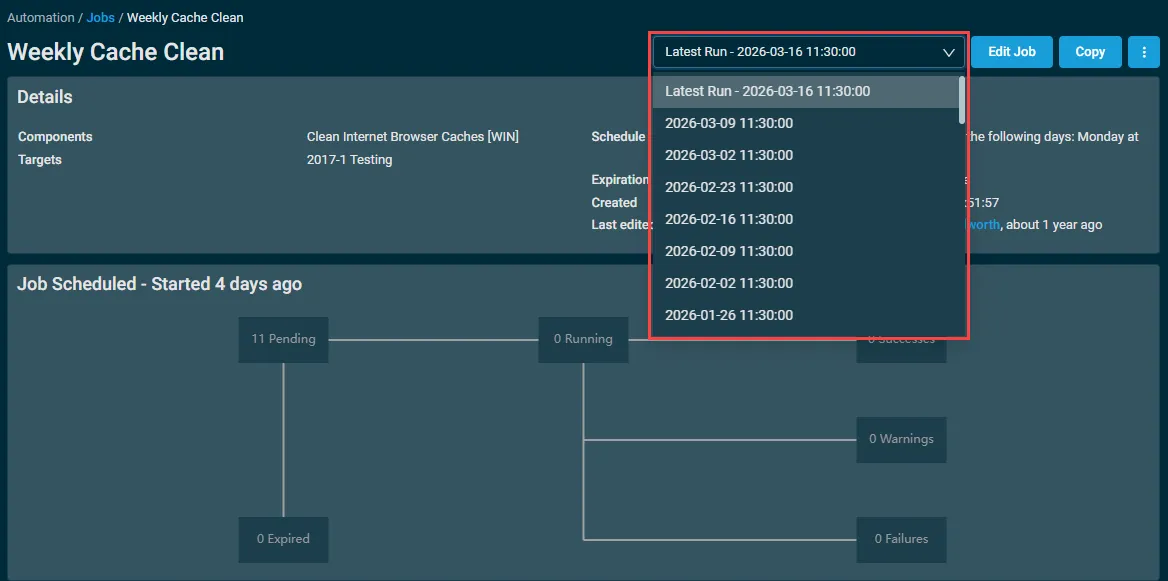
The execution history is available in the Details section of the job results page, where a new dropdown selector allows users to switch between individual job runs. By default, the most recent run is selected, and both the Devices table and Job Summary dynamically update to reflect the selected execution. 
 

Learn more about Job History to enhance endpoint management in Datto RMM. 

One complete platform for IT & security management

Kaseya 365 is the all-in-one solution for managing, securing, and automating IT. With seamless integrations across critical IT functions, it simplifies operations, strengthens security, and boosts efficiency.

Email security under NIS2 

With evolving AI threats, traditional defences are no longer enough  Email has long been a point of vulnerability for businesses, but the scale and sophistication of attacks are evolving, posing

Read blog post

Cyber resilience in the age of NIS2: Why backup is no longer just an IT function 

A question every business should be asking is: How quickly can we get back to business if something goes wrong?  Downtime is expensive, and in

Read blog post

Cloud complacency is putting European Microsoft 365 and Azure data at risk

Microsoft 365 and Azure data is your responsibility. Learn why backup and recovery are essential to protect cloud data from loss, ransomware, and disruption.

Read blog post