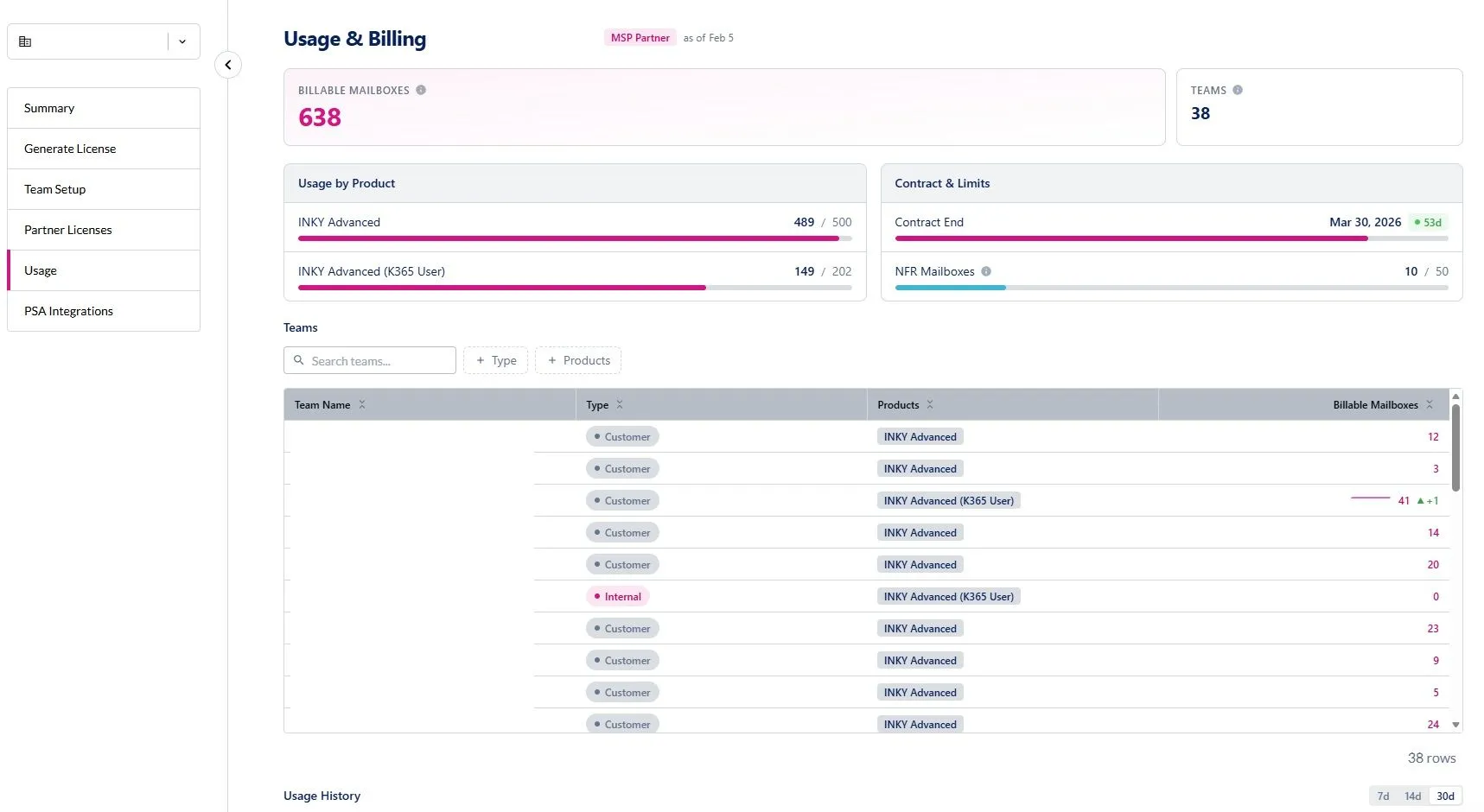
Inky now includes a dedicated Usage & Billing page for Kaseya partners and direct customers, providing real-time visibility into mailbox counts, contract health and product allocation — all without leaving the INKY dashboard.
What’s new:
- Billing metrics: View total billable mailboxes, NFR mailboxes and migration mailboxes with color-coded status indicators.
- Usage by product: Progress bars show current usage versus committed quantities per SKU, with overage alerts when limits are exceeded.
- Contract status: See your contract end date and days remaining at a glance.
- Team-level breakdown:MSP partners can view per-team usage with inline sparkline trends, filter by team type or product, and search across all managed teams.
- Historical trends: Track daily usage over 7, 14 or 30 days with a multi-series line chart covering billing, NFR and migration counts.
- Team management: Click any team row to manage SKU assignments and user group membership (M365 and Google Workspace) directly from the dashboard.
Who can access it:
- MSP partners: Navigate to Partner Center > Usage
- Direct customers (MME): Navigate to Settings > Usage
Learn more about Usage & Billing for partners and Usage & Billing for direct customers.