Outbound email: Migration to modern Microsoft 365 authentication (OAuth)
This release replaces legacy username/password SMTP authentication with Microsoft’s OAuth authorization code flow when integrating outbound email with Microsoft 365. The new method eliminates the need to store user credentials and aligns with Microsoft’s planned deprecation of basic authentication, improving security and long-term compatibility.

When configuring outbound email using OAuth, administrators only need to provide the Application ID, Directory ID and Client Secret. Existing configurations using the legacy method will continue to function temporarily, but administrators will see a persistent banner prompting them to migrate. The banner will also notify admins if an issue occurs when refreshing the SMTP OAuth access token.
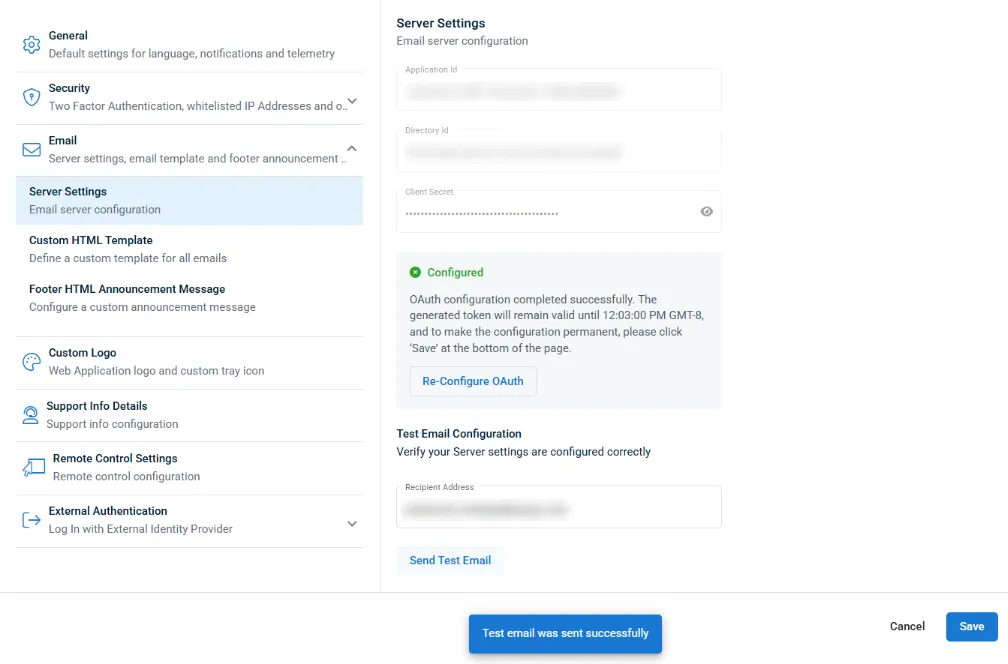
Important: Migration should be completed before Microsoft begins deprecating basic authentication — currently expected to start December 31, 2026 — to ensure uninterrupted outbound email functionality.
One Complete Platform for IT & Security Management
Kaseya 365 is the all-in-one solution for managing, securing, and automating IT. With seamless integrations across critical IT functions, it simplifies operations, strengthens security, and boosts efficiency.

Fake voicemails, real malware: Inside a 26,000-email SVG smuggling campaign
Download now
What sets the world's top MSPs apart?
Download now
Microsoft security challenges: How to protect your business, data and identity
Discover the biggest Microsoft security challenges and learn practical strategies to protect your users, data, identities and business from evolving threats.
Download now