Endpoint user interface
Datto EDR and Datto AV now include a Datto Endpoint User Interface that brings clear security status straight to the desktop. End users can easily see that EDR and AV are active on their devices, helping reduce uncertainty and giving them more confidence that they’re protected.
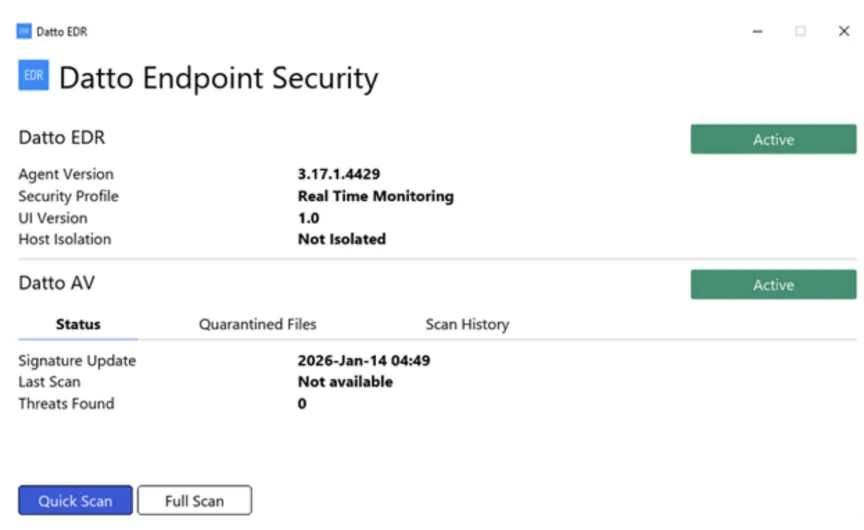
On Windows devices, a new system tray icon shows real-time agent status for both EDR and AV, giving simple visual confirmation that protection is running. From the tray menu, users can open the full desktop interface to view protection details and initiate a Datto AV scan on demand, without needing to contact IT for basic reassurance.
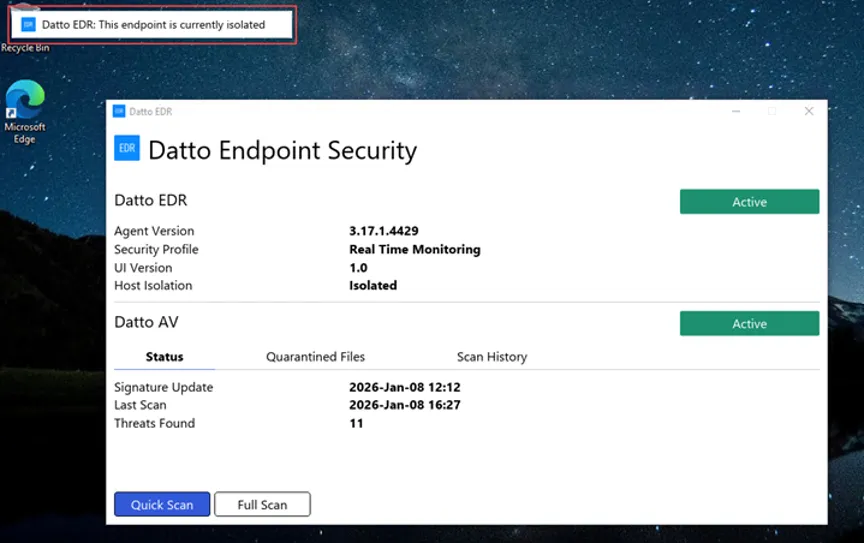
New in-app banners let users know when Datto AV has quarantined a file or when Datto EDR has isolated a device, so they understand why behavior or access might have changed. These messages only appear when the desktop UI is open or minimized and do not allow users to take remediation actions, keeping control of IT while improving transparency and reducing confusion at the endpoint.
Learn more about endpoint user interface for Datto EDR and Datto AV here.
One Complete Platform for IT & Security Management
Kaseya 365 is the all-in-one solution for managing, securing, and automating IT. With seamless integrations across critical IT functions, it simplifies operations, strengthens security, and boosts efficiency.

Is this email safe? INKY Smart Insights answers in seconds
INKY Smart Insights gives IT teams a plain-language verdict with cited evidence on flagged emails, cutting manual investigation time from 10 minutes to 5 seconds.
Read now
Fake voicemails, real malware: Inside a 26,000-email SVG smuggling campaign
Attackers disguised malicious JavaScript as voicemail attachments across 26,589 emails targeting 5,527 organizations. Here's how the SVG smuggling campaign worked — and how INKY caught every one.
Read now
What sets the world's top MSPs apart?
Three-quarters of MSP 501 winners list security as a top revenue driver. We asked a six-time honoree what it actually takes to make the list — here's what separates the best from the rest.
Read now