Configure Autotask user-report ticketing per report type
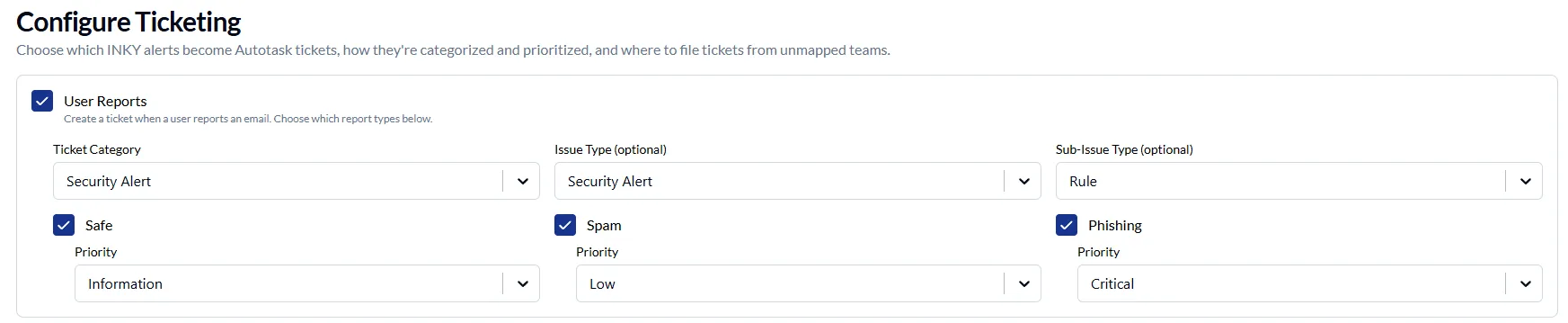
Autotask Smart Ticketing now allows you to choose which report types should create tickets. This allows you to create tickets only for the report types you act on, such as a phishing-only configuration.
Safe, spam and phishing reports each have their own toggle and their own ticket priority. Previously, turning User Reports created tickets for all three and required a priority for each, which made a phishing-only configuration impossible to save. Connections configured previously keep all three report types enabled, so the tickets you receive today will not change until you edit the configuration.
Learn more about the Autotask Ticketing Integration for INKY here.
One Complete Platform for IT & Security Management
Kaseya 365 is the all-in-one solution for managing, securing, and automating IT. With seamless integrations across critical IT functions, it simplifies operations, strengthens security, and boosts efficiency.

Fake voicemails, real malware: Inside a 26,000-email SVG smuggling campaign
Download now
What sets the world's top MSPs apart?
Download now
Microsoft security challenges: How to protect your business, data and identity
Discover the biggest Microsoft security challenges and learn practical strategies to protect your users, data, identities and business from evolving threats.
Download now