PSA organization mapping report
SaaS Alerts now includes a PSA Organization Mapping Report that brings all PSA connection details into one place. This report makes it easy to see which organizations are mapped, how they are linked to your PSA and whether related agreement features are enabled.
Each row shows the SaaS Alerts (SA) organization ID and name alongside the corresponding PSA organization name and ID, as well as the current mapping status. Additional columns show agreement mapping status, agreement name, ticketing status and billable user sync status. In-page search, column filters and export options make it easy to analyze or share the data as needed.
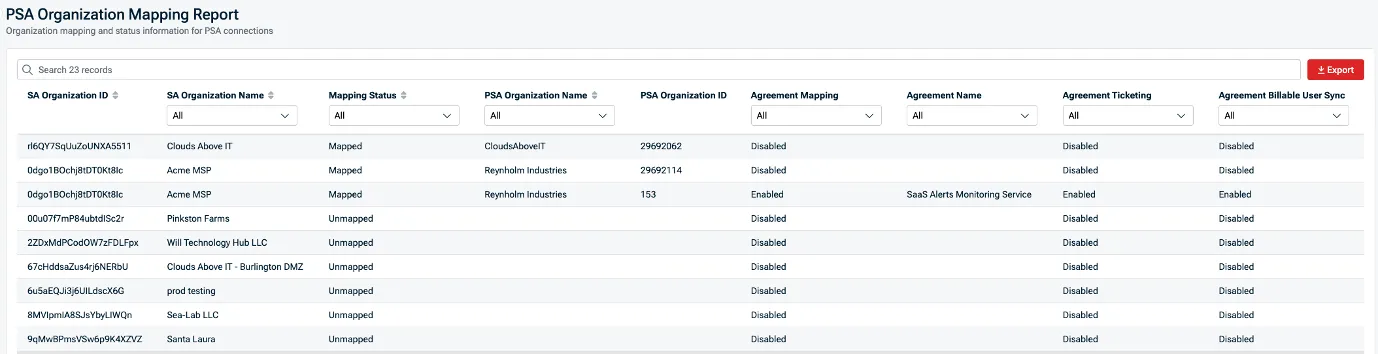
With this report, your team can quickly identify unmapped organizations, disabled agreement mappings, or ticketing and billing sync issues — and fix configuration issues before they impact alert routing, billing or reporting.
Sign into SaaS Alerts to use the PSA organization mapping report now.
One Complete Platform for IT & Security Management
Kaseya 365 is the all-in-one solution for managing, securing, and automating IT. With seamless integrations across critical IT functions, it simplifies operations, strengthens security, and boosts efficiency.

Is this email safe? INKY Smart Insights answers in seconds
INKY Smart Insights gives IT teams a plain-language verdict with cited evidence on flagged emails, cutting manual investigation time from 10 minutes to 5 seconds.
Read now
Fake voicemails, real malware: Inside a 26,000-email SVG smuggling campaign
Attackers disguised malicious JavaScript as voicemail attachments across 26,589 emails targeting 5,527 organizations. Here's how the SVG smuggling campaign worked — and how INKY caught every one.
Read now
What sets the world's top MSPs apart?
Three-quarters of MSP 501 winners list security as a top revenue driver. We asked a six-time honoree what it actually takes to make the list — here's what separates the best from the rest.
Read now