AI-powered email security for modern threats
Stop advanced phishing and email-based threats before they reach users with INKY, Kaseya's GenAI-driven email analysis tool that understands intent, visuals and behavior. Dynamic in-inbox coaching strengthens decisions, while automated review reduces escalations and frees IT to focus on higher-value work.
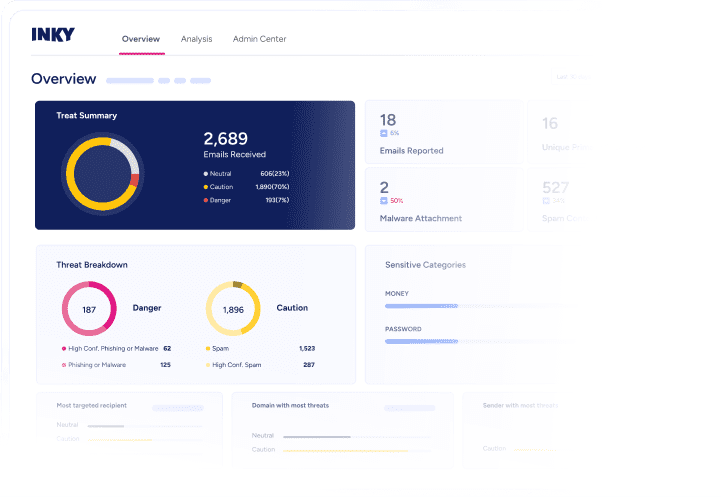
Detect the intent behind every email
INKY GenAI reads email text with true comprehension, recognizing meaning, intent, and subtle signals of phishing or manipulation. It delivers proactive, zero-day protection against evolving threats.
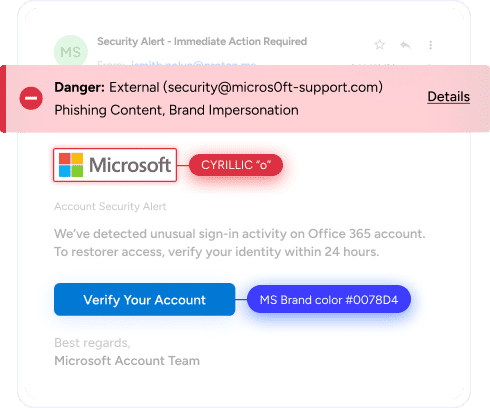
Play tough defense against email impersonation
Detect the behaviors of the most sophisticated attackers with technology that’s always getting smarter to keep you ahead of brand forgery and account takeovers.
“We started out wanting INKY for the banners and the insight it gives employees into phishing. But seeing all that INKY can do really opened up so many other doors. It’s really helped us out.” Ryan McNabb ,Technology Director, Big-D Construction
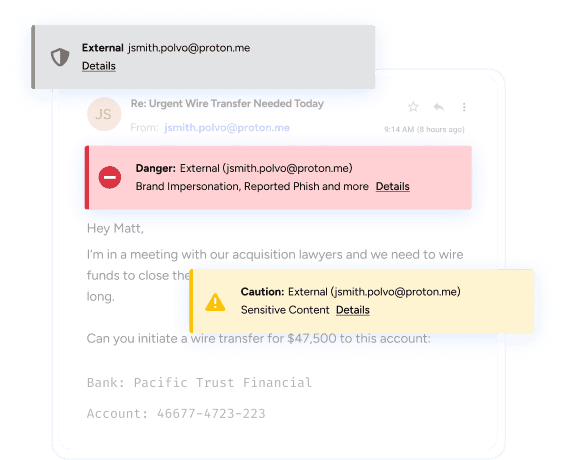
Coach users to make smart decisions
Periodic security training is no match for distracted, busy users. Instead, use live mail to continuously coach everyone to make safe choices in real-time across any device or email client.
“As for the INKY banners, you really can’t get anything on the market that look as nice. You’re not ever going to find banners like these that list all the reasons why things are being flagged.” Michael Trillo, Director of End User Engineering, Netrio
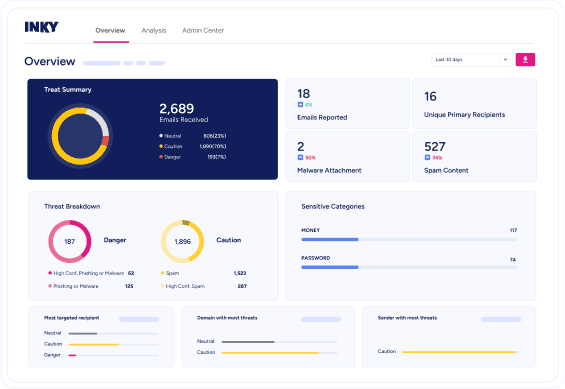
Ease the email security burden on IT
Deploy in minutes and manage with ease while reducing tickets and manual investigation. Give busy IT teams valuable time back to focus on what matters most.
“It’s like a thousand things less I have to worry about every single day.” Simon Pardo, CEO, Computer Care
Next-gen email security you can trust

Explainable GenAI
The INKY dashboard shows exactly what GenAI detected in each email, tagging threat categories, explaining risks with hover details, and highlighting suspicious language so admins gain deeper insight into emerging threats.

Computer vision
Visually analyzes emails like a human, detecting brand impersonation, logo manipulation, QR code threats, and blended text-plus-visual attacks that pattern matching simply misses.

Color-coded banners
Flag threats and guide users with clear coaching messages. Real-time support improves judgment and reduces risky clicks. Works on every device and client with no plugins and supports 30+ languages.

Behavioral detection technologies
Analyzes sender relationships and writing patterns to uncover anomalies, compromised accounts, and subtle shifts in communication that signal phishing, impersonation, or account takeover attempts.

Customized graymail filtering
Reduces inbox clutter by automatically routing bulk, low-priority emails out of user inboxes while still scanning them for hidden threats. IT teams cut distractions, lower ticket volume, and maintain strong protection without blocking legitimate messages.

Intuitive admin dashboard
The customizable dashboard lets admins adjust banner behavior, refine user guidance, and manage detection policies with clarity and control, creating a consistent security experience across every mailbox.
Streamline email security in one smart solution
| INKY Advanced Included in Kaseya 365 User | INKY Pro Add-on for Kaseya 365 User | |
|---|---|---|
Inbound Mail ProtectionAnti-Phishing, Anti-Malware, Spam filter uses Al to block impersonation and ransomware with intuitive user coaching |  | |
Internal Mail ProtectionAccount takeover protection with sender profiling and social graphing anomaly detection | | |
Advanced Attachment AnalysisDetect Zero-Day malware. | | |
Graymail ProtectionSuper spam filter for newsletters and alike. | | |
Email SignaturesUpdate and control email signatures for compliance and branding purposes. | | |
Generative AIUnderstand language and intent to stop email threats with precision | | |
Outbound Mail ProtectionDetect and prevent data loss with interactive safeguards for outgoing emails | | |
Email EncryptionEasy-to-use encryption encourages organizations to keep their data secure | | |
DMARC MonitoringMonitor domain usage to improve email delivery. | |
Get email security and much more with Kaseya 365 User
Kaseya 365 User delivers a single, integrated subscription that provides everything needed to prevent, respond to, and recover from user-targeted threats.
Hear from our customers
Real stories, real success. See how Kaseya partners thrive.

"We really liked INKY. It kept users informed, showed them what was happening and gave them confidence in why decisions were being made."
Simon PardoCEO, Computer Care
Our commitment to you
Kaseya's Global Services helps you get the most from your tech solutions, boost performance and achieve business goals.
Explore professional servicesKaseya’s Direct to Tech™ delivers fast, expert-level support to help your business quickly resolve issues and minimize risk.
Explore customer supportKaseya's Partner First Pledge is a commitment to flexible terms, shared risk and dedicated support for your business.
Explore Partner FirstFrequently asked questions about advanced email security
Email security software is a dedicated solution for protecting email users, mailboxes and domains from threats and misuse. It typically combines tools such as inbound filtering to prevent threats like phishing and malware, outbound controls to prevent sensitive data leaks, domain authentication to reduce impersonation, encryption options, quarantine and remediation workflows, and reporting for visibility and audit needs. Many platforms also integrate with Microsoft 365 or Google Workspace so teams can investigate, remove and remediate malicious messages quickly.
AI-powered email security software goes a step further by using machine learning or generative AI to analyze content and behavior at scale. Instead of relying only on static rules, it can spot patterns that look suspicious, detect subtle social engineering, and adapt to new tactics as attackers change their approach.
Email security is important because email remains a primary attack vector for threats like phishing, credential theft and malware delivery, and a single successful message can lead to account compromise, data loss or financial fraud. When phishing succeeds, attackers can use stolen access to move money, expand to other systems, or deploy ransomware that disrupts operations.
The most common email security threats generally involve social engineering, fraud, compromise and disruption. Common examples include:
- Phishing: Deceptive messages that trick recipients into clicking, opening, or sharing credentials.
- Account takeover (ATO): A mailbox is compromised, then used to read messages, change rules, impersonate users, or pivot to other targets.
- Business email compromise (BEC): Impersonation or compromised accounts used to redirect payments or request sensitive information.
- Malware and ransomware: malicious attachments or links that deliver malware or encrypt systems and demand payment.
- Conversation hijacking: Attackers insert themselves into an existing thread to add malicious links, invoices, or payment changes, making the request look legitimate.
- Brand impersonation: Lookalike domains, spoofed display names, or visual mimicry of trusted brands to increase credibility and response rates.
- Data exfiltration: Sensitive information sent out intentionally or accidentally, often via replies, forwarding rules, or unauthorized sharing.
- Graymail and spam: High-volume, low-value messages that create noise, distract users and can hide real attacks.
AI is used in email security solutions to improve detection and response against threats that are hard to catch with simple rules, especially when it comes to phishing and social engineering. Machine learning can correlate signals across content, sender behavior, relationships and delivery patterns to spot anomalies and high-risk messages faster than manual review.
GenAI adds another layer by enabling more human-like understanding of language and intent, which can help identify subtle manipulation, unusual requests, or context mismatches that resemble real-world fraud. At the same time, attackers are also using AI to craft more convincing lures and obfuscate payloads, which is why modern defenses increasingly use AI to detect, analyze and respond at scale.
An email security banner is an in-inbox warning and coaching strip inserted near the top of an email message to help recipients quickly understand trust and risk before they click or reply. It typically uses clear visual cues (often color-coded), highlights what looks suspicious, and provides simple actions like viewing details or reporting the message for review.
In more advanced implementations, banners appear consistently across desktop and mobile clients without requiring end-user plugins, can be managed centrally by administrators, and may remove themselves when a user forwards or replies so external recipients do not see internal security warnings and forwarded messages can be rescanned.
Ready to get started?
Request a demo to see how Kaseya's AI-powered email security platform protects your organization from modern phishing threats.