Cloud backup: a practical guide for IT teams and MSPs

According to the 2026 Kaseya State of the MSP Report, 50% of MSPs reported year-over-year BCDR revenue growth, driven by clients who have learned that cloud platforms do not replace backup. It is one of the clearest commercial signals in managed services today: demand for backup that actually works under pressure is growing, not shrinking.

“Cloud backup” gets used to describe three fundamentally different problems. Backing up on-premises servers to the cloud is a different challenge from backing up workloads running inside AWS or Azure, which is different again from backing up data living in SaaS applications like Microsoft 365. Each has its own failure modes, recovery requirements, and appropriate solutions.

This guide covers all three. Datto, part of the Kaseya family, has protected more than 500,000 businesses through MSPs worldwide, which gives us a detailed view of where each approach succeeds and where it fails under real recovery pressure.

Backup to the cloud: protecting on-premises servers

This is the most established use case. On-premises servers, VMs, and endpoints generate backup copies that replicate to cloud storage for off-site protection. The cloud is the destination, not the environment being protected.

The core challenge is the tension between recovery speed and cost. A terabyte of data at typical internet recovery speeds can take hours or days to retrieve. Cloud-only recovery is insufficient for sub-hour RTO requirements. Organizations that discover this limitation during a real incident face downtime measured in days rather than hours.

The solution is the hybrid appliance-plus-cloud model. A local backup appliance, such as Datto SIRIS, handles fast recovery of recent data at local network speeds, including instant local virtualization so a failed server can be running again in minutes. The same backup simultaneously replicates to the Datto Cloud for off-site protection and long-term retention. If the primary site is lost entirely, cloud virtualization allows workloads to spin up in the Datto Cloud while the physical environment is restored.

This is the architecture that best serves most SMB clients: fast local recovery when speed matters, independent immutable cloud copy when resilience matters.

What MSPs get wrong here: treating cloud replication as the whole backup strategy and skipping the local appliance to reduce upfront cost. The economics look better on paper. In a ransomware incident that encrypts the local environment and requires full server recovery over the internet, the client recovers in days instead of hours and the MSP bears the cost of that gap.

Explore Datto SIRIS for hybrid backup and disaster recovery

Backing up the cloud: protecting AWS and Azure workloads

Cloud infrastructure does not back itself up. AWS and Azure operate under a shared responsibility model: the provider is responsible for the resilience of the infrastructure; the customer is responsible for the data and workloads running on it. An EC2 instance or Azure VM that gets encrypted by ransomware, accidentally deleted, or corrupted by a bad deployment is the customer’s problem to recover.

The specific risks with native cloud backup:

Native tools like AWS Backup and Azure Backup provide some protection, but they operate within the provider’s ecosystem. A compromised cloud account, a ransomware attack that reaches cloud credentials, or a provider-side incident can affect both primary workloads and same-account backups simultaneously. Native backup also rarely meets the independence requirements of cyber insurance policies that specify off-site, immutable copies.

Datto Backup for Microsoft Azure addresses this by replicating Azure VMs and Azure Files to the Datto Cloud, outside the Azure ecosystem entirely, with immutable storage and flat-fee pricing that removes the egress cost unpredictability of native Azure Backup. Hourly replication gives a 60-minute recovery point objective. Recovery options include file-level restore, full VM restore, and cloud virtualization directly in the Datto Cloud.

What MSPs get wrong here: assuming that because a client is “in the cloud” they are automatically protected. AWS and Azure provide infrastructure resilience, not data backup. MSPs who manage cloud environments without independently backing up those workloads are operating with a significant liability gap.

Backing up cloud apps: SaaS data protection

SaaS applications sit in a separate category from cloud infrastructure. Microsoft 365, Google Workspace, and similar platforms manage the application and its availability, but they do not provide backup in any meaningful recovery sense. Microsoft’s retention defaults are designed for compliance and accidental deletion scenarios with short windows. They are not designed for point-in-time recovery after a ransomware attack, malicious deletion by a compromised account, or a bulk misconfiguration.

The shared responsibility model applies here too. Microsoft is responsible for the platform. The organization is responsible for its data inside it.

What is actually at risk: email, calendars, contacts, SharePoint sites, OneDrive files, and Teams data. In most SMB environments, this represents the majority of operational data. A ransomware attack that encrypts SharePoint or OneDrive, or a compromised admin account that bulk-deletes mailboxes, can cause significant damage that native retention policies do not recover from.

Datto SaaS Protection backs up Microsoft 365 and Google Workspace data three times daily to an independent Datto Cloud repository with unlimited retention. Recovery is granular: individual emails, files, folders, or entire accounts can be restored to any point in time. SaaS Protection+ adds integrated threat detection with automated ransomware and phishing scanning across the Microsoft 365 environment.

What MSPs get wrong here: not selling SaaS backup at all, or selling it as an optional add-on. Every client using Microsoft 365 or Google Workspace has data at risk that the platform will not recover for them. SaaS backup should be a non-negotiable component of any managed services agreement that includes Microsoft 365.

The 3-2-1 rule and why it still applies

The 3-2-1 rule predates cloud backup but remains the most useful single framework for evaluating whether a backup architecture is sound: three copies of data, on two different media types, with one copy off-site.

Cloud backup satisfies the off-site requirement. What it does not automatically satisfy is the independence requirement. Backup stored in the same cloud account as primary data is exposed to the same threats: a ransomware attack or account compromise that destroys production data can reach same-account backups just as easily.

For any client with meaningful recovery obligations, the off-site cloud copy must be in a separate, independently controlled environment with immutable object storage. This applies to all three use cases above. On-premises backups replicating to the Datto Cloud are outside the client’s primary environment. Azure workloads backed up to Datto are outside Azure. SaaS data backed up to Datto SaaS Protection is outside the Microsoft 365 tenant. That independence is the point.

Ransomware and the case for immutability

Ransomware operators have shifted their tactics toward targeting backup infrastructure specifically. Verizon’s 2025 Data Breach Investigations Report linked ransomware to 75% of system-intrusion breaches. Attackers who compromise or delete backups before encrypting production data eliminate the recovery path and force payment.

A backup architecture resilient to ransomware requires three properties that traditional backup does not guarantee.

Isolation. Backups accessible through the same credentials or network as production systems can be reached by an attacker who has compromised those systems. The off-site copy must be genuinely isolated.

Immutability. Once written, backup copies should not be modifiable or deletable by any process other than the designated retention expiry. Immutable object storage with a defined lock period prevents ransomware and compromised administrator accounts from destroying backup data. The Datto Cloud is built on this principle, with cloud deletion defense that blocks unauthorized alterations or deletions regardless of what happens to the protected environment.

Tested recoverability. According to Sophos research, 45% of ransomware victims who used backups recovered within a week. Those who could not rely on backups faced recovery times of one to six months in 31% of cases. The difference is almost always whether recovery had been tested before the incident. Datto SIRIS’s AI-powered screenshot verification delivers more than 99% accuracy, flagging suspect backup jobs before they become recovery failures. An untested backup is not a backup.

Managing cloud backup at scale as an MSP

For MSPs, the operational requirements of cloud backup go beyond protecting individual clients. The economics of managed services require that backup management scales without proportionally increasing technician time.

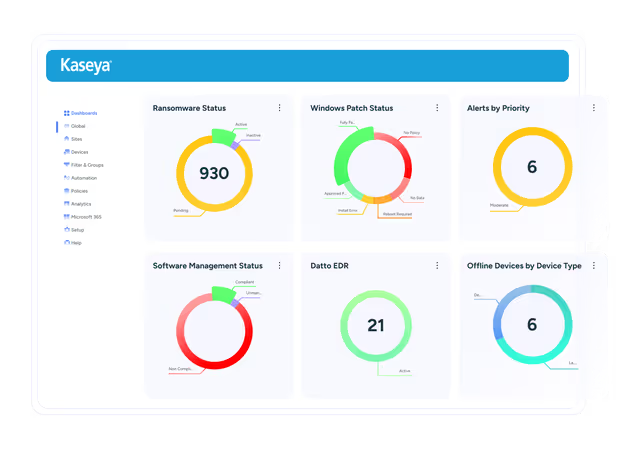
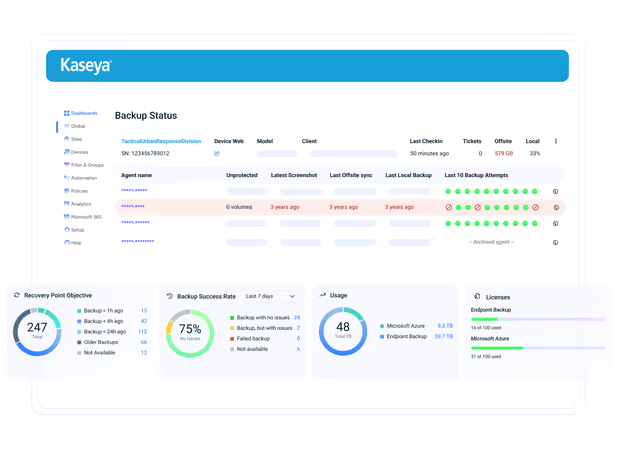
Unified visibility across all three use cases. The clearest operational gap in most MSP backup stacks is fragmented visibility: on-premises BCDR in one console, cloud infrastructure backup in another, SaaS backup in a third. Datto’s unified backup status page consolidates SIRIS, Datto Endpoint Backup with Disaster Recovery, Datto Backup for Microsoft Azure, and SaaS Protection across all clients in a single view. One console, one set of alerts, one reporting workflow.

Standardized protection policies. MSPs who define standard backup policies by client tier and apply them consistently across the portfolio have fewer coverage gaps, lower remediation overhead, and cleaner reporting for compliance and cyber insurance purposes. Ad hoc configurations per client are how gaps accumulate invisibly.

Automated alerting and hero reports. Backup failures that require a technician to notice them are failures waiting to happen. Automated alerting on job failures, missed backups, and verification errors, combined with scheduled client-facing reports showing backup health, turns backup management from a reactive activity into a documented service.

Pricing predictability. Cloud backup platforms with per-GB or variable egress pricing create unpredictable client billing and unpredictable margins. Flat-fee pricing across storage, DR testing, and egress makes backup a reliable margin contributor rather than a cost variable.

Key Takeaways

  • “Cloud backup” describes three distinct problems: backing up on-premises servers to the cloud (Datto SIRIS), backing up cloud infrastructure workloads like AWS and Azure (Datto Backup for Microsoft Azure), and backing up SaaS application data (Datto SaaS Protection). Each requires a different solution.
  • Cloud providers do not back up your data. AWS, Azure, and Microsoft 365 all operate under a shared responsibility model where the organization is responsible for its own data protection.
  • Immutability and isolation are non-negotiable. Backup stored in the same account or environment as production data is not independent backup and will not survive a ransomware attack that targets credentials.
  • For MSPs, unified visibility across all backup types from a single console is the operational requirement that makes backup management scalable. Fragmented visibility across multiple tools is how coverage gaps go undetected.

One Complete Platform for IT & Security Management

Kaseya 365 is the all-in-one solution for managing, securing, and automating IT. With seamless integrations across critical IT functions, it simplifies operations, strengthens security, and boosts efficiency.

One platform. Everything IT.

Kaseya 365 customers experience the benefits of the best IT Management and Security tools in a single solution.

Explore Kaseya 365

Your success is our #1 priority

Partner First is a commitment to flexible terms, shared risk and dedicated support for your business.

Explore Partner First Pledge

2025 Global MSP Benchmark Report

The 2025 Global MSP Benchmark Report from Kaseya is your go-to resource for understanding where the industry is headed.

Download Now

Cloud management: how to govern multi-cloud environments without losing control

Most organizations do not plan to have multi-cloud environments. They end up with them because different teams made different decisions

Read blog post

Cloud detection and response: MSPs’ guide to cloud security

The use of SaaS applications and the volume of cloud workloads are surging. Businesses today use approximately 112 SaaS apps

Read blog post

What Is Cloud Computing? Services, Types, Advantages and Use Cases

As the digital horizon expands, businesses worldwide are embracing the cloud, recognizing its transformative capabilities in orchestrating efficiency, progress and

Read blog post