At our core, we’re always focused on helping MSPs deliver more strategic value with less administrative effort. That commitment to continuous improvement is what drives every enhancement we make to myITprocess.
Quarterly business reviews (QBRs) are where MSPs prove value, reinforce strategy and deepen client relationships. However, scheduling them is often the least strategic part of the process.
Today, we’re excited to introduce Microsoft 365 meeting sync, a powerful Outlook and Microsoft Teams integration designed to make QBR scheduling seamless, consistent and effortless.
This update transforms QBR scheduling from a disconnected, manual task into a streamlined, automated workflow — directly inside myITprocess.
A fully integrated QBR scheduling experience
Microsoft 365 meeting sync tightly integrates myITprocess Meetings with Microsoft Outlook and Microsoft Teams, giving you a fully streamlined scheduling experience.
Now, you can:
- View Outlook availability directly inside myITprocess
- Automatically create Outlook calendar events
- Keep meeting titles, dates and times synced
- Auto-generate Microsoft Teams meeting links
- Send professional, customizable invite emails
- Manage everything from one workflow
The entire workflow is initiated and managed within myITprocess, while Outlook and Teams remain the underlying scheduling and meeting platforms. This reduces context switching and makes myITprocess the natural starting point for both QBR planning scheduling.
How Microsoft 365 meeting sync works
When there’s friction in your QBR process, client engagement drops and credibility suffers. Microsoft 365 meeting sync removes those barriers by making scheduling effortless. This helps to increase consistency and strategic engagement, and boosts client retention and expansion.
With Microsoft 365 meeting sync, myITprocess now supports the entire QBR lifecycle — from planning to scheduling to execution — in one connected experience.
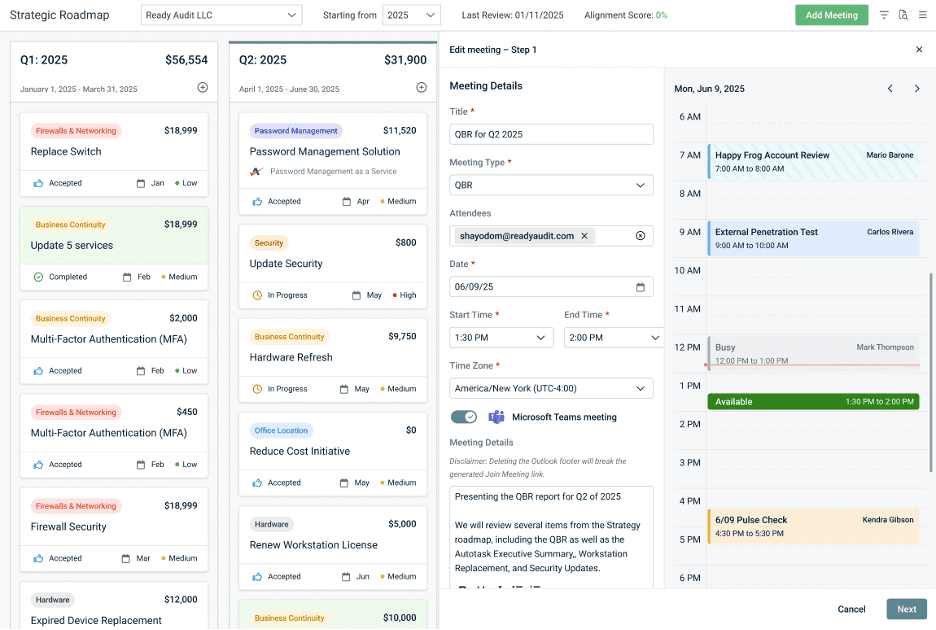
View Outlook availability without leaving myITprocess
When creating or editing a QBR meeting, you can now see your Outlook calendar availability directly within the scheduling view.
No more switching tabs, guessing or accidental conflicts. You select a time that works and move forward with confidence.
Automatically create and sync Outlook events
Once a date and time are confirmed:
- myITprocess automatically creates the Outlook event
- Titles, dates and times stay aligned between both systems
- Changes sync automatically to prevent mismatches
This eliminates double entry and reduces the risk of missed meetings.
Auto-generate Microsoft Teams links
Enable the option to generate a Microsoft Teams meeting, and myITprocess will:
- Create the Outlook event
- Automatically generate the Teams link
- Embed the link directly into the invite email, so attendees always know how to join
No more copying and pasting links. No more outdated meeting URLs. No more last-minute scrambles.
Send professional, customizable invite emails
We’ve also improved the invite experience. Instead of drafting emails from scratch in Outlook, you can now:
- Include purpose, agenda and expectations
- Personalize the message before sending
- Deliver a consistent, professional invite every time
This will help to set clear expectations, prepare better and engage with clients more effectively.
Eliminate QBR scheduling busywork
We’re committed to continuously evolving myITprocess to support the way modern MSPs operate. Microsoft 365 meeting sync is another step forward in helping you deliver strategic value efficiently.
At IT Glue, we believe strategic conversations shouldn’t be slowed down by administrative tasks. By simplifying the administrative side of QBRs, Microsoft 365 meeting sync gives you more time to focus on delivering insights, recommendations and measurable business outcomes.
This enhancement helps you save time on QBR logistics and standardize client communication while reducing manual effort and the risk of errors.
To learn more about Microsoft 365 meeting sync and how it fits into your client strategy workflow, check out the full feature details in the myITprocess knowledge base or schedule a demo with an IT Glue specialist to see it in action.