AI-powered screenshot verification
Backups shouldn’t just report completion. You need to know they’re truly recoverable when it matters most. But static checks can misinterpret login screens, legal disclaimers and update states as failures. That leads to unnecessary support escalations, tedious manual validation and lower recovery confidence.
Smarter backup verification starts here
AI-powered screenshot verification for Datto BCDR eliminates uncertainty. Visual AI enhances the backup verification process by confirming machine boot states with 99.9% accuracy. It also reduces false positives by 70% and gives you proof your data is recoverable.
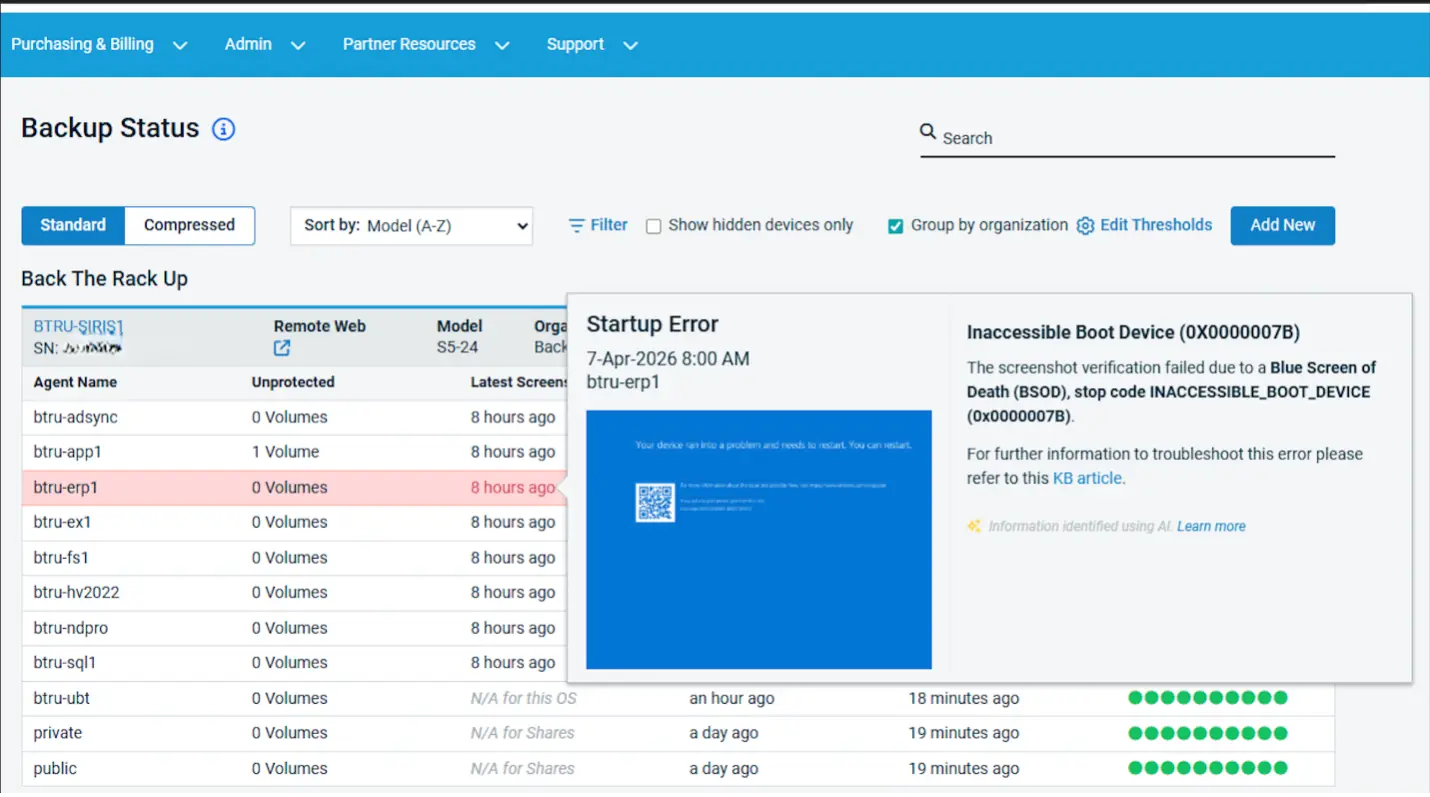
In the event of issues, AI-powered screenshot verification goes beyond pass/fail checks to pinpoint exactly what went wrong. Instead of spending hours manually testing, digging through logs or escalating to support, you get clear, direct and actionable guidance to resolve issues fast. Your team will spend less time troubleshooting, freeing them up to focus on higher-value work.
Bringing AI-powered screenshot verification to life
Hear from Andrea Villareal, Kaseya’s AI Integration Product Manager, about the backup verification challenges we’re solving with AI and how to use this feature for faster proof, less manual effort and greater confidence in every recovery point.
Continuity without compromise
AI-powered screenshot verification is available on every Datto BCDR (SIRIS, ALTO) device at no additional cost. No new tools, no new workflows.
- Enabled by default (with per-device controls)
- Analysis runs securely in Datto Cloud on Kaseya-owned and operated models
- Images are never sent to third parties
- Processes only boot screen images, never backup data
- Results displayed directly on the BCDR Status Page in the Datto Partner Portal
AI-powered screenshot verification transforms routine screenshot checks into a driver of business resilience, technical certainty and operational efficiency. Discover how it can reduce noise, protect margins and increase confidence in every recovery.
One Complete Platform for IT & Security Management
Kaseya 365 is the all-in-one solution for managing, securing, and automating IT. With seamless integrations across critical IT functions, it simplifies operations, strengthens security, and boosts efficiency.

Best IT ticketing systems in 2026: Top 10 tools to consider
Compare the best IT ticketing software in 2026 for SLA tracking, knowledge base, reporting, billing and RMM or IT documentation integration.
Read now
Best PSA software in 2026: Top 10 tools to consider
Discover the 10 best PSA software tools for IT service delivery and project management in 2026. Compare side by side to find the right one for your business.
Read now
5 best NinjaOne alternatives for IT management in 2026
Compare 5 NinjaOne alternatives across RMM, PSA, documentation, security and backup. See what each has to offer and how to pick the best fit.
Read now