User-Defined Fields (UDFs): Data Type Support
UDFs can now be configured as Boolean, Number, Date or Text, helping standardize device data and reduce input errors. The UI validates values against the configured type and clearly flags mismatches across Device Lists, Device Details, Filters, policy, job and report targeting.
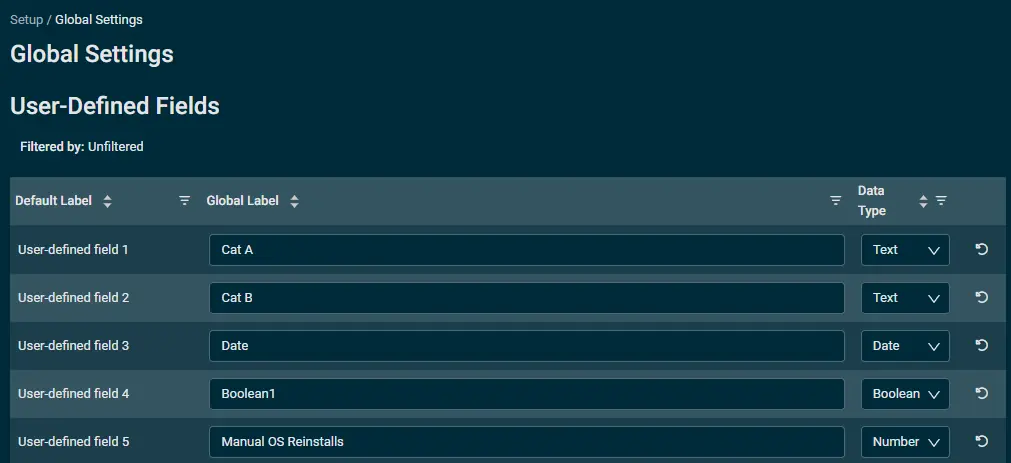
Existing values are preserved when a UDF’s data type changes, with incompatible values flagged rather than deleted. New mismatch filtering, filter validation and smarter sorting make it easier to identify and correct inconsistent data while maintaining existing workflows.
One Complete Platform for IT & Security Management
Kaseya 365 is the all-in-one solution for managing, securing, and automating IT. With seamless integrations across critical IT functions, it simplifies operations, strengthens security, and boosts efficiency.

MCP for MSPs: What changes in service delivery
Learn how Model Context Protocol (MCP) changes MSP service delivery, six workflows it impacts, how to approach adoption and which controls to put in place.
Read now
MCP security: Risks, authentication and gateways
Learn about MCP security risks, how authentication should work, what an MCP gateway does and seven steps IT teams can take to adopt MCP safely.
Read now
MCP vs. API: What’s the difference and why it matters
Explore the differences between MCP and APIs, how MCP builds on APIs like the Datto RMM API, and when IT teams and MSPs should use each approach or both.
Read now