Email authentication on the Routing page
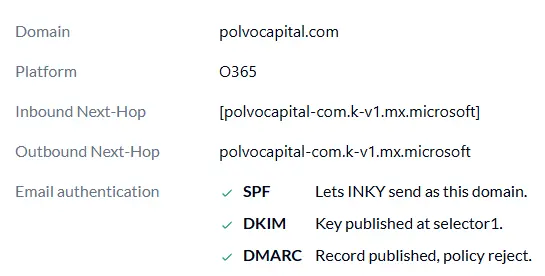
In the Admin Center > Routing now shows SPF, DKIM and DMARC records for each configured domain, exactly as DNS publishes them. Every record is marked OK or needing action, so administrators can verify email authentication in the same place they set up mail routing.
Each row shows when the domain was last checked, and Check again runs a fresh lookup on demand. For domains where Microsoft or Google publishes the DNS, such as contoso.onmicrosoft.com, the page confirms there is nothing to change.
Learn more about email authentication now on the routing page
One Complete Platform for IT & Security Management
Kaseya 365 is the all-in-one solution for managing, securing, and automating IT. With seamless integrations across critical IT functions, it simplifies operations, strengthens security, and boosts efficiency.

MCP for MSPs: What changes in service delivery
Learn how Model Context Protocol (MCP) changes MSP service delivery, six workflows it impacts, how to approach adoption and which controls to put in place.
Read now
MCP security: Risks, authentication and gateways
Learn about MCP security risks, how authentication should work, what an MCP gateway does and seven steps IT teams can take to adopt MCP safely.
Read now
MCP vs. API: What’s the difference and why it matters
Explore the differences between MCP and APIs, how MCP builds on APIs like the Datto RMM API, and when IT teams and MSPs should use each approach or both.
Read now