New INKY Threat Center
Previously called Triage, the new INKY Threat Center brings queues that need a decision into a unified workspace including reported mail, in-flight message deletions, burst activity and account takeover enforcements. Each with a live count in the tab bar, so you can quickly jump to the specific queue that needs attention.
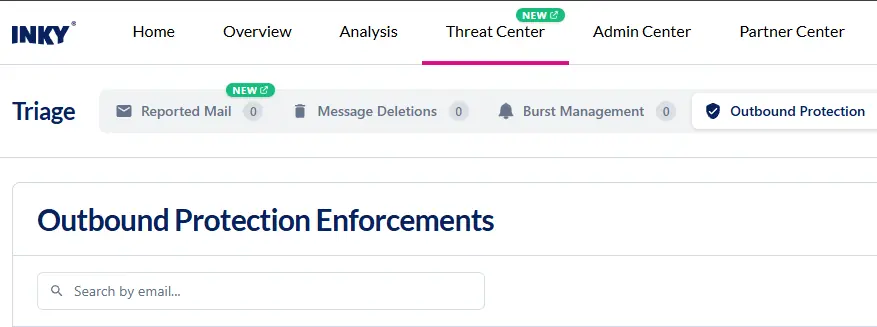
Depending on what your team has enabled, Threat Center can show these tabs:
Reported Mail
A queue for reviewing user-reported emails, seeing how they were reported and remediating them.
- Reported emails are grouped by message rather than listed one report at a time. A message several people reported now appears on a single row you act on once.
- Emails with the same message ID and sender are also grouped together, too, and can be remediated as a single group.
- Learn more about Reported Mail.
Message deletions
In-flight message deletion requests, with their status.
Burst management
Shows users that are currently in inbound or outbound burst mode and users that have been prevented from entering burst mode.
Outbound protection
Provides a view for monitoring and managing both active and historical account takeover (ATO) enforcements. The count of Active Enforced Users is shown on this tab and requires the outbound protection analysis entitlement.
- Includes account takeover (ATO) detection, monitoring users’ sending behavior for signs of a compromised account
- It scores outbound mail from each user on three signals: message bursts, dangerous links and spam or phishing content and puts a user into enforcement mode when their score crosses the low-risk threshold and ATO enforcement approvers are notified so they can review the messages and release the user.
- When a user is in enforcement, their outbound messages are delivered, quarantined or discarded according to the action set for that risk level.
- Learn more: Account Takeover (ATO) Detection
By bringing these security decisions into one workspace, Threat Center helps your team triage suspicious activity faster, reduce duplicate remediation work and respond more consistently to email threats and compromised accounts. This gives you clearer visibility across active risks while making day-to-day security operations easier to manage.
One Complete Platform for IT & Security Management
Kaseya 365 is the all-in-one solution for managing, securing, and automating IT. With seamless integrations across critical IT functions, it simplifies operations, strengthens security, and boosts efficiency.

MCP vs. API: What’s the difference and why it matters
Explore the differences between MCP and APIs, how MCP builds on APIs like the Datto RMM API, and when IT teams and MSPs should use each approach or both.
Read now
What is an MCP server? A guide for MSPs
An MCP server connects the AI tools you already use to your RMM, PSA and documentation platforms. Learn how MCP works, what MSPs gain and how to secure it.
Read now