Phishing simulation reports: automatic closure and notification controls
When a user reports one of your team’s recognized phishing simulations, INKY closes the report on arrival, so simulated messages no longer add to your queue of reports to review. Two settings let you decide who hears about them.
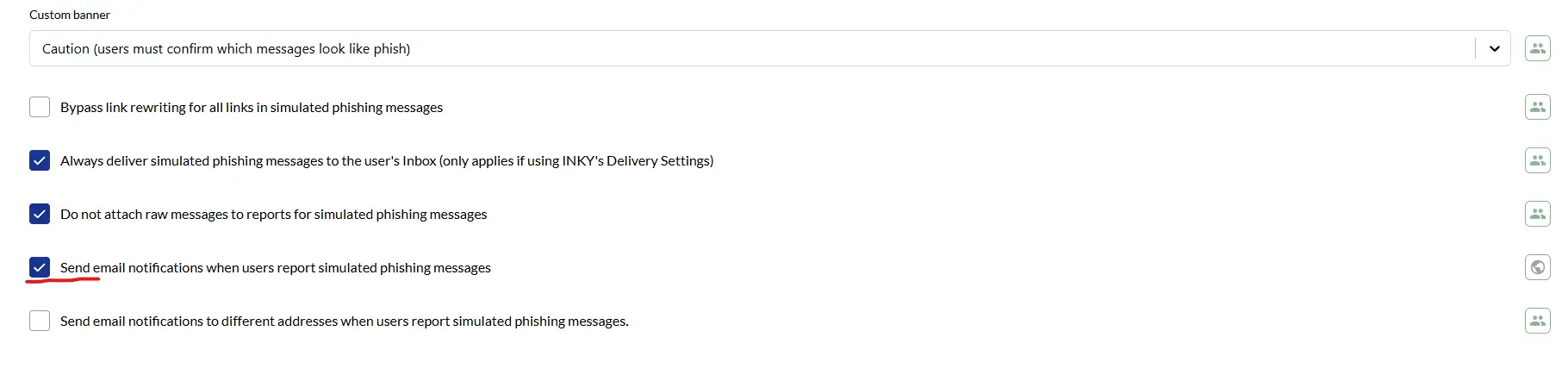
In Admin Center > Phishing Awareness Training, “Send email notifications when users report simulated phishing messages” is on by default, so nothing changes until you turn it off. For the Autotask integration, “Also create tickets for reports of your recognized phishing simulations” is off by default and can be turned on if you want those reports tracked as tickets.
Learn more about phishing simulations here
One Complete Platform for IT & Security Management
Kaseya 365 is the all-in-one solution for managing, securing, and automating IT. With seamless integrations across critical IT functions, it simplifies operations, strengthens security, and boosts efficiency.

MCP for MSPs: What changes in service delivery
Learn how Model Context Protocol (MCP) changes MSP service delivery, six workflows it impacts, how to approach adoption and which controls to put in place.
Read now
MCP security: Risks, authentication and gateways
Learn about MCP security risks, how authentication should work, what an MCP gateway does and seven steps IT teams can take to adopt MCP safely.
Read now
MCP vs. API: What’s the difference and why it matters
Explore the differences between MCP and APIs, how MCP builds on APIs like the Datto RMM API, and when IT teams and MSPs should use each approach or both.
Read now