INKY Smart Insights
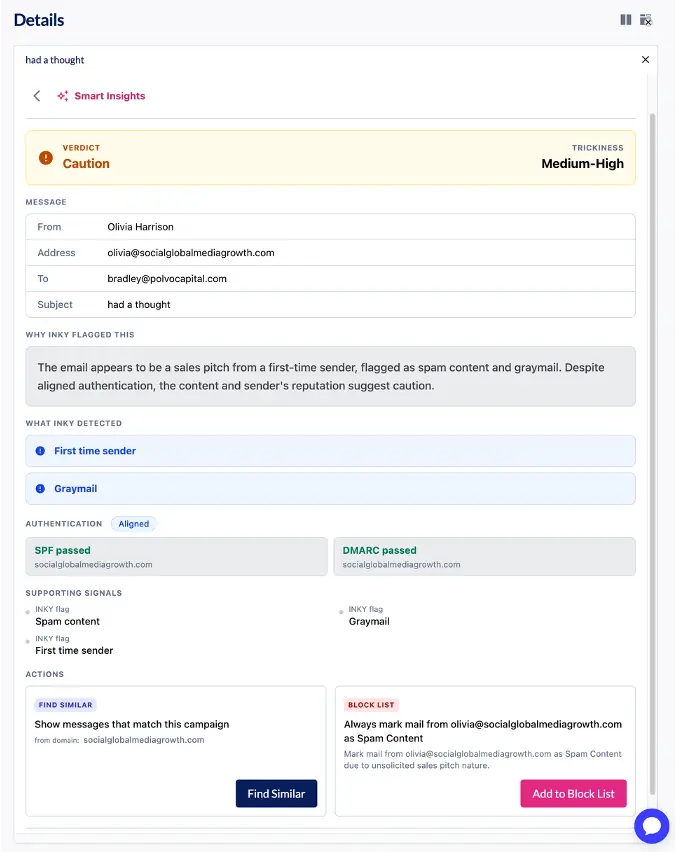
Investigating a suspicious email often means looking past the first alert to decide whether the message is legitimate or malicious. INKY Smart Insights uses a large language model (LLM) to give your team an AI-powered second opinion. It sits right in the INKY dashboard, explains what makes a message risky and helps you act with confidence.
Smart Insights gives MSP technicians and IT admins a fast, well-reasoned answer they can share. Use it for reported phishing tickets or to answer “is this safe?” from your users.”
How it works
- Open any message in the INKY dashboard.
- Select Smart Insights.
- Within moments, see a risk assessment, a plain-language explanation of what INKY found and suggested next steps, all in one panel.
Smart Insights looks at an email’s context, intent and technical indicators. It then turns those signals into a clear assessment of the message.
What Smart Insights provides
- Risk assessments: Each email gets one of three ratings:
- Likely Legitimate: No meaningful signs of risk; the message appears to be what it claims.
- Suspicious: Some warning signs are present. Worth a closer look before anyone acts on it.
- Likely Malicious: Strong evidence of phishing, impersonation or fraud.
- Trickiness ratings: See how sophisticated or deceptive an email is, from Low to High, including attempts to impersonate trusted senders.
- Plain-language explanations: Understand why an email got its assessment. This makes complex threats easier to investigate and to explain to end users.
- Risk indicators and supporting signals: Spot warning signs such as unusual requests, suspicious domains, hidden content and email authentication issues.
- Recommended actions: Find similar messages, or add senders to allow and block lists, in one click from the analysis panel.
See it in action
A user reports an email that appears to come from your company’s payroll provider. It asks them to confirm their direct deposit details within 24 hours to avoid a missed paycheck. Smart Insights rates it Likely Malicious with a High trickiness rating. It explains that the sender’s domain is a lookalike of the real provider, the message creates false urgency around a sensitive request and the link leads somewhere other than where it claims. From the same panel, you can block the sender and find other messages from the same campaign.
Where it helps most
Smart Insights is especially useful for messages that look legitimate but make unusual requests, emails from unfamiliar senders and messages in a gray area that call for a closer look. It also recognizes and labels simulated phishing tests, so training campaigns don’t distract real investigations. With every insight in one place, security teams spend less time piecing signals together and more time protecting their organizations and customers.
Because Smart Insights takes a deeper look after delivery, its assessment can occasionally differ from the INKY banner. That’s by design: it gives you an additional perspective, not a replacement for INKY’s real-time protection.
Your team stays in control
Smart Insights is designed to support your team’s judgment, not replace it. Every assessment shows the evidence behind it, so you can verify the reasoning before you act.
Smart Insights is included with INKY Pro and is on by default. Administrators can turn off LLM-powered analysis for any team to meet internal security or compliance policies, and INKY’s core threat detection is unaffected. Message content is processed within INKY’s secure cloud infrastructure and is never used to train INKY’s or any third party’s AI models.
One Complete Platform for IT & Security Management
Kaseya 365 is the all-in-one solution for managing, securing, and automating IT. With seamless integrations across critical IT functions, it simplifies operations, strengthens security, and boosts efficiency.

FIPS 140-3: What it is and how IT Glue supports it
Learn what FIPS 140-3 is, why it matters to MSPs and corporate IT teams, and how IT Glue supports FIPS 140-3 compliance.
Read now
Best IT ticketing systems in 2026: Top 10 tools to consider
Compare the best IT ticketing software in 2026 for SLA tracking, knowledge base, reporting, billing and RMM or IT documentation integration.
Read now
Best PSA software in 2026: Top 10 tools to consider
Discover the 10 best PSA software tools for IT service delivery and project management in 2026. Compare side by side to find the right one for your business.
Read now