Automation: Role-based access controls (RBAC) for Automation Hub folders
Automation Hub now supports team-level folder permissions, giving administrators granular, role-based control over automation content. With folder-level RBAC, admins can define whether folders are shared, not shared or inherit permissions from a parent folder, and specify exactly which user-defined teams can view, run or edit scripts, tasks and workflows.
This update improves governance and scalability while preserving a simple technician experience. Non-admin users only see content shared with their team, sharing status is clearly visible in the UI, and permissions are consistently enforced across web and mobile clients. All permission changes are logged for audit and compliance, while existing content access is maintained by default to ensure a smooth transition.
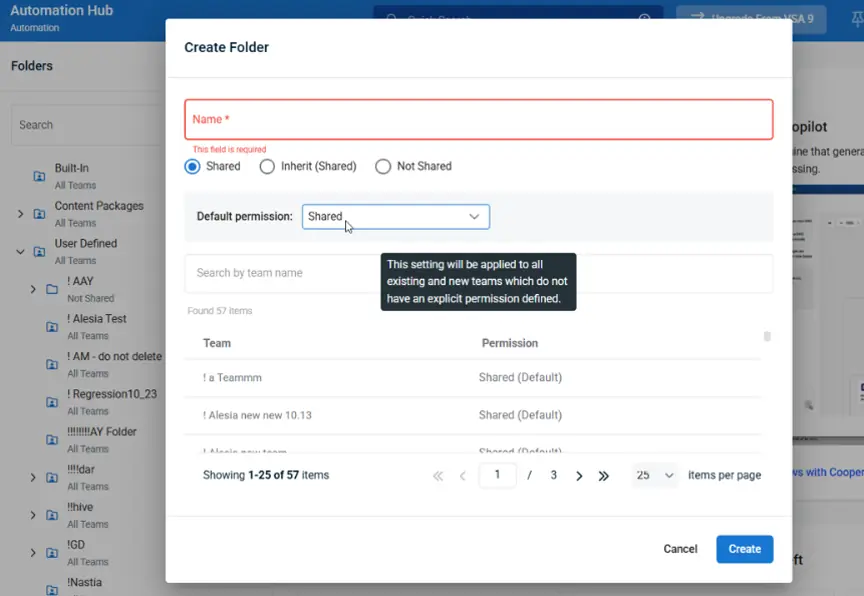
Learn all about this role-based access control (RBAC) update in VSA 10.
One Complete Platform for IT & Security Management
Kaseya 365 is the all-in-one solution for managing, securing, and automating IT. With seamless integrations across critical IT functions, it simplifies operations, strengthens security, and boosts efficiency.

For MSPs, offering compliance begins at home
Offering MSP compliance services starts at home. Learn why becoming compliant first builds trust, wins customers, and turns your process into the product.
Read now
FIPS 140-3: What it is and how IT Glue supports it
Learn what FIPS 140-3 is, why it matters to MSPs and corporate IT teams, and how IT Glue supports FIPS 140-3 compliance.
Read now
Best IT ticketing systems in 2026: Top 10 tools to consider
Compare the best IT ticketing software in 2026 for SLA tracking, knowledge base, reporting, billing and RMM or IT documentation integration.
Read now