Kaseya VSA 10
Kaseya VSA 10: Automate and manage IT at scale
Kaseya VSA 10 gives MSPs and IT departments one solution to monitor, manage, automate and support distributed devices. Standardize routine work, strengthen control across endpoints and networks, and help technicians resolve issues faster through a modern, intuitive management experience.
Why Kaseya VSA 10?
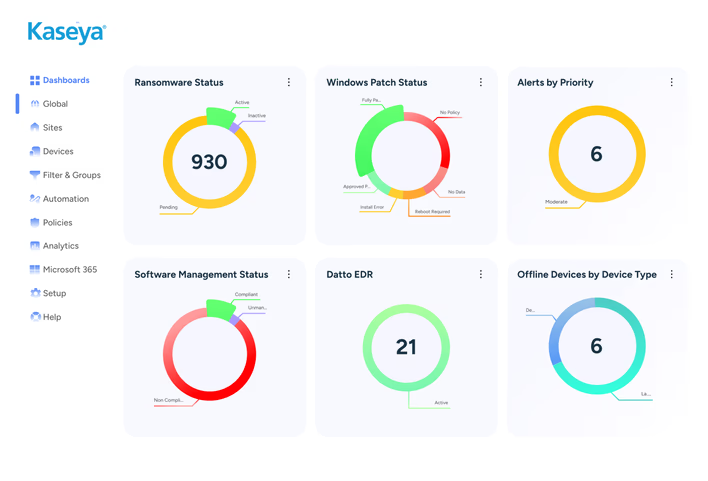
Turn everyday IT work into scalable operations
Device growth should not force linear growth in manual work. Kaseya VSA combines visibility, policy, AI-powered automation and remote action so teams can manage more consistently, reduce repetitive administration and maintain control across customer and corporate environments.
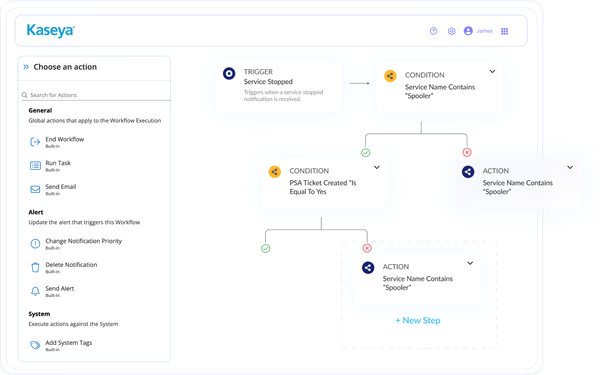
Generate workflows with Kaseya Assist
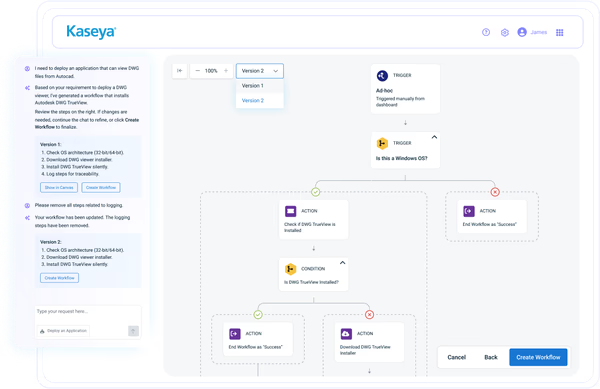
Describe the automation outcome you need, and Kaseya Assist generates a suggested workflow without requiring you to start from a blank canvas or write scripts. Review the proposed actions, refine the workflow with follow-up prompts, then edit and save it in VSA 10.
"VSA 10 is poised to increase our efficiency by at least 75% due to our ability to automate more."Shawn Brown - COO and Co-Owner, CST Group Inc.
Keep every managed device within reach
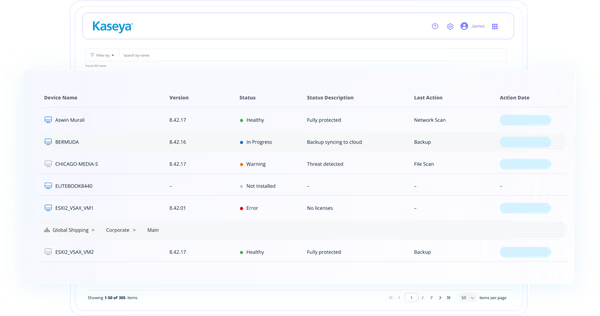
Monitor Windows, macOS and Linux endpoints, discover network devices and manage supported mobile fleets through policy. Centralized status, alerts and device details help teams see what needs attention and act before small issues become operational disruption.
"One of the standout features of Kaseya VSA is its comprehensive and centralized management capabilities. It provides a single platform to oversee and control a wide range of IT systems and infrastructure."Zeeshan Khan - User Support Specialist, Xtreme Business Solutions
Resolve issues without losing context
Launch remote sessions, use background tools and run commands from the device card without moving through disconnected consoles. Technicians can troubleshoot, transfer files and take approved actions while keeping the device record and relevant details in view.
"(VSA) makes keeping everything together a breeze. The platform does everything I need and is perfect for my business."Elizabeth Hermann - Owner, DogGone IT
Connect the tools your team depends on
Integrations with service desk, documentation, security and backup products help information move with the work. MSPs can reduce tool switching across customer operations, while IT departments can align endpoint activity with core business systems.
"The way the three tools — VSA, BMS and IT Glue are integrated and work with one another gives our team a great toolset to boost efficiency and save time."Larry Robertson - Partner, MERIT Solutions
Features
Explore the core capabilities of Kaseya VSA 10
VSA 10 brings daily device operations into one consistent experience. Use its core capabilities to standardize service delivery, support distributed users, strengthen governance and build repeatable processes across one organization or many customer environments.

Automation workflows
Create scripts, tasks and visual workflows for routine maintenance, remediation and deployment with Kaseya Assist. Use templates, schedule work for later, monitor execution from the device card and generate workflows from natural-language outcomes with Kaseya Assist.

Monitoring and alerting
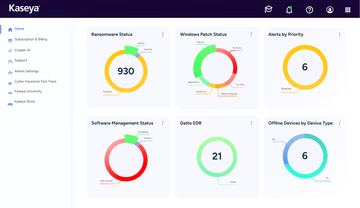
Track device health, services, performance and availability through profiles and notifications. Use real-time status and configurable alerts to identify conditions that require attention, then connect monitoring events to automated response workflows.

Patch and software control
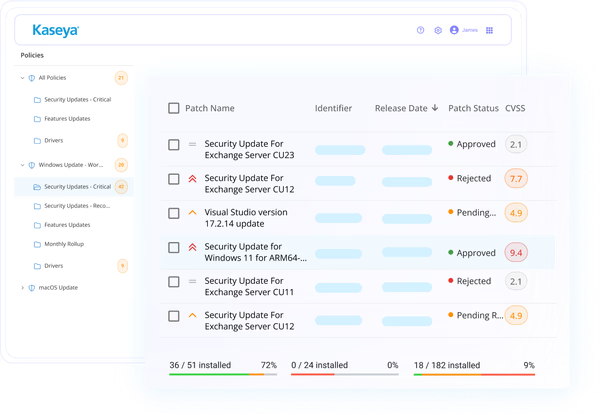
Define patch policies for operating systems and third-party software, control deployment schedules and reboot communication, and use reporting to review status. Consistent policies help teams keep distributed devices current with less manual coordination.

Device and network visibility
View hardware, software, memory, operating system and configuration details from a centralized device record. Organize devices by customer, organization, site, group or tag to support focused actions, reporting and dynamic policy targeting.

Security and access controls
Use role-based permissions, audit logging and policy-driven ransomware detection. Supported deployments can use FIPS 140-3 compliant cryptographic communications, while detection policies can alert, isolate devices and attempt to stop ransomware processes.

Mobile device management
Enroll and manage supported Apple and Android devices, apply configuration and security profiles, deploy applications, run remote commands and review device status. Bring mobile assets into the same operational model as the rest of the environment.

Remote support tools
Connect to supported endpoints through remote desktop, private RDP or on-demand sessions. Use terminal, PowerShell, file, registry, service and process tools from the device card to troubleshoot without interrupting users unnecessarily.

Reporting and audit trails
Use built-in templates and a no-code report designer to create, schedule and export operational reports. Review audit activity with search, filtering and customizable columns to support administrative reviews, investigations and compliance checks.
Kaseya 365 Endpoint
Get endpoint management and much more with Kaseya 365 Endpoint
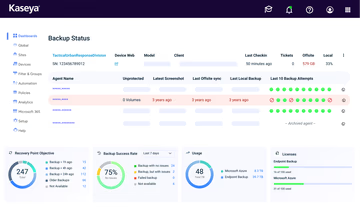
Kaseya 365 Endpoint delivers a single, integrated subscription that provides everything needed to manage, secure, backup and automate your endpoints.
Customer Success
Our commitment to you
Professional services
Kaseya's Global Services helps you get the most from your tech solutions, boost performance and achieve business goals.
24/7 customer support
Kaseya’s Direct to Tech™ delivers fast, expert-level support to help your business quickly resolve issues and minimize risk.
Partner First Pledge
Kaseya's Partner First Pledge is a commitment to flexible terms, shared risk and dedicated support for your business.
Testimonials
Hear from our customers
Real stories, real success. See how Kaseya partners thrive.

Blackline IT: Protecting people, not just systems
Read case study
Built to last How Astute turned efficiency into predictable growth
Read case study
Built on grit: How NEXTGen IT turns challenges into comebacks
Read case studySee how Kaseya VSA 10 fits your IT operation
Bring monitoring, automation, patching, remote support, device management and reporting into one solution. See how Kaseya VSA can help an MSP standardize service across customers or help an IT department manage distributed devices with greater consistency.

FAQ
Frequently asked questions about
Kaseya VSA
What is Kaseya VSA?
Kaseya VSA is an IT management solution for MSPs and IT departments. The current generation, VSA 10, centralizes device monitoring, automation, patching, remote support, mobile device management, reporting and policy-based administration.
What does Kaseya VSA do?
Kaseya VSA helps teams monitor device health, apply policies, automate routine work, deploy patches and software, support users remotely, manage mobile devices and report on IT operations. MSPs can manage multiple customer environments, while IT departments can manage their own distributed estate.
How does Kaseya VSA work?
VSA 10 uses agents on supported endpoints, plus policies, profiles and connectors for other managed device types. Administrators work from a central console to collect status, trigger alerts, run automation, apply configuration, start remote sessions and review results.
How much does Kaseya VSA cost?
Kaseya VSA pricing depends on factors such as deployment model, device volume, packaging and required capabilities. Kaseya provides tailored pricing through its sales team, so organizations should request a quote based on their environment and operating needs.
Who is Kaseya VSA designed for?
Kaseya VSA is designed for managed service providers and internal IT departments that need consistent control across distributed devices. It supports lean teams, growing environments and larger operations that require repeatable automation, policy and reporting.
What is the difference between VSA 9 and VSA 10?
VSA 10 is the current generation of Kaseya VSA. It modernizes the user experience and expands visual automation workflows, advanced reporting, mobile device management, policy controls and device tools. Existing VSA 9 customers should follow current Kaseya upgrade guidance.
Is Kaseya VSA available as SaaS and on premises?
Yes. VSA 10 is available for SaaS and on-premises deployments. Availability, setup and prerequisites can vary by capability and release, so customers should confirm the current requirements for features such as FIPS communications, integrations and mobile device management.
Does Kaseya VSA support mobile devices?
Yes. VSA 10 supports management of Apple and Android devices through mobile device management capabilities. Teams can enroll devices, apply supported configuration and security profiles, manage applications, run commands and review device information from the console.
Can Kaseya VSA automate IT tasks?
Yes. VSA 10 supports scripts, tasks and visual workflows for maintenance, deployment, remediation and user communication. Teams can start from built-in templates, schedule actions, respond to monitoring events and use Kaseya Assist to generate workflows from natural-language outcomes.
How does Kaseya VSA integrate with other tools?
Kaseya VSA integrates with service desk, documentation, security and backup products, including Autotask, BMS, ConnectWise and IT Glue. APIs and webhooks also help teams automate onboarding, synchronize data and connect VSA 10 with established operational workflows.
Ready to get started?
Request a demo to see how Kaseya VSA will help you automate and scale endpoint management.