Backup do Entra ID para garantir a continuidade dos dados de identidade
Obtenha uma gestão de identidade e acesso (IAM) mais robusta com Backup for Microsoft Entra ID Datto Backup for Microsoft Entra ID. Concebida tanto para equipes internas de TI quanto para MSPs, esta solução baseada em nuvem da Kaseya preserva objetos e configurações do diretório, permitindo que os usuários façam login mesmo quando surgem problemas.
Manter um acesso confiável aos serviços da Microsoft
Backup for Microsoft Entra ID Datto Backup for Microsoft Entra ID uma solução de continuidade de negócios e recuperação de desastres (BCDR) que reduz o tempo de inatividade causado por problemas como exclusões, erros de configuração ou ameaças cibernéticas. Ele se integra ao Datto SaaS Protection recuperar dados críticos de identidade e do Microsoft 365 Exchange em uma única operação simplificada.
Proteção de dados da Scale Entra ID
Minimize a complexidade e o trabalho manual com backups automatizados para usuários, funções e grupos. Padronize sua abordagem em todos os locatários gerenciados, para que os dados do Entra ID permaneçam protegidos e recuperáveis para toda a sua empresa ou base de clientes.
“Nossos clientes estão cada vez mais migrando para serviços hospedados na nuvem. Desde a adoção acelerada do armazenamento em nuvem e da colaboração, a proteção de seus dados tornou-se uma prioridade ainda maior. O Datto é uma maneira realmente fácil de conseguir isso.” Graham Poca, gerente de TI, mindIT
Recuperar-se de qualquer situação
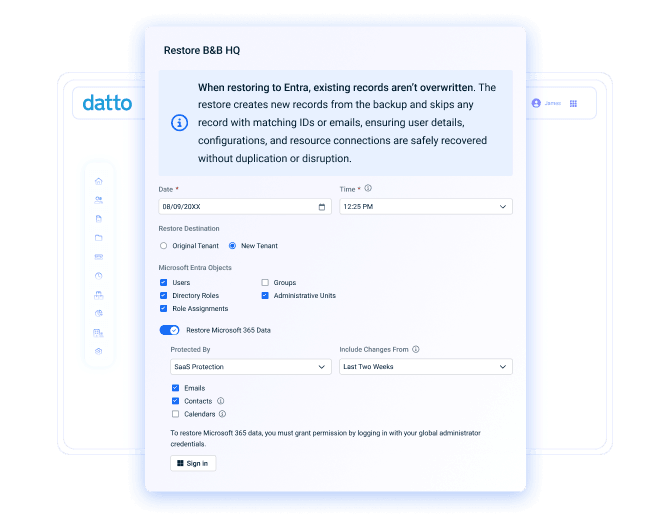
Várias cópias de segurança diárias e diversos métodos de restauração ajudam a garantir que você possa recuperar os serviços de identidade em caso de interrupções. Mantenha a produtividade e o rumo certo revertendo as alterações após um incidente ou transferindo objetos corrompidos para um locatário limpo, caso o original esteja comprometido.
“Os provedores de nuvem, como a Microsoft, transferem a responsabilidade pela gestão dos dados para o usuário e, se você for um administrador, o prazo para recuperar os dados é muito curto. A Datto permite que você durma tranquilo, sabendo que seus dados na nuvem estão protegidos por backup.” William Pecs, Gerente de Projetos de Nuvem, Total Technology Resources
Consolidar o gerenciamento de backups
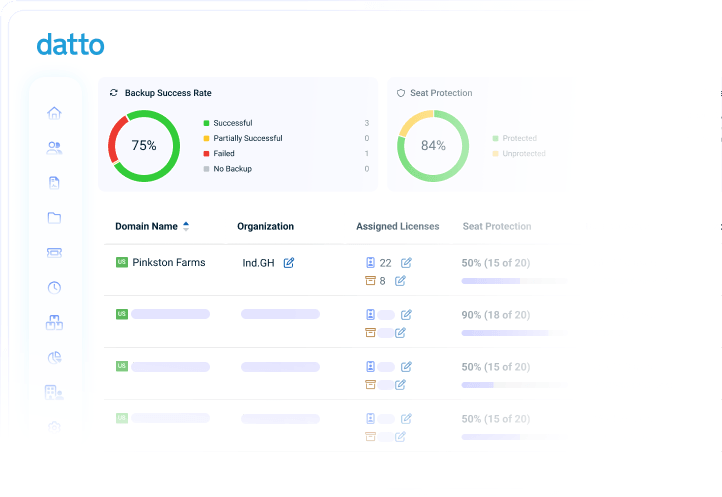
Proteja e monitore todos os usuários do Entra ID a partir de um único painel, onde você pode alternar entre contas de clientes ou departamentos sem precisar se autenticar novamente. Verifique o estado dos backups e tome as medidas necessárias para garantir a integridade das identidades. Acesse os dados com o mínimo de complicações.
“Se você procura um produto SaaS fácil de configurar e usar, então este é o produto ideal para você. Assim como todos os produtos da Datto, a configuração e a funcionalidade foram projetadas de forma a exigir o mínimo de interação no dia a dia.” Daniel Doler, Gerente Geral, Nectar Group
Backup e recuperação do Entra ID para manter as empresas em pleno funcionamento

Implementação simplificada
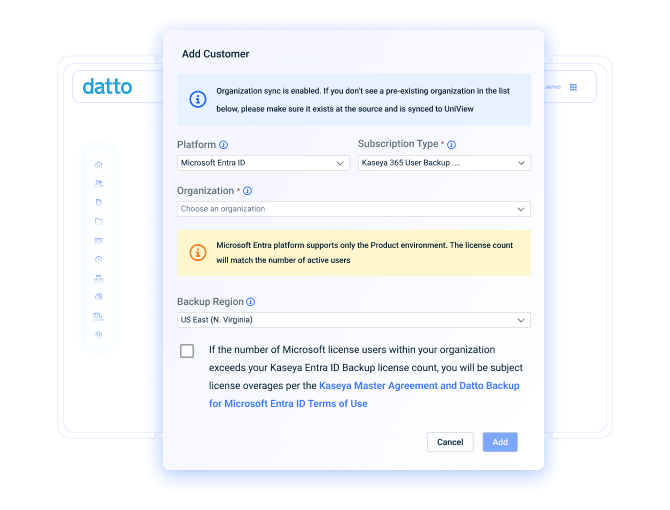
Comece a proteger os dados críticos de identidade da sua organização ou dos seus clientes em poucos minutos, com uma configuração guiada passo a passo. Cadastre locatários rapidamente, programe backups imediatamente e confirme a cobertura pelo portal de gerenciamento. Não é necessária nenhuma configuração complexa nem treinamento.

Backups automáticos 6 vezes por dia
Crie vários pontos de recuperação diariamente para cada locatário com instantâneos automáticos executados a cada quatro horas. Acione backups adicionais sob demanda, receba notificações sobre problemas por meio de alertas baseados em limites e monitore detalhes por usuário para obter a máxima eficiência.

Fluxos de trabalho versáteis de restauração
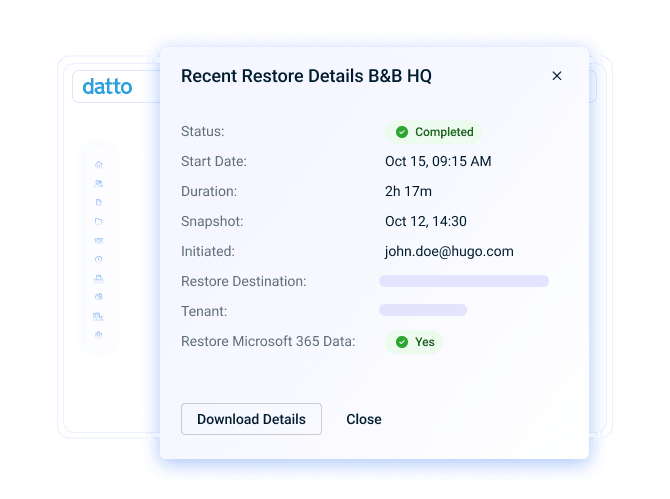
Supere erros, interrupções ou ataques com recursos de recuperação projetados para qualquer cenário. Volte ao último estado conhecido como válido com a restauração a um ponto específico no tempo, transfira dados de uma conta de usuário para outra ou restaure diretamente em um novo locatário quando ocorrer um desastre.

Armazenamento e retenção escaláveis
Amplie a proteção à medida que seu ambiente de TI cresce, mantendo a soberania dos dados e os requisitos de conformidade. Você pode manter pontos de recuperação ilimitados, escolher entre regiões globais de armazenamento em nuvem e conservar os dados do Entra ID por tempo indeterminado com retenção ilimitada, tudo sem custo adicional.

Portal de gerenciamento multilocatário
Execute backups, monitore o desempenho e realize restaurações para cada cliente ou locatário a partir de um único painel. Integre novos clientes, monitore licenças, avalie a rentabilidade e utilize o hub de integração para conectar os dados de backup à gama de ferramentas de gerenciamento de TI da Kaseya.

Segurança em conformidade com as normas
Mantenha os dados de backup do Entra ID seguros e prontos para auditoria com criptografia tanto em trânsito quanto em repouso, controle de acesso baseado em funções (RBAC), autenticação multifatorial (MFA) para o portal de gerenciamento e suporte integrado à conformidade com SOC 1/SSAE 16, SOC 2 Tipo II, HIPAA e GDPR.
Nosso compromisso com você
Os Serviços Globais da Kaseya ajudam você a tirar o máximo proveito de suas soluções tecnológicas, melhorar o desempenho e atingir suas metas de negócios.
Explore os serviços profissionaisO Direct to Tech™ da Kaseya oferece suporte rápido e especializado para ajudar sua empresa a resolver problemas rapidamente e minimizar riscos.
Conheça o suporte ao clienteO compromisso Partner First Pledge da Kaseya Partner First Pledge de condições flexíveis, risco compartilhado e suporte dedicado para a sua empresa.
Explore o Partner FirstOuça o que nossos clientes têm a dizer
Histórias reais, sucesso real. Veja como os parceiros da Kaseya prosperam.

Blackline IT: Protegendo as pessoas, não apenas os sistemas
Leia o estudo de caso →
Feito para durar: como a Astute transformou a eficiência em crescimento previsível
Leia o estudo de caso →
Construído com determinação: como a NEXTGen IT transforma desafios em vitórias
Leia o estudo de caso →Perguntas frequentes sobre o backup do Microsoft Entra ID
O backup do Entra ID consiste na criação e no armazenamento de cópias seguras dos principais objetos de diretório e configurações da Microsoft. Esses dados de backup são normalmente armazenados fora do locatário de produção, para que possam ser restaurados caso o Entra ID seja comprometido ou fique indisponível. Isso permite que as organizações recuperem o acesso aos serviços da Microsoft em caso de interrupção.
A forma como o Entra ID é copiado para backup depende da solução escolhida. Com Backup for Microsoft Entra ID Datto Backup for Microsoft Entra ID, o processo começa com uma captura inicial completa dos locatários cadastrados. Os tipos de objetos protegidos incluem usuários, grupos, funções, entidades de serviço, dispositivos, contatos, aplicativos e unidades administrativas. Esses dados são armazenados como um ponto de recuperação em uma nuvem segura de propriedade da Kaseya.
Após o primeiro backup completo, são criados instantâneos incrementais automaticamente a cada quatro horas (seis vezes por dia) para registrar as alterações e criar pontos de recuperação adicionais. Quando necessário, os administradores podem restaurar os dados do Entra ID a partir de qualquer backup anterior usando opções flexíveis de recuperação, incluindo restaurações no locatário original, em um locatário existente ou em um locatário recém-criado.
É importante fazer backup do Entra ID, pois ele é o mecanismo de gerenciamento de identidade e acesso para muitos serviços da Microsoft, incluindo o Microsoft 365 e o Azure. Quando os objetos do diretório são perdidos ou corrompidos, os usuários podem ficar sem acesso e as operações comerciais são frequentemente interrompidas.
O modelo de responsabilidade compartilhada da Microsoft é mais um motivo para fazer backup do Entra ID. Embora a Microsoft seja responsável pela infraestrutura subjacente de seus serviços em nuvem, a proteção dos dados armazenados no serviço continua sendo de responsabilidade do cliente. Por isso, uma solução de backup e recuperação do Entra ID é fundamental para manter a disponibilidade de objetos e configurações críticos do diretório.
Pronto para começar?
Solicite uma demonstração para ver como o Datto Backup for Microsoft Entra ID proteger os dados de identidade e acesso.