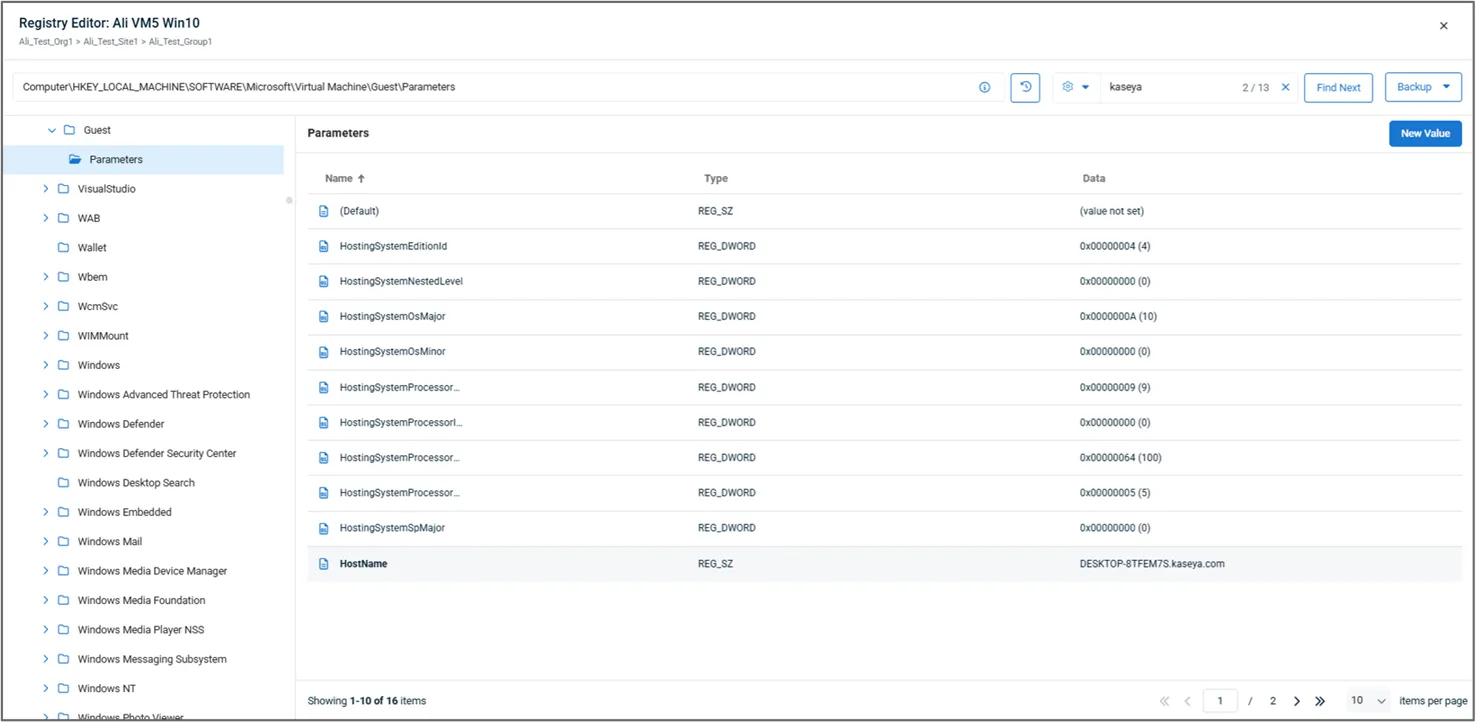
La commande « Registry Viewer » (introduite dans la mise à jour 10.21) a été mise à jour et renommée « Registry Editor ». Elle est accessible depuis la section « Gérer » du volet des détails de l'appareil et offre les nouvelles fonctionnalités suivantes de gestion à distance des appareils :
- Rechercher une ruche ou une clé spécifique dans le registre d'un appareil.
- Créer, mettre à jour et supprimer des clés et des valeurs du Registre.
- Sauvegardez l'intégralité du registre ou des clés individuelles en les exportant vers un fichier .reg.
- Importer une sauvegarde du registre à partir d'un fichier .reg.
L'Éditeur du Registre est accessible depuis la section « Gérer » de la fiche de tout appareil Windows connecté. En cliquant dessus, une fenêtre contextuelle s'ouvre, contenant les éléments suivants :
Navigation par clés (volet gauche) : naviguez manuellement dans les branches et les clés du registre. En survolant une clé, vous accédez à des actions contextuelles permettant de renommer ou de supprimer la clé, de créer une nouvelle clé ou une nouvelle valeur, ou d'exporter la clé vers un fichier de registre (.reg). Lorsque vous sélectionnez une clé, son chemin d'accès complet s'affiche dans la zone de chemin d'accès en haut de la page. Vous pouvez copier ce chemin dans le presse-papiers ou le coller directement pour éviter toute navigation manuelle.
Historique de navigation : affiche les 10 derniers chemins d'accès sélectionnés (par technicien) pour faciliter la navigation.
Valeurs (volet de droite) : affiche une liste paginée des valeurs associées à la clé sélectionnée. Il est possible de modifier ou de supprimer des valeurs en passant la souris dessus ; une option « Nouvelle valeur » est disponible dans le coin supérieur droit du volet.
Boîte de recherche : recherchez une chaîne de caractères dans l'ensemble du registre ou au sein d'une clé ou d'une structure sélectionnée. Une fenêtre contextuelle indiquera le nombre de résultats trouvés et vous pourrez utiliser la fonction « Rechercher suivant » pour passer de l'un à l'autre. Les options de recherche (icône en forme d'engrenage) permettent de sélectionner les types de données à rechercher et, si vous le souhaitez, de spécifier une correspondance exacte.
Remarque : la recherche dans l'ensemble du registre peut prendre jusqu'à une minute.
Sauvegarde : importez un fichier de registre (.reg) sur l'appareil ou exportez l'intégralité du registre ou une branche sélectionnée.