KASEYA MCP SERVERS & SKILLS
Put your AI tools to work in Kaseya
Kaseya’s first-party MCP servers connect your compatible AI tools to Datto RMM, Autotask and IT Glue. Kaseya-built skills give you ready-to-use starting points for common IT workflows, helping you spend less time gathering information and more time resolving issues.
WHY KASEYA MCP SERVERS & SKILLS?
Only Kaseya gives you a library of skills, helping you get started quickly
MSPs and IT teams want to put AI to work in their IT operations without taking on more integration and maintenance burden. Kaseya's first-party MCP servers connect compatible AI tools to supported Kaseya products, while Kaseya-built skills provide ready-to-use starting points for common IT workflows that teams can adapt to their business.
Free your team for higher-value work
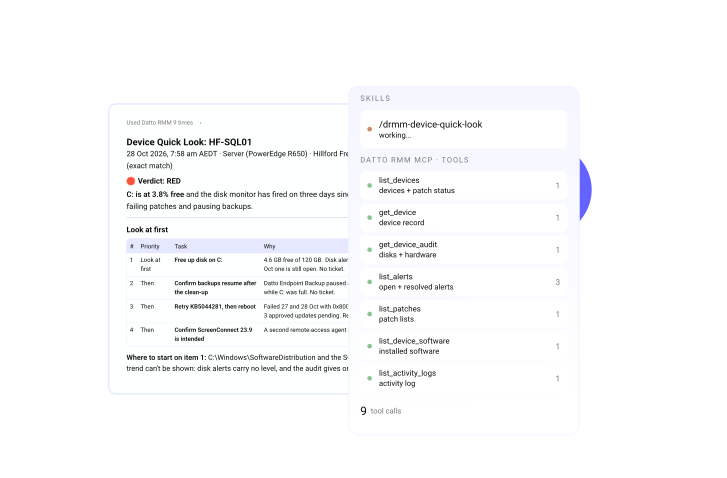
Free teams from repetitive tasks so you can focus on work that takes real expertise. Kaseya-built skills handle the information gathering and first-pass investigation in common IT workflows.
"When you free people up and give them time, it gives them the opportunity to come up with the next big idea or build stronger relationships with customers. Time is everything.”JR Bareis - Founder & CEO, Tigerhawk Technologies

Build for what your business needs
No two MSPs or IT teams operate the same way. Start with Kaseya-built skills and first-party connectivity, reducing the need to build and maintain custom integrations from scratch.
"Kaseya gives us the business operations tools we need. MCP lets us go beyond what's built in to get the information and functionality our business needs."Kurt Rinear - Chief Technology Officer, CTTS, Inc.
Resolve faster with everything in view
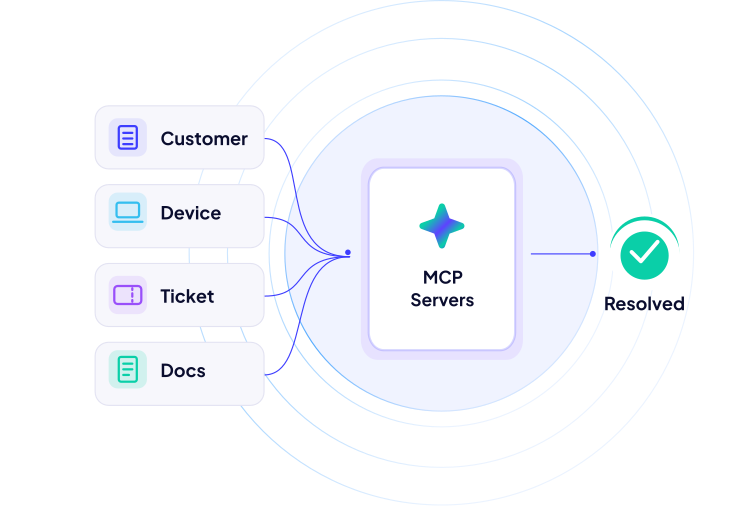
Bring relevant customer, device, ticket and documentation context from supported Kaseya products into the AI tools you already use. Spend less time searching across systems and more time moving toward resolution.
"Our Monday meeting packs, client health reports and security gap tracking now build themselves from live data."Matt Seeds - Managing Director, Inspired IT
FEATURES
Skills that put AI to work from day one
Kaseya gives you the flexibility to use, adapt or build skills for your business.

First-party MCP servers
Connect AI tools to supported Kaseya product data and actions. Get the benefits of first-party connection to supported Kaseya product data and workflows without building and maintaining custom API integrations.

Kaseya-built skills
Start with ready-to-use workflows for recurring IT tasks across Datto RMM, Autotask and IT Glue. Skills make connectivity useful right away, so your team sees value without waiting on custom builds.

Adapt and extend your way
Use skills as they are, adapt them to your service model or build new ones as your needs evolve. Shape workflows around your stack, escalation rules and client requirements.
PRE-BUILT SKILLS
Skills at a glance
Availability may vary as MCP servers and skills are released. Access our GitHub repo for the latest skills.
| Product | Skill | What it does |
|---|---|---|
| Autotask | Autotask Briefing | Get up to speed on tickets and customers faster |
| Autotask | Autotask Guarded Changes | Make controlled changes with greater confidence |
| Datto RMM | Alert Noise Review | Reduce alert fatigue and focus on priorities |
| Datto RMM | Device Quick Look | Quickly understand device health |
| Datto RMM | Device Timeline | Understand what changed on a device |
| Datto RMM | Morning Pulse | Start the day knowing what needs attention |
| Datto RMM | OS Lifecycle | Identify devices needing OS upgrades |
| Datto RMM | Patch Posture | Quickly review patch compliance |
| Datto RMM | Security Coverage Gaps | Identify endpoints with security gaps |
| Datto RMM | Software Finder | Find software across managed devices |
| Datto RMM | Stale & Ghost Devices | Identify stale devices for cleanup |
| IT Glue | Client Environment Review | Identify risks and plan proactive improvements |
| IT Glue | Hygiene Check | Identify documentation gaps and prioritize improvements |
| IT Glue | Organization Overview | Quickly understand a customer's IT environment |
| IT Glue | Create Documents | Turn ticket details and resolution notes into reusable documentation |
| IT Glue | Search Documents | Find relevant documentation for a ticket or issue |
| IT Glue | Update Documents | Propose documentation updates based on resolution notes, with user approval |
Getting started
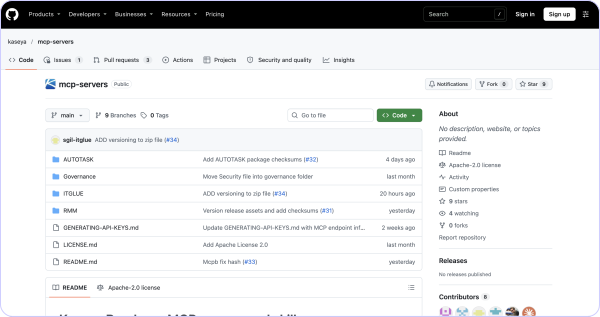
Connect your AI tools to supported Kaseya products. Our GitHub repository covers setup instructions, MCP server resources and Kaseya-built skills.
Explore the Kaseya GitHub repository
Find the MCP servers and skills available for your Kaseya products.
Follow the setup instructions
Use the README to configure your MCP connection, enter the required product credentials and install available skills.
Put AI to work
Start exploring skills and workflows, from reviewing device health to gathering insights across your Kaseya products.
Customer Success
Our commitment to you
Professional services
Kaseya's Global Services helps you get the most from your tech solutions, boost performance and achieve business goals.
24/7 customer support
Kaseya’s Direct to Tech™ delivers fast, expert-level support to help your business quickly resolve issues and minimize risk.
Partner First Pledge
Kaseya's Partner First Pledge is a commitment to flexible terms, shared risk and dedicated support for your business.
Testimonials
Hear from our customers
Real stories, real success. See how Kaseya partners thrive.

Blackline IT: Protecting people, not just systems
Read case study
Built to last: How Astute turned efficiency into predictable growth
Read case study
Built on grit: How NEXTGen IT turns challenges into comebacks
Read case studyFAQ
Frequently asked questions about MCP servers and skills
What are MCP Servers?
MCP stands for Model Context Protocol, an open standard that lets AI tools connect to external systems, data and actions. Kaseya’s first-party MCP servers connect the AI tools you already use to supported Kaseya products. That gives AI access to your tools, as well as real customer, device, ticket and documentation context.
What are Kaseya-built skills?
Skills are ready-to-use starting points for common MSP workflows, such as reviewing device health, cutting alert noise or getting up to speed on a ticket. MCP servers provide the connection, and skills make it immediately useful. You can use skills as they are, adapt them or build new ones. They are available for download at https://github.com/kaseya/mcp-servers.
Which Kaseya products are supported?
Kaseya MCP servers are available for Autotask PSA, Datto RMM and IT Glue. Kaseya-built skills support common MSP workflows, with availability varying by product. Visit GitHub for the latest supported capabilities.
What is Early Access?
Early Access is a version of the product that gives customers an opportunity to explore its capabilities, gain hands-on experience and provide feedback. Additional capabilities, enhancements and improvements will be introduced as the product progresses toward General Availability (GA).
Which AI tools can I use with Kaseya MCP Servers?
During early access, Kaseya supports Claude Desktop and Claude Code. Kaseya's setup instructions and troubleshooting guidance are designed for Claude. Other MCP-compatible AI tools may connect, but Kaseya does not provide official setup or troubleshooting support for them at this time.
What permissions do MCP Servers have?
MCP servers access Kaseya products using the permissions associated with the configured API credentials. Available actions depend on the product and the access granted to those credentials.
Do I need to know how to code?
No coding is required to use Kaseya-built skills with Claude Desktop. Some initial configuration is required, and step-by-step setup instructions are available on GitHub.
How is this different from API integrations or third-party MCP Servers?
Point integrations and third-party servers can require you to build and maintain your own connections and workflows. Kaseya combines first-party connectivity to the RMM, PSA and documentation products MSPs rely on with Kaseya-built skills designed for common MSP workflows.
Can I customize skills for my business?
Yes. Skills are starting points, not fixed workflows. Adapt them around your stack, service model, escalation rules and client requirements, or build more as your needs evolve.
How can MCP Servers help technicians resolve issues faster?
Kaseya MCP servers connect compatible AI tools to supported product data and actions, while Kaseya-built skills help technicians retrieve relevant information, investigate issues and determine next steps with less manual effort. Available capabilities vary by product and skill.
Ready to get started?
Connect your AI tools to supported Kaseya products and install pre-built skills.