MCP servers & skills: A day in the life of an MSP technician
Imagine it’s 8:30 a.m. You (an MSP technician) log in to find dozens of alerts, a growing queue of support tickets and several customers waiting for updates. Before resolving a single issue, you need to identify what needs immediate attention, investigate device problems, review ticket histories and track down relevant customer documentation.
Sound familiar? We hear versions of this story every day at Kaseya from our MSP customers. These tasks take critical time away from troubleshooting and other high-value activities.
That’s why we’re introducing first-party Model Context Protocol (MCP) servers and Kaseya-built skills for Datto RMM, Autotask PSA and IT Glue in Early Access* — so technicians can simplify their workflows and focus more on solving customer problems.
A day in the life of an MSP technician with Kaseya MCP servers and skills
Let’s follow an MSP technician through a typical workday to see how Kaseya MCP servers and skills simplify everyday tasks.
8:30 a.m. | Start the day knowing what needs attention
Kaseya-built skill: Morning Pulse | Datto RMM
Every MSP technician knows the morning routine. Log in to the RMM platform, review alerts, check device statuses and see which issues need immediate attention.
With hundreds or thousands of endpoints to manage across multiple customers, even figuring out where to start can take valuable time.
Now imagine starting your morning with a prioritized worklist instead of manually checking multiple dashboards.
Using the Morning Pulse skill for Datto RMM, technicians can quickly identify devices and issues that need attention.
For example, a technician could ask:
“Give me my morning pulse. What needs my attention today?”
The skill creates a prioritized daily worklist, helping the technician focus on issues with the greatest potential customer impact.
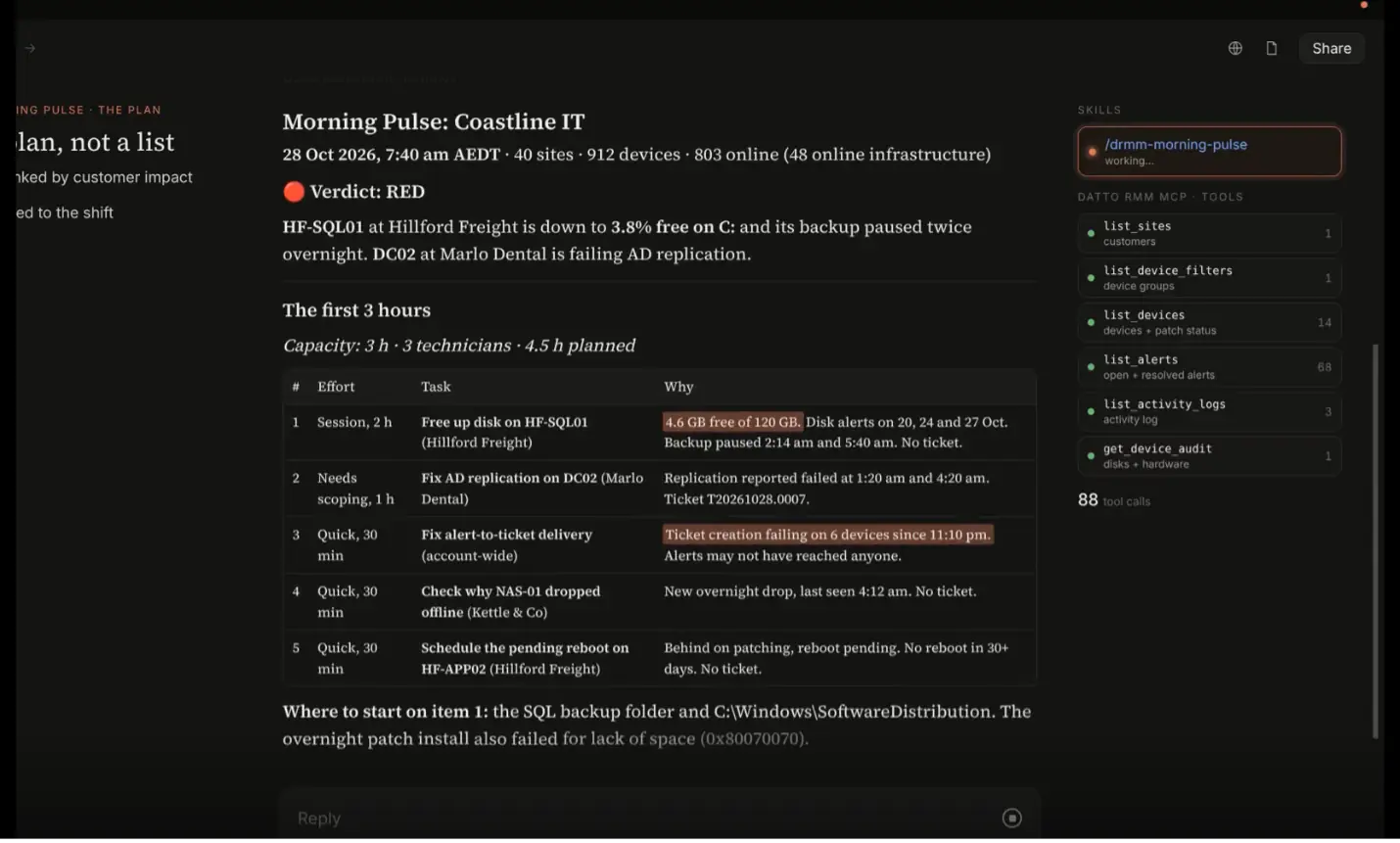
Figure 1: Morning Pulse
9:15 a.m. | Investigate device issues without the guesswork
Kaseya-built skills: Device Quick Look + Device Timeline | Datto RMM
One of the issues flagged in the morning worklist involves a device experiencing recurring alerts. The technician now needs to understand what’s happening and what might have changed.
Traditionally, that means opening the device record, checking its health, reviewing alerts and digging through activity logs.
With Kaseya-built skills, gathering that context becomes much easier.
The Device Quick Look skill provides a snapshot of the device’s health and current issues. The Device Timeline skill shows recent changes and activity, helping the technician understand what happened leading up to the problem.
The technician can ask:
Device Quick Look: “Why does NWL-APP01 keep alerting?”
Device Timeline: “What changed on NWL-APP01 before it rebooted?”
For example, if a device starts experiencing performance problems following a recent change, reviewing its activity timeline can help the technician identify a potential connection worth investigating.
With device health and recent activity in view, the technician can focus on relevant findings and troubleshoot more efficiently.
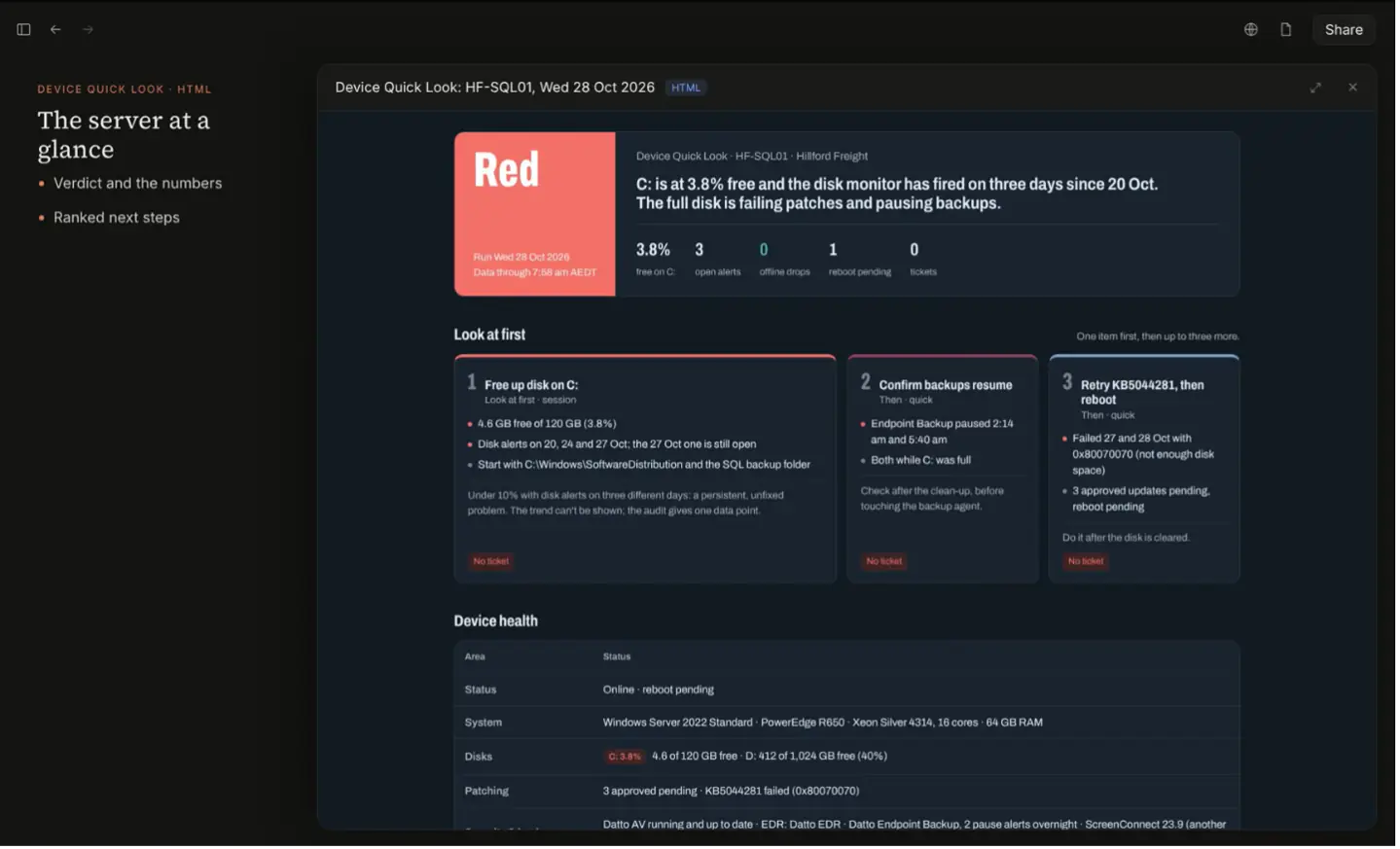
Figure 2: Device Quick Look
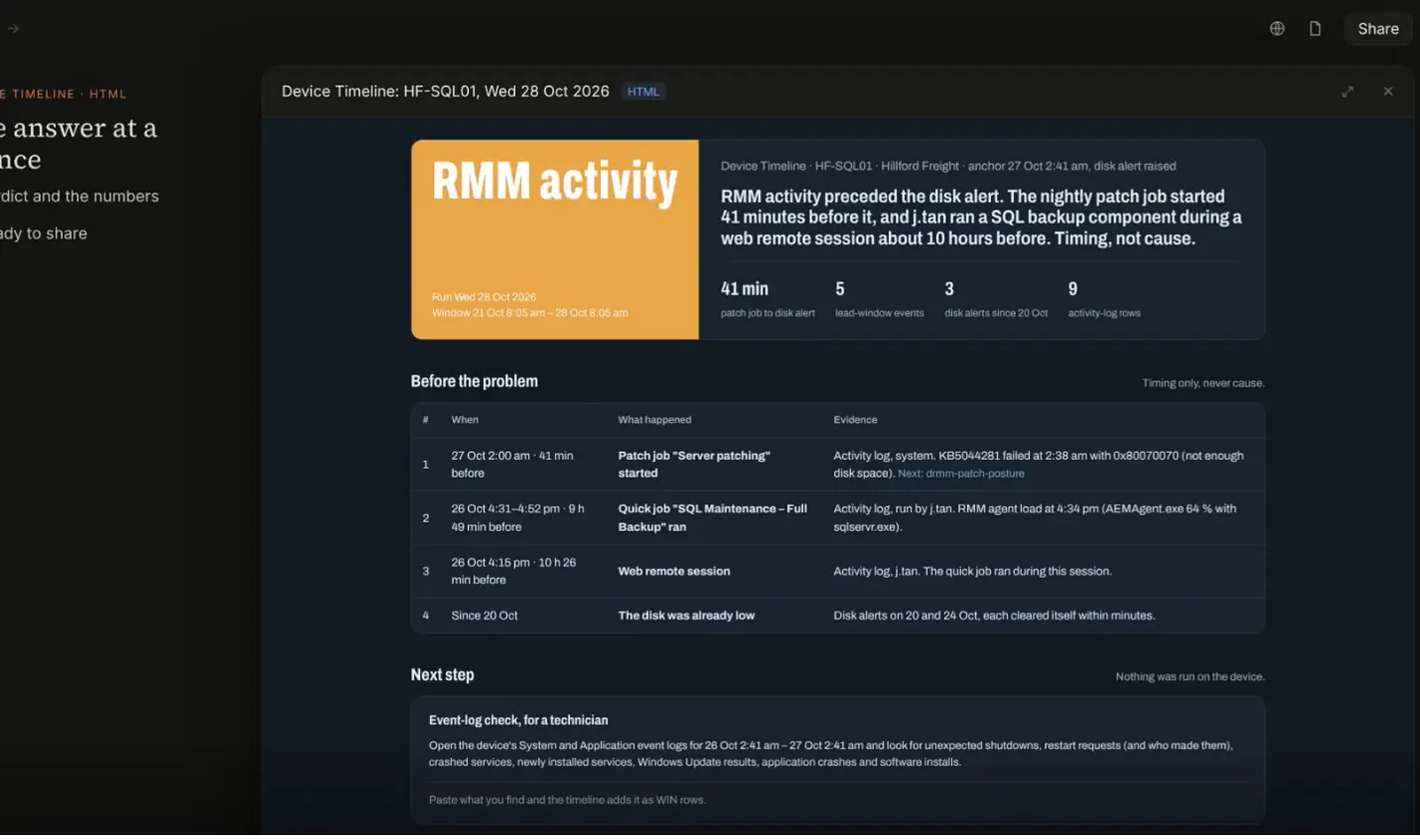
Figure 3: Device Timeline
10:30 a.m. | Get the full ticket and customer story in one briefing
Kaseya-built skill: Autotask Briefing | Autotask PSA
With a better understanding of the device’s condition, the technician turns to Autotask to review the customer’s ticket history and determine what’s already been investigated.
What problem did the customer report? Who is the primary contact? What information is available about the affected device?
With the Autotask Briefing skill, technicians can gather relevant ticket, company, contact and device information into a single summary.
For example:
“Brief me on this ticket, including the customer details, previous notes and related device information.”
The skill brings the available information together, helping the technician understand what’s already been investigated, avoid repeating earlier steps and determine where to pick up the work.
“What would have taken three to four hours of manually reviewing tickets took about five minutes using MCP and AI.” — Kurt Rinear, Chief Technology Officer, CTTS, Inc.
1:30 p.m. | Understand a customer’s IT environment without digging through documentation
Kaseya-built skill: Organization Overview | IT Glue
After reviewing the support ticket, the technician realizes that understanding the device issue requires a broader view of the customer’s IT environment.
Perhaps the issue involves network connectivity, and the technician needs to review information about the customer’s network equipment, internet connection or other infrastructure.
With the Organization Overview skill for IT Glue, technicians can generate a site-visit overview that brings together relevant information about a customer’s environment, including network equipment, internet details, printers and site documentation.
For example, a technician could ask:
“What network gear is at [site] for [client] and who is their ISP?”
The skill generates a structured overview and flags missing documentation, helping the technician identify relevant infrastructure components and information gaps that may require further investigation.
3:30 p.m. | Identify documentation gaps and prioritize improvements
Kaseya-built skill: Hygiene Check | IT Glue
While reviewing the customer’s IT environment, the technician notices gaps in the available documentation. As the day winds down, the next step is to identify which records need attention and what should be updated first.
Keeping documentation accurate is important for efficient service delivery, but identifying what needs attention can require manually reviewing numerous records.
With the Hygiene Check skill, technicians can assess a customer’s documentation quality and identify areas that may need improvement.
For example, they could ask:
“Run a hygiene check on [client] and tell me what to fix first.”
The skill generates a documentation scorecard highlighting potential gaps, such as missing asset information, outdated documents and duplicate records. It also provides a prioritized list of recommended improvements.
The technician can use these recommendations to prioritize document updates in IT Glue.
The skill is read-only, so any documentation changes are made separately in IT Glue.
The bigger picture: AI that works the way your MSP does
By the end of the day, our technician has identified priority issues, investigated a device, gathered ticket context, reviewed customer documentation and identified gaps to address.
None of these activities are new. They’re part of everyday MSP operations.
What’s different is how much manual effort goes into completing them.
Kaseya’s MCP servers and skills help MSPs bring AI into these familiar workflows without requiring technicians to manually piece together information from multiple systems.
Here’s how the two technologies work together:
- MCP servers provide connectivity. Kaseya’s first-party MCP servers connect supported Kaseya solutions to AI tools MSPs already use, making relevant product information and supported capabilities accessible through AI-assisted workflows.
- Kaseya-built skills make that connectivity useful. Skills provide ready-to-use starting points for common MSP tasks, from investigating device issues and gathering ticket context to reviewing customer environments and identifying documentation gaps.
Together, they offer a practical approach to putting AI to work in IT operations.
Three ways Kaseya MCP servers and skills help MSPs
Kaseya MCP servers and skills help MSPs work more efficiently, streamline operations and deliver better customer service through three key benefits.
1. More capacity
For MSPs, technician capacity is about how many endpoints each technician can effectively support while maintaining service quality.
Kaseya-built skills help reduce manual information gathering and repetitive work, giving technicians more time to investigate and resolve customer issues. By making relevant information easier to access, skills help teams make better use of existing technician capacity.
Over time, these efficiencies can create opportunities to improve service consistency, enhance scalability and increase the number of endpoints supported per technician.
“When you free people up and give them time, it gives them the opportunity to come up with the next big idea or build stronger relationships with customers. Time is everything.” — JR Bareis, Founder & CEO, Tigerhawk Technologies
2. More flexibility
Every MSP has its own processes, customers and service delivery requirements. A rigid, one-size-fits-all approach to AI automation can limit its usefulness.
Kaseya combines first-party MCP connectivity with ready-to-use skills, helping MSPs get started without having to develop every integration and workflow themselves.
MSPs can use compatible AI tools already in their environment, adapt Kaseya-built skills to their operational needs and create additional workflows as their requirements evolve.
This approach offers the benefits of pre-built capabilities without sacrificing customization. It can also reduce the setup effort and ongoing maintenance associated with building and supporting custom integrations.
“Kaseya gives us the business operations tools we need. MCP lets us go beyond what’s built in to get the information and functionality our business needs.” — Kurt Rinear, Chief Technology Officer, CTTS, Inc.
3. More context
One of the biggest challenges in MSP service delivery is that critical information often lives across multiple systems.
Device health and activity reside in the RMM platform. Ticket histories and customer information live in the PSA. Technical documentation sits in a separate knowledge management system.
Technicians may need information from all three to investigate an issue effectively.
Kaseya’s first-party MCP servers connect AI tools to Datto RMM, Autotask PSA and IT Glue, while Kaseya-built skills help make relevant information easier to retrieve and use.
“Having the right information available to technicians without them having to look it up is where you start saving a lot of time.” — JR Bareis, Founder & CEO, Tigerhawk Technologies
From experimenting with AI to putting it to work
AI has enormous potential for MSPs, but unlocking value takes more than simply giving technicians access to an AI assistant.
It requires connecting AI to the systems, information and workflows that power everyday IT operations.
Building and maintaining those connections independently takes significant technical expertise and ongoing effort. And even after the integrations are in place, MSPs still need to figure out how to turn that connectivity into useful workflows.
Kaseya’s MCP servers and skills help bridge that gap.
With first-party connectivity to Kaseya solutions, along with ready-to-use skills designed around common MSP tasks, MSPs have a practical starting point for bringing AI into service delivery.
The potential benefits go beyond individual technician productivity. Better access to information and more efficient workflows can help MSPs increase technician capacity, improve service consistency and create opportunities for profitable growth.
How to get started
To get started, connect the first-party MCP servers to your AI tool using the setup instructions in GitHub. Once connected, you can use the prebuilt skills, adapt them to your team’s processes or build additional workflows and skills as needed
Visit GitHub for MCP server and skill setup resources and join the community on Discord to share your experiences. You can also visit the Kaseya MCP servers & skills webpage to explore the offering.
*Early Access is a version of the product that gives customers an opportunity to explore its capabilities, gain hands-on experience and provide feedback. Additional capabilities, enhancements and improvements will be introduced as the product progresses toward General Availability (GA).
Important: During Early Access, Kaseya supports Claude Desktop and Claude Code. Kaseya’s setup instructions and troubleshooting guidance are designed for Claude. Other MCP-compatible AI tools may connect, but Kaseya does not provide official setup or troubleshooting support for them at this time.