If you’ve ever built a Quarterly Business Review (QBR) from scratch — again and again — you already know the problem. It’s not only time-consuming, but also inconsistent, difficult to scale and nearly impossible to standardize across a growing team.
For MSPs, where QBRs are critical to demonstrating value, aligning strategy and driving client retention, this creates a real operational bottleneck.
That’s where QBR report templates come in.
The new QBR report templates feature in myITprocess gives your team the ability to create, save and reuse structured QBR layouts — with pre-defined sections, ordering, widgets and formatting — all managed centrally in a template library and easily applied when building new QBRs.
Instead of rebuilding every report from scratch, your vCIOs can now generate polished, consistent QBRs in just a few clicks.
The real problem with QBRs today
As MSPs grow, QBR delivery becomes harder.
A lack of a standardized system leads to:
- Repetitive manual work recreating the same structure for every report
- Inconsistent messaging and layouts across vCIOs and clients
- Missed or incomplete sections like strategic roadmaps or budgets
- No centralized control over branding, structure or quality
- Widely varying QBR quality, making it difficult to scale delivery
A smarter way to build QBRs
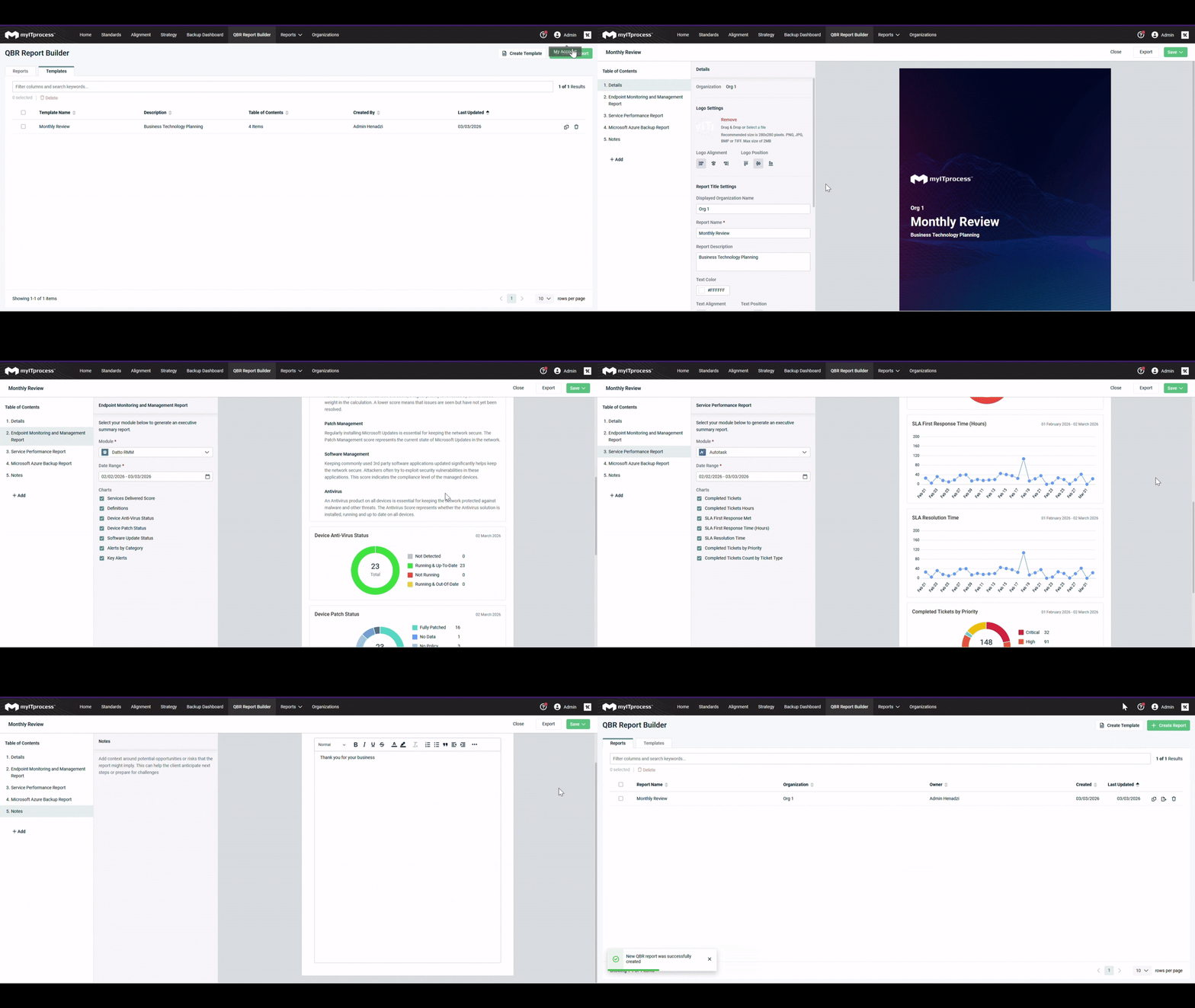
QBR report templates transform how your team creates and delivers QBRs.
With this feature, you can:
- Create reusable templates with pre-defined sections, structure and settings
- Standardize delivery across your entire organization
- Apply templates instantly when generating new QBRs
- View and manage all available templates centrally through a template library
This means your team spends less time formatting and more time delivering insights that matter.
Why it matters
Save time on every QBR
Stop rebuilding reports from scratch. Templates preserve your preferred structure, sections and configurations, so your team can focus on strategy, not setup.
Deliver consistent, professional reports
Ensure every QBR meets your standards. Templates establish consistent formatting, branding and structure across all teams.
Scale across teams and regions
Whether you have 2 vCIOs or 20, shared templates make it easy for anyone to deliver high-quality QBRs in minutes.
Tailor for different client needs
Create templates for different industries, service tiers or business goals without reinventing the wheel each time.
Onboard new team members faster
Give new hires a clear framework from day one. With ready-made templates, they can produce strong QBRs immediately.
Keep everything up to date
Update templates centrally and ensure future reports always reflect your latest best practices without affecting existing reports.
QBR report templates use cases
- Standardizing QBRs across a growing team
Imagine a 40-person MSP with six vCIOs and more than 100 clients struggling with inconsistent QBR quality.
Each vCIO builds reports differently, key sections are sometimes missing and new hires don’t know what “good” looks like.
With QBR report templates:
- Leadership creates a “Standard QBR – Gold Clients” template in the QBR Report Builder
- Every report includes consistent sections such as:
- Alignment reports (with agreed tags/settings)
- Strategic roadmaps (with standard statuses/sections)
- Budget overviews
- Executive summaries
- vCIOs simply select the template and customize client-specific insights
Outcome:
Consistent, on-brand QBRs across all regions and faster onboarding for new team members.
- Scaling QBR production without burnout
Consider an MSP managing more than 250 clients that needs to deliver hundreds of QBRs each year. This scale presents significant operational challenges.
Building each report manually and copy-and-paste workflows lead to outdated data, errors and inefficiencies.
With QBR report templates:
- The team creates tier-based templates:
- Basic (Bronze)
- Standard (Silver/Gold)
- Security-focused
- Reports are generated instantly with pre-configured sections and data
- Built-in warnings highlight missing inputs or disconnected data sources
Outcome:
Teams can generate QBRs at scale, focus on meaningful inputs and eliminate risky copy-paste workflows.
- Delivering specialized QBRs (security, compliance and more)
For regulated industries such as health care and finance, QBRs must emphasize security posture and compliance.
Currently, these reports are built manually by a few specialists, leading to inconsistency, increased risk and greater reliance on specific individuals.
With QBR report templates:
- MSPs build a “Security QBR Template” once, including:
- Security-focused alignment reports
- Roadmaps for security initiatives
- Budget sections for security investments
- Pre-defined executive summaries for tools like EDR and SaaS backup
- Templates flag missing integrations and required inputs
Outcome:
Consistent, repeatable, audit-ready QBRs that empower any vCIO to deliver value every time, not just specialists.
Transform QBRs with the QBR report templates
QBR report templates transform Quarterly Business Reviews from one-off, manual efforts into a repeatable, scalable process. Instead of rebuilding reports from scratch or relying on individual styles, your team can align on a shared, professional structure for every client conversation.
By defining reusable layouts that reflect your ideal QBR flow — key sections, visuals and narrative — QBR report templates help keep the focus on insight and strategy, not formatting. vCIOs can quickly spin up polished, on-brand reports that highlight the outcomes that matter most to each client, while leadership gains confidence that QBRs are being delivered consistently across the organization.
As your client base grows, QBR report templates help you maintain a high-quality standard. They support standardization without sacrificing flexibility, allowing you to adapt templates to different client types or strategic goals while preserving a cohesive experience. The result is faster preparation, clearer storytelling and more impactful business review meetings that strengthen long-term relationships.
Ready to simplify your QBR process? Explore QBR report templates and start delivering consistent, high-quality reports faster and at scale.