Passwords are still the easiest way in. According to the 2025 Data Breach Investigations Report (DBIR), compromised credentials were used to gain initial access in 22% of breaches.
Most security breaches don’t start with advanced exploits or zero-day attacks. They start with something far more ordinary: old credentials, reused passwords, forgotten accounts or access that was never properly removed. That could mean a former employee still tied to a shared login, a password that hasn’t been rotated in years or an account everyone assumes is inactive.
For IT teams, this kind of risk often lives in the gray area, where password decisions are based on memory and assumptions rather than certainty — assuming a password was rotated, an account was cleaned up or a credential still meets today’s standards.
Without a centralized, objective way to audit passwords, teams are forced to rely on memory, assumptions and manual spot checks — while attackers rely on the opposite. To close that gap, IT Glue is introducing Smart Audit for passwords, a new capability designed to help IT teams continuously identify, prioritize and remediate password risk — all from within IT Glue.
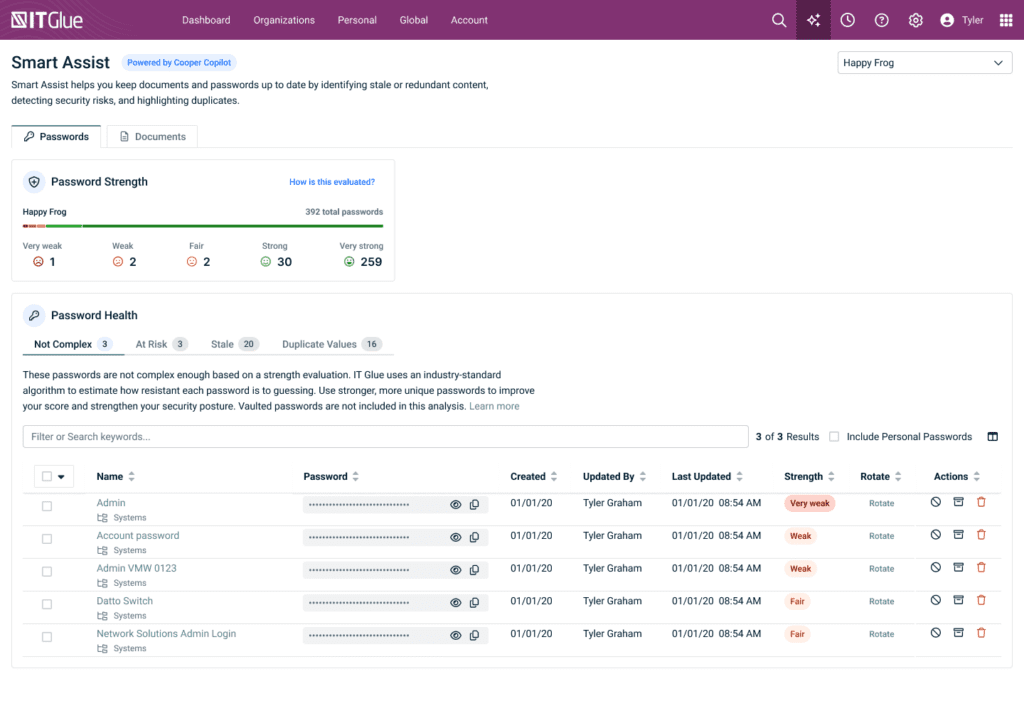
What Smart Audit for passwords does: One function, multiple risk signals
Smart Audit works by continuously analyzing stored passwords using pre-built intelligence and industry-trusted models to answer one critical question: Which passwords put us at risk right now?
Rather than forcing teams to manually review credentials one by one, Smart Audit surfaces clear, actionable risk signals across the environment. From a single view, IT teams can identify risky passwords and take action immediately — deleting, updating or rotating credentials without switching tools or relying on guesswork.
The types of password risk Smart Audit identifies include the following:
1. Stale passwords
Passwords that haven’t been viewed or accessed in a long time are easy to forget, but they remain prime attack targets.
Smart Audit flags credentials that may be outdated or no longer actively managed, allowing teams to proactively rotate or remove forgotten passwords before they are exploited.
2. Non-complex passwords
What qualifies as a “strong” password shouldn’t depend on who’s reviewing it.
Smart Audit removes subjectivity by using “zxcvbn,” an industry-trusted password strength model that measures how long it would realistically take to crack a password. Rather than relying on basic character rules, zxcvbn evaluates common words, predictable patterns and reused or slightly modified passwords. It is widely regarded as one of the strongest password strength estimators in the industry. All passwords that are below a strength value of three (“fair”) will appear on the Non-Complex Password Health tab.
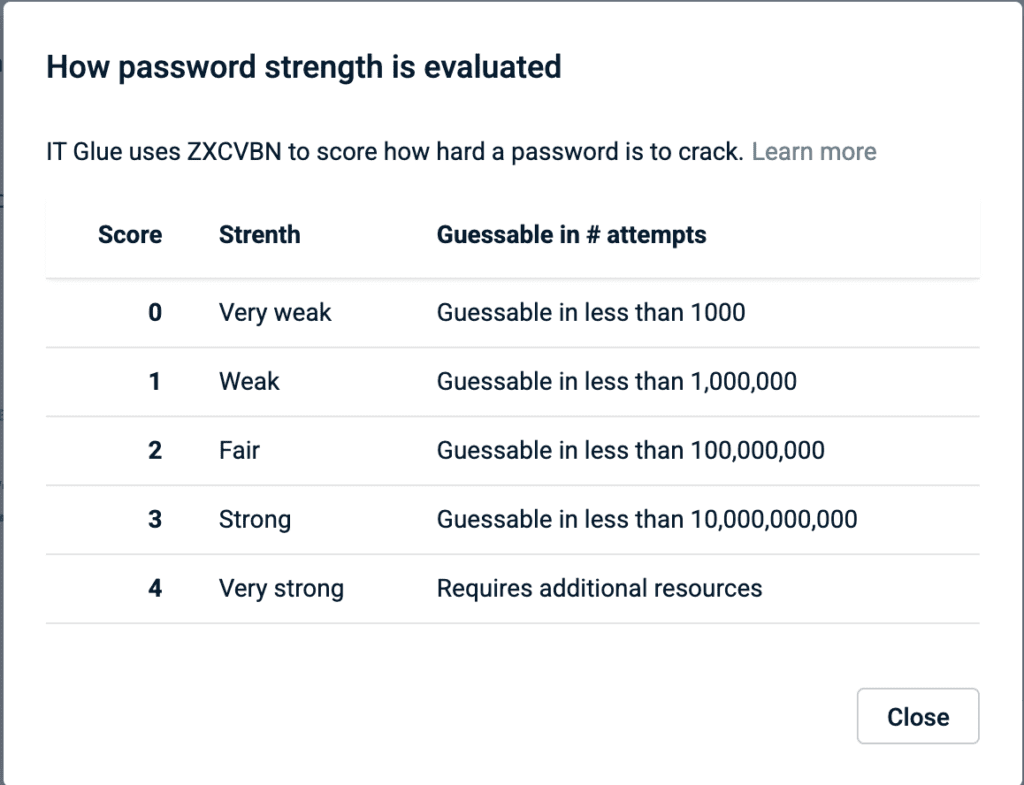
This creates consistent, defensible scoring that helps teams align on password standards without debate or guesswork.
3. Duplicate passwords
Reusing passwords across systems significantly increases the impact of a breach.
Smart Audit identifies passwords reused across multiple assets, helping teams reduce the risk of credential stuffing and limit the blast radius if a single password is compromised.
With Smart Audit, teams can take bulk actions on passwords, such as deleting, archiving or ignoring them. Passwords that are no longer needed can be deleted, while stale passwords can be archived for reference without remaining active. Selecting “Ignore” removes passwords from Smart Audit until they once again meet one of the audit criteria — stale, non-complex or duplicate.
4. Passwords accessed by deleted users (coming soon)
Lingering access after offboarding is one of the most dangerous and commonly missed security gaps.
In phase two of its launch, Smart Audit will highlight passwords accessed by users who have since been deleted, helping teams uncover potential insider risk and offboarding gaps. This will make it easier to identify former employees with lingering access — a problem that often goes unnoticed until an audit or incident occurs.
5. Real-time password strength guidance (coming soon)
Weak passwords remain a silent risk inside most organizations. Smart Audit is about to change that.
As users create passwords, they will see real-time strength feedback, helping them avoid weak or easily guessable credentials from the start.
Closing the gap between password risk and security
Identifying password risk is only half the battle. What actually reduces exposure is how quickly teams can act on it.
Smart Audit for passwords is built directly into IT Glue, allowing IT teams to move seamlessly from insight to remediation. Risky credentials can be identified, prioritized and addressed in one place — whether that means deleting outdated access, updating weak passwords or rotating credentials in bulk. There’s no need for spreadsheets, manual audits or reliance on institutional memory.
More importantly, Smart Audit shifts password management from a reactive task into a proactive security function. Instead of hoping access was cleaned up correctly or assuming passwords still meet today’s standards, teams gain continuous visibility into password risk and the ability to address issues before they turn into incidents.
Want to see how Smart Audit for passwords works in IT Glue?
Get a free demo to see how IT Glue helps teams identify and remediate password risk with confidence.